

AMP TAB.
Analysing AMP pages, handling the most common issues and their fixes.
What AMP is, how it links to the canonical page and what you’ll find in SEO Spider’s AMP tab: columns, filters and the most common validation errors.
AMP: Accelerated Mobile Pages
AMP stands for Accelerated Mobile Pages, a technology (web component framework) born from a collaboration between Google and Twitter to speed up the loading of web pages on mobile devices. This project, together with mobile-first indexing, shows how strongly the search engine is focused on mobile.
AMP drastically cuts load times compared with traditional pages, for a completely different user experience that can mean fewer abandoned pages and more conversions and leads, as well as better performance, one of the most significant ranking signals.
AMP is used mainly by news sites. Since 2021 it’s no longer required to appear in Google’s Top Stories, so many sites are dropping it in favour of fast standard pages.
AMP pages are alternatives to traditional pages, but they follow specific syntax and markup rules that set them apart from canonical pages.
To tell search engines that AMP pages exist, matching link tags are used between the canonical page and the AMP version:
<!-- Link tag on the canonical page, pointing to the AMP version -->
<link rel="amphtml" href="https://www.domain.com/amp/page.html">

<!-- Link tag on the AMP page, pointing to the canonical version -->
<link rel="canonical" href="https://www.domain.com/page.html">
This way, when Google crawls the canonical page (in the example: https://www.domain.com/page.html) it also discovers the AMP version (https://www.domain.com/amp/page.html) and, if it considers it valid, adds it to its CDN.
It’s important to remember that the lightweight version doesn’t hurt the site’s crawl budget, because Google allocates a separate one to AMP.
Configuration and columns
The AMP tab includes every Accelerated Mobile Page (AMP) discovered during the crawl. They’re identified by the AMP HTML tag and rel="amphtml" inlinks.
To populate this tab, enable AMP in both Crawl and Store in 1Configuration›2Spider›3Crawl.
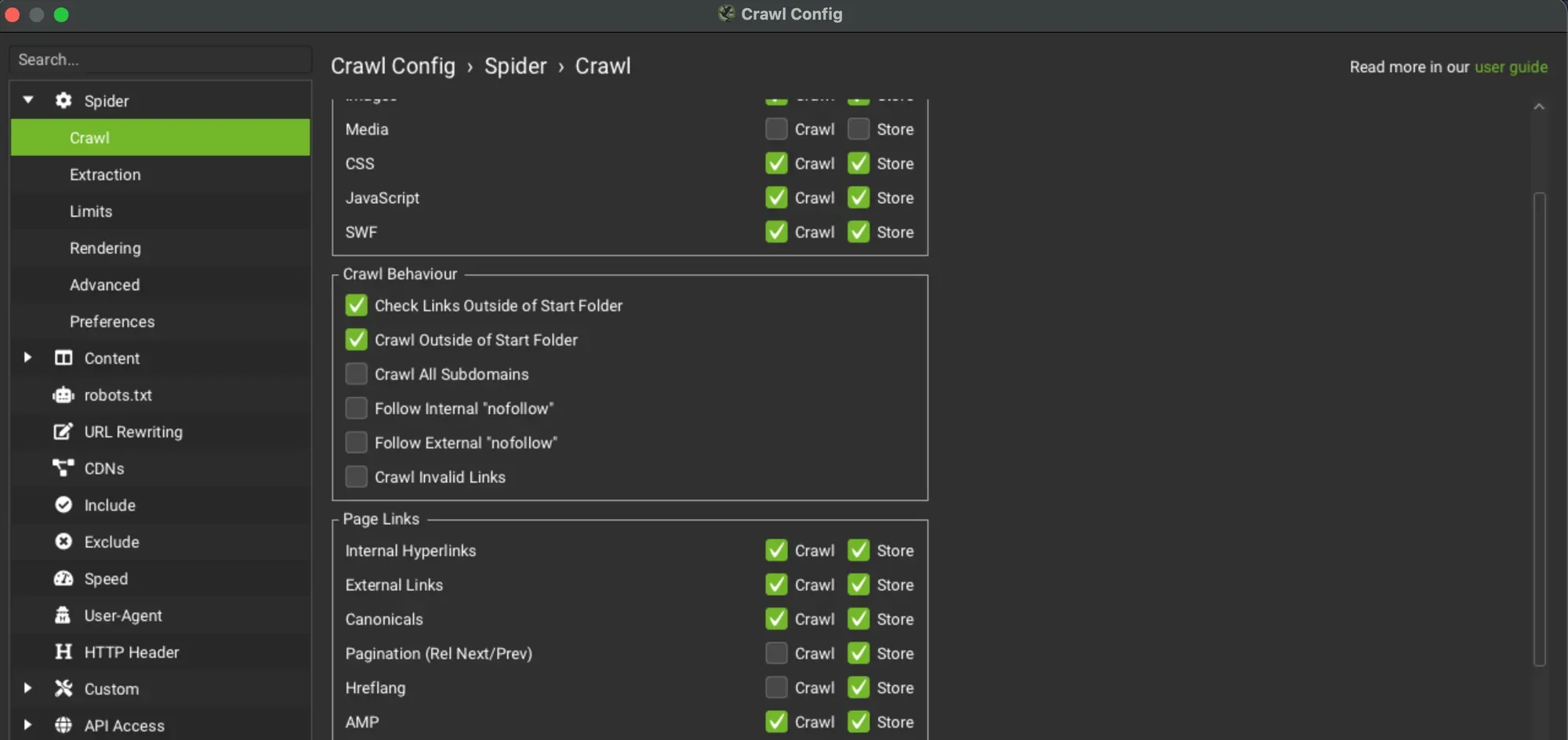
The tab’s columns:
- Address: the crawled URL.
- Occurrences: the number of canonical link tags found (via both the link element and HTTP).
- Indexability: whether the URL is indexable or non-indexable.
- Indexability Status: the reason a URL can’t be indexed.
- Title 1: the page’s first title.
- Title 1 Length: the title length in characters.
- Title 1 Pixel Width: the page title width in pixels.
- H1-1: the page’s first H1 heading.
- H1-Len: the number of characters in the H1.
- Size: the size of the AMP page in bytes.
- Word Count: the total number of words inside the body tag, excluding HTML markup.
- Text Ratio: the ratio between the number of text (non-HTML) characters in the page’s body tag and the total number of characters in the HTML page, as a percentage.
- Crawl Depth: how far the AMP page is from the crawl’s start page, in clicks. In SEO Spider, redirects count as an extra level.
- Response Time: the time needed to download the URL, in seconds.
Filters
The AMP tab has two kinds of filters: the first for pure SEO checks, the second for specific AMP page requirements.
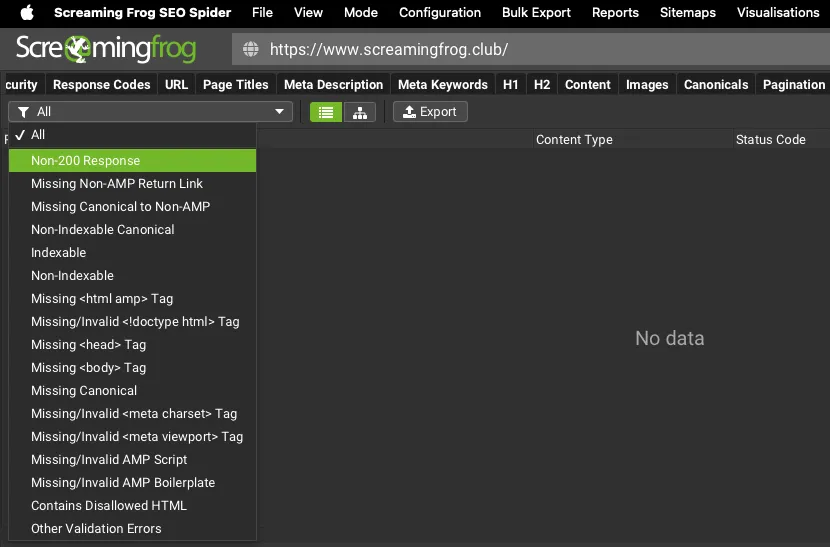
SEO filters
- Non-200 Response: AMP URLs that don’t return a 200 “OK” status code. Possible causes: blocked by robots.txt, no response, redirects, client and server errors.
- Missing Non-AMP Return Link: URLs that have an AMP version but no rel="amphtml" return link tag to the AMP URL.
- Missing Canonical to Non-AMP: AMP URLs missing the link tag to the canonical URL, or with a link tag pointing to another AMP resource.
- Non-Indexable Canonical: AMP URLs whose canonical is a non-indexable URL. Canonical links should normally be indexable.
- Non Indexable: AMP URLs that are non-indexable because they’re correctly canonicalised to the desktop (canonical) version.
- Indexable: AMP URLs that are indexable. AMP URLs with a desktop equivalent should always be non-indexable, because they’re canonicalised to it. Only AMP URLs without a desktop equivalent should be indexable.
AMP validation filters
Here’s an example of a valid AMP page, with every element the filters check:
<!doctype html>
<html amp lang="en">
<head>
  <meta charset="utf-8">
  <script async src="https://cdn.ampproject.org/v0.js"></script>
  <title>Hello, AMPs</title>
  <link rel="canonical" href="https://amp.dev/documentation/guides-and-tutorials/start/create/basic_markup/">
  <meta name="viewport" content="width=device-width,minimum-scale=1,initial-scale=1">
  <style amp-boilerplate>body{-webkit-animation:-amp-start 8s steps(1,end) 0s 1 normal both;-moz-animation:-amp-start 8s steps(1,end) 0s 1 normal both;-ms-animation:-amp-start 8s steps(1,end) 0s 1 normal both;animation:-amp-start 8s steps(1,end) 0s 1 normal both}@-webkit-keyframes -amp-start{from{visibility:hidden}to{visibility:visible}}@-moz-keyframes -amp-start{from{visibility:hidden}to{visibility:visible}}@-ms-keyframes -amp-start{from{visibility:hidden}to{visibility:visible}}@-o-keyframes -amp-start{from{visibility:hidden}to{visibility:visible}}@keyframes -amp-start{from{visibility:hidden}to{visibility:visible}}</style><noscript><style amp-boilerplate>body{-webkit-animation:none;-moz-animation:none;-ms-animation:none;animation:none}</style></noscript>
</head>
<body>
  <h1 id="hello">Hello AMPHTML World!</h1>
</body>
</html>- Missing HTML AMP Tag: AMP HTML pages must contain a top-level HTML AMP tag.
<html amp lang="en">- Missing/Invalid Doctype HTML Tag: AMP pages must start with the
<!doctype html>doctype. - Missing Head Tag: AMP HTML pages must contain the head tag, which is optional in regular HTML.
- Missing Body Tag: AMP HTML documents must contain the <body> tag. This filter shows pages where it’s missing.
- Missing Canonical: AMP URLs must contain a canonical tag in the head pointing to the regular HTML (non-AMP) version of the document, or to itself if no such version exists.
- Missing/Invalid Meta Charset Tag: AMP HTML pages must contain a meta charset="utf-8" tag straight after the <head> tag, to encode the page.
- Missing/Invalid Meta Viewport Tag: AMP HTML pages must contain the meta name="viewport" content="width=device-width,minimum-scale=1" tag in their head. Including initial-scale=1 is also recommended for a responsive viewport.
- Missing/Invalid AMP Script: SEO Spider checks that AMP HTML pages contain a script async src="https://cdn.ampproject.org/v0.js" tag in their head.
- Missing/Invalid AMP Boilerplate: AMP HTML pages that don’t contain the AMP boilerplate code in their head, or where it’s invalid. The AMP boilerplate <style amp-boilerplate>…</style> hides the page content by setting the body’s opacity to 0. Once AMP has loaded, the system works out the page layout and sets the body’s opacity to 1, making the content visible.
- Contains Disallowed HTML: every AMP URL with HTML not allowed in AMP.
- Other Validation Errors: AMP URLs with other errors reported by the official AMP validator.
Questions about AMP TAB?
These guides come from real projects. If something in your crawl doesn’t add up, or you want to apply this process to your site, get in touch.
 Author.Raffaele Visintin.Search & Strategic Marketing Advisor
