

PAGINATION TAB.
Analysing paginated listing pages so the crawler can navigate them correctly.
What you’ll find in SEO Spider’s Pagination tab: how to read rel=next and rel=prev and what the filters mean, from unlinked pagination URLs to sequence errors.
Pagination tab overview
The pagination tab includes information on the rel="next" and rel="prev" HTML link elements found in a crawl, which are used to indicate the relationship between component URLs in a paginated series.
Google announced on 21 March 2019 that it had not used rel="next" and rel="prev" for indexing for a long time, but other search engines such as Bing (which also powers Yahoo) still use them as a hint for discovery and for understanding the site architecture.
Pagination attributes should be placed in the head of the document and look like this in HTML:
<link rel="prev" href="https://www.example.com/seo/">
<link rel="next" href="https://www.example.com/seo/page/2/">Columns
- Address: the crawled URL.
- Occurrences: the number of pagination attributes found on the URL.
- Indexability: whether the URL is indexable or non-indexable.
- Indexability Status: the reason a URL is non-indexable.
- rel="next": SEO Spider collects these HTML link elements, designed to indicate the relationship between URLs in a paginated series. The link points to the URL of the next page.
- rel="prev": the Spider collects these HTML link elements, designed to indicate the relationship between URLs in a paginated series. The link points to the URL of the previous page.
- Canonical Link Element 1/2 etc: the canonical URL.
- HTTP Canonical 1/2 etc: the canonical sent via HTTP.
- Meta Robots 1/2 etc: the meta robots found on the URL.
- X-Robots-Tag 1/2 etc – X-Robots-Tag data: SEO Spider finds every instance if there’s more than one.
Filters
To populate the tab, enable Pagination (Rel Next/Prev) in Crawl and Store in 1Configuration›2Spider›3Crawl.
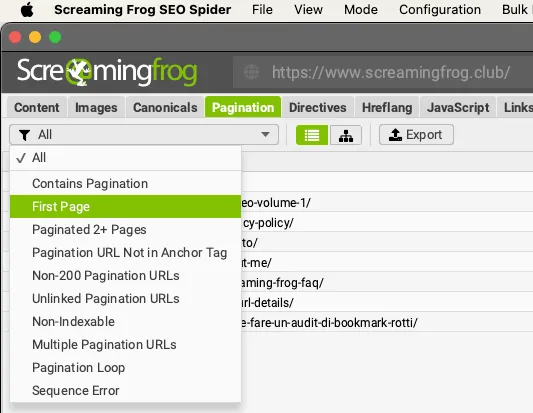
The available filters are:
-
Contains Pagination: the crawled URL has a rel="next" and/or rel="prev" attribute in its HTML, so it’s part of a paginated series.
-
First Page: the URL only has a rel="next" attribute, so it’s the first page of a paginated series. It’s quick and useful to scroll through these URLs and make sure they’re correctly implemented on the parent page of the series.
-
Paginated 2+ Pages: the URL has a rel="prev", so it isn’t the first page but a paginated page in a series.
-
Pagination URL Not In Anchor Tag: a URL in one or both of the page’s rel="next" and rel="prev" attributes isn’t found as a hyperlink in an HTML anchor, so users can’t click it to navigate the series.
-
Non-200 Pagination URL: URLs in the rel="next" and rel="prev" attributes don’t respond with a 200 ‘OK’ status code. This can include URLs blocked by robots.txt, with no response, 3XX (redirects), 4XX (client errors) or 5XX (server errors). Pagination URLs must be crawlable and indexable, so non-200 URLs are treated as errors and ignored by search engines. Non-200 pagination URLs can be bulk exported from 1Reports›2Pagination›3Non-200 Pagination URLs.
-
Unlinked Pagination URL: the URL in the rel="next" and rel="prev" attributes has no links other than the attribute itself (no links from other resources on the site). Pagination attributes can’t pass PageRank like a traditional anchor element, so this may point to an internal linking problem, or a problem with the URLs in the pagination attribute. These URLs can be bulk exported from 1Reports›2Pagination›3Unlinked Pagination URLs. Like Pagination Loop, this filter is only populated after Crawl Analysis.
-
Non indexable: the pagination URL is not indexable. From an SEO point of view, paginated URLs should all be indexable, unless there’s a “View All” page or extra parameters on pagination URLs that require canonicalisation. A very common mistake is canonicalising paginated pages 2+ to the first page of the series. Another common mistake is using “noindex” on paginated pages, which stops Google indexing them and following their outlinks.
-
Multiple Pagination URLs: there are several rel="next" and rel="prev" attributes on the page, which can confuse search engine crawlers.
-
Pagination Loop: URLs whose rel="next" and rel="prev" attributes create loops that stop navigation through the series.
Loop example:
domain.com/page/1  rel=next → domain.com/page/2
domain.com/page/2  rel=next → domain.com/page/3   rel=prev → domain.com/page/1
domain.com/page/3 rel=next → domain.com/page/2 (goes back: loop)- Sequence Error: URLs with an error in the sequence of rel="next" and rel="prev" HTML link elements. This check makes sure the URLs in the rel="next" and rel="prev" link elements are reciprocal and confirm their relationship in the series.
Questions about PAGINATION TAB?
These guides come from real projects. If something in your crawl doesn’t add up, or you want to apply this process to your site, get in touch.
 Author.Raffaele Visintin.Search & Strategic Marketing Advisor