

SEO Embeddings with Screaming Frog.
A practical guide to semantic analysis
How to use embeddings with Screaming Frog and the OpenAI API to work on what pages mean, not on keywords. You calculate semantic similarity, find hidden duplicates, guide internal linking and build clusters with a ready-to-use Python script.
What are embeddings?
Embeddings translate words into numbers (vectors). Imagine turning every page on your site into a multidimensional GPS coordinate:
- Vectorisation: the AI turns text into a list of numbers (e.g. [0.1, -0.5, 0.8]).
- Proximity: two pages about the same topic will have vectors close together in mathematical space, even if they use different words (e.g. “car” and “automobile”).
- SEO application: this helps us understand how Google groups our content and uncover semantic “gaps” in our structure.
Embeddings are fast becoming a fundamental element of artificial intelligence (AI) and machine learning (ML). These powerful tools let you represent complex data in more manageable formats, significantly improving the effectiveness of machine learning algorithms.
Embeddings are vector representations of complex objects such as words, images or users. They turn non-numerical data into a numerical form that ML (machine learning) algorithms can easily process.
Turning this data into vector representations lets you effectively uncover relationships and patterns that are very useful for strategically managing complex analyses.
The size of a vector is determined by the embedding model used, and it determines how well it can represent the meaning of a word or document with a series of numbers that bots can work with.
Vector size represents the depth of analysis encoded in the embedding space.
But what data can you get from these vectors? In word embeddings, for example, you can derive semantic, syntactic and contextual aspects; the larger the vector, the more detailed the information. This shows how SEO analysis moves from the sterile study of “keywords” to uncovering “search intent”, not based on our own judgement but on in-depth analysis that’s increasingly similar to what search engine spiders do.
Benefits of embeddings
- Dimensionality reduction: embeddings reduce the complexity of the original data while keeping the relevant information. This makes data handling and analysis more efficient, and in SEO they’re real goldmines for analyses that increasingly mirror how search engine spiders behave.
- Better algorithm performance: because they capture semantic relationships, embeddings improve the accuracy and precision of ML algorithms. This is especially clear in natural language processing (NLP) and image recognition.
- Flexibility and applicability: embeddings can be applied to many data types and sectors, from product recommendations to sentiment analysis, making them versatile tools. For example, by assigning series of numbers to words based on semantic similarity, “word embedding” lets neural network models understand context far more meaningfully and process it.
Applications of embeddings in SEO
- Natural language processing (NLP): in NLP, word embeddings such as Word2Vec and GloVe help models better understand the context and meaning of words in text. This has revolutionised applications such as machine translation, sentiment analysis and smart chatbots. Word embeddings can be useful for keyword analysis and targeting, because they help us understand meanings and relationships between words and identify patterns and trends in text data, pinpointing the most important or relevant queries in a text. This is useful for SEO, as it lets companies identify the keywords users use most when looking for a particular product or service. By understanding relationships between words, word embeddings can also help identify synonyms and related terms useful for keyword targeting and for spotting potential search terms users might use to find the company’s products.
- Product recommendations: a very useful application is e-commerce, where analysing embeddings lets you present related products precisely and strategically, based on product similarities and user preferences. This improves customer experience and increases sales, going beyond suggesting “complementary” products or products from the same category, as the most popular CMSs usually do automatically. Embeddings let you build ever more accurate, high-performing strategies that look for the balance between supply and demand.
- Image recognition: embeddings are also used in image recognition, where they help identify and classify objects in images. Techniques such as convolutional neural networks (CNNs) generate embeddings that represent visual features, improving recognition performance.
- SEO and digital marketing: embeddings are also used to improve SEO and digital marketing strategies, enabling a better understanding of user behaviour and more effective content creation.
Let’s look more closely at the SEO applications of embeddings:
- Clustering: in SEO, “clusters” are groups of related content around a main topic. Each cluster includes a central “pillar page” that covers the topic broadly and more specific supporting pages that go deeper into related subtopics. This approach helps organise site content, improving navigation and user experience, and supports better indexing by search engines. Content clusters also increase the site’s authority on specific topics, improving organic rankings.
- Classification: assigning categories to words or documents based on trained models.
- Recommendations: suggesting relevant articles to users.
- Measuring similarity and diversity: assessing similarities and differences between words and documents. This helps you avoid duplicate content and manage potential query “cannibalisation”, with very specific analyses that catch even the smallest details and features of the crawled pages.
- Anomaly detection: identifying elements that differ significantly from the rest of the data, to optimise the internal architecture or rework content.
- Targeted information retrieval: extracting relevant information from large datasets.
- Language translation: word embeddings help translation by providing a shared representation of words across languages. To translate a word from one language to another, a machine learning model must understand its meaning in both languages. Word embeddings provide this by representing words in a language-independent way, so the embedding of a word in one language can be compared with the embedding of the same word in another, letting the model understand the word in both. So this approach goes beyond classic lexical and syntactic translation, producing contextualised content in each language version that helps improve rankings in foreign SERPs.
- Sentiment analysis: to build a sentiment or emotion lexicon with word embeddings, you could start by selecting a set of words or phrases known to be associated with particular sentiments or emotions. These might be words or phrases annotated by humans for sentiment, or ones commonly used on social media or other online platforms to express particular feelings. Once you have them, the next step is to use word embeddings to create vectors for each of these words or phrases, either with a pre-trained word embedding model or from scratch with machine learning algorithms and a large text dataset. Once you have vectors for the lexicon, you can use them to identify the sentiment or emotion associated with other words or phrases. For example, if a word or phrase is similar to a lexicon vector associated with a particular sentiment, you can infer it’s associated with that sentiment too (source: https://marketbrew.ai/word-embeddings-a-comprehensive-guide).
- Content generation: embedding information can be used to generate new sentences related to the original text. For example, with a text about the outdoors, word embeddings can identify relevant words and phrases such as “camping” or “outdoor living” to improve the page and make it more relevant to the “outdoor” search intent. As well as generating full content, word embeddings let you calculate the semantic similarity of a query against others in a vocabulary (cosine similarity), making your content more readable without copy written purely for SEO. A high cosine similarity means the vectors are similar, while a low one means they’re different and won’t be treated as semantic synonyms by the spider.
- Contextual word prediction: embeddings can improve the accuracy of autocomplete or predictive text. They capture the context in which words appear, so they can predict the next word based on the preceding ones, enabling autocomplete for internal search. Together with the always useful Google Analytics 4 analysis of the queries used on your site, this helps improve UX, for example on your e-commerce store, and serve potential buyers the best possible offer.
In earlier guides we highlighted the importance of N-gram analysis, but with embeddings you can take your insights to a whole new level.
In terms of SEO effectiveness, word embeddings have several advantages. First, they give a less approximate understanding of the meaning and context of words within a document, which helps assess a page’s relevance and quality, compared with treating analysis as the frequency of individual entities, which remains valid for internal architecture but isn’t as specific as the scenario we’re describing. Also, N-grams can’t identify related terms, so their analytical power is clearly more limited.
Screaming Frog, embeddings and the ChatGPT API
To enable semantic analysis in the crawler, follow these steps:
- Prepare the API key: go to the OpenAI Platform, generate a new secret key and copy it.
- Set up Custom JavaScript:
- Open Screaming Frog and go to 1Configuration›2Custom›3Custom JavaScript.
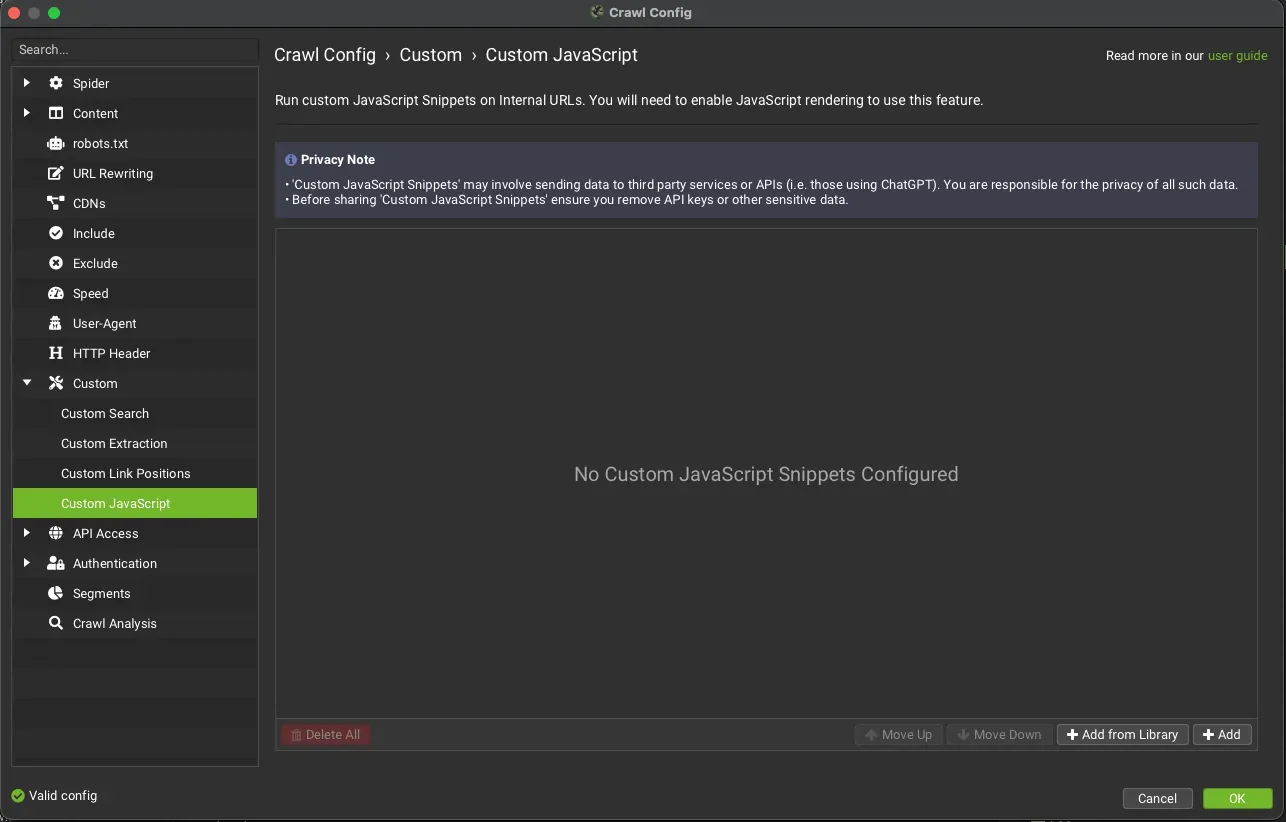
- Click “Add from Library” (bottom right).
- Select the official snippet: (ChatGPT) Extract embeddings from page content.
- Enter the key:
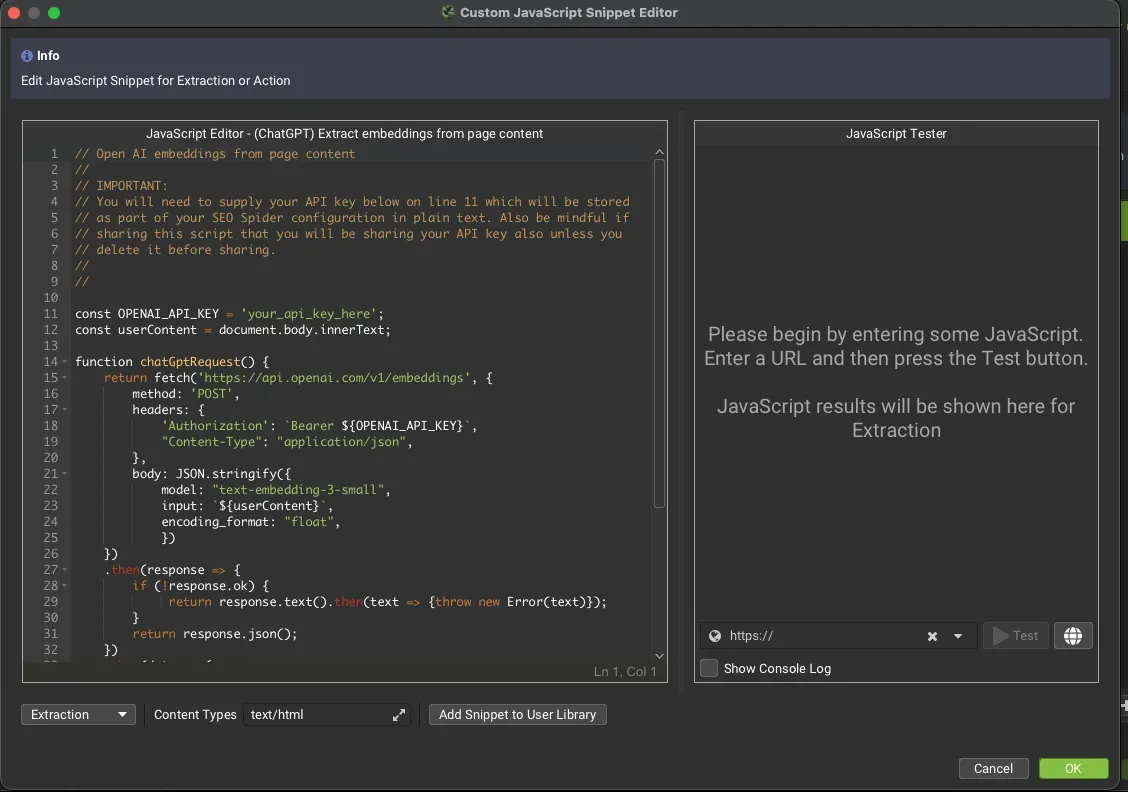
- Click the “JS” icon of the snippet you just added.
- Paste your API key on line 11 of the snippet, replacing
your_api_key_hereinconst OPENAI_API_KEY.
- Start the crawl: run the crawl. The software will query OpenAI for each URL and save the vector in the Custom JavaScript tab.
Screaming Frog SEO Spider version 20 introduced embeddings generated with an OpenAI model, via the API, directly through a built-in feature of the tool.
To do this, Screaming Frog added the ability to run custom JavaScript, available in 1Configuration›2Custom›3Custom JavaScript, where you choose the dedicated script and enter your OpenAI API key to start generating embeddings during the crawl.
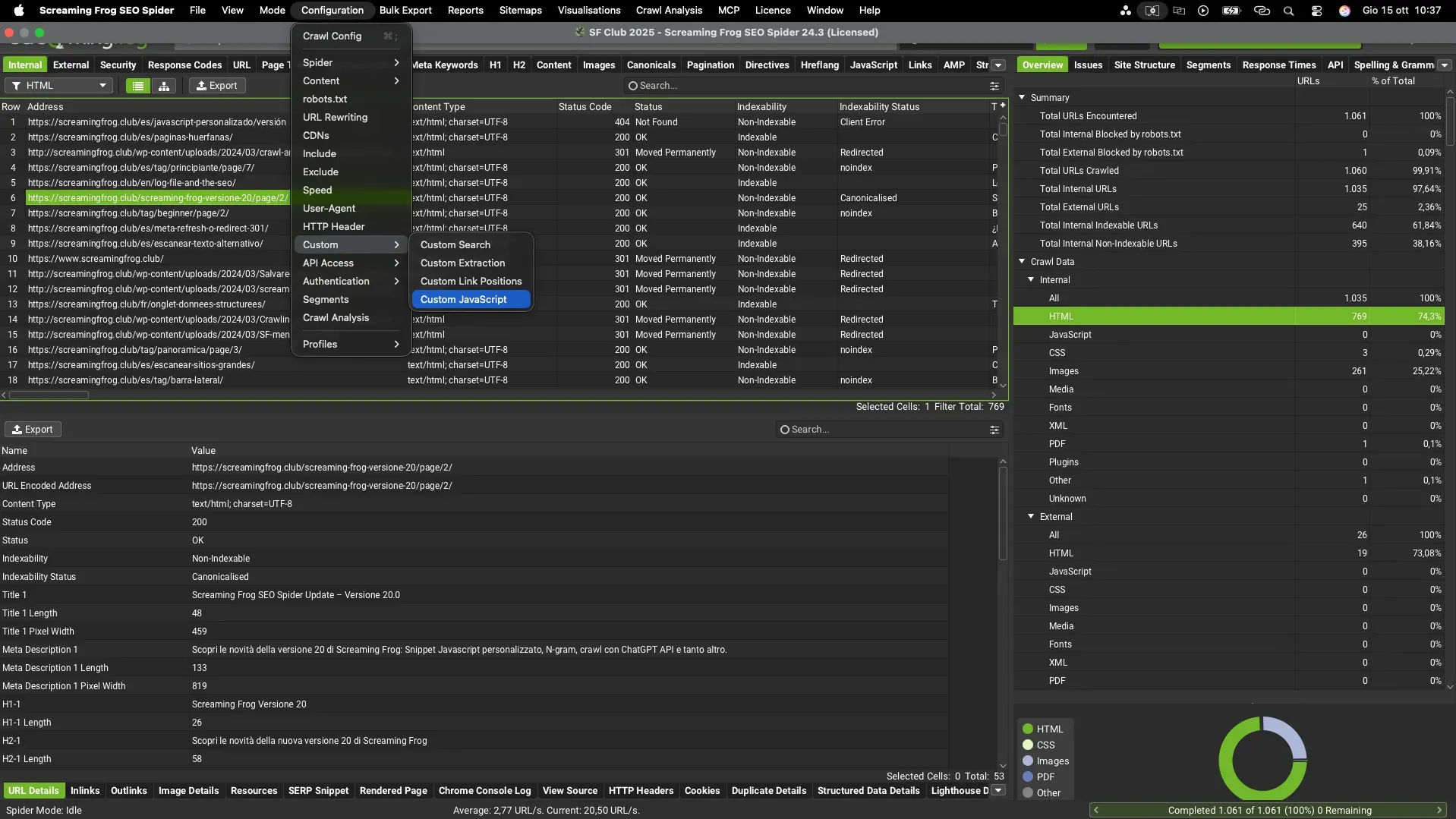
Once in Custom JavaScript, just click “+Add from Library” and choose Screaming Frog’s “(ChatGPT) Extract embeddings from page content”.
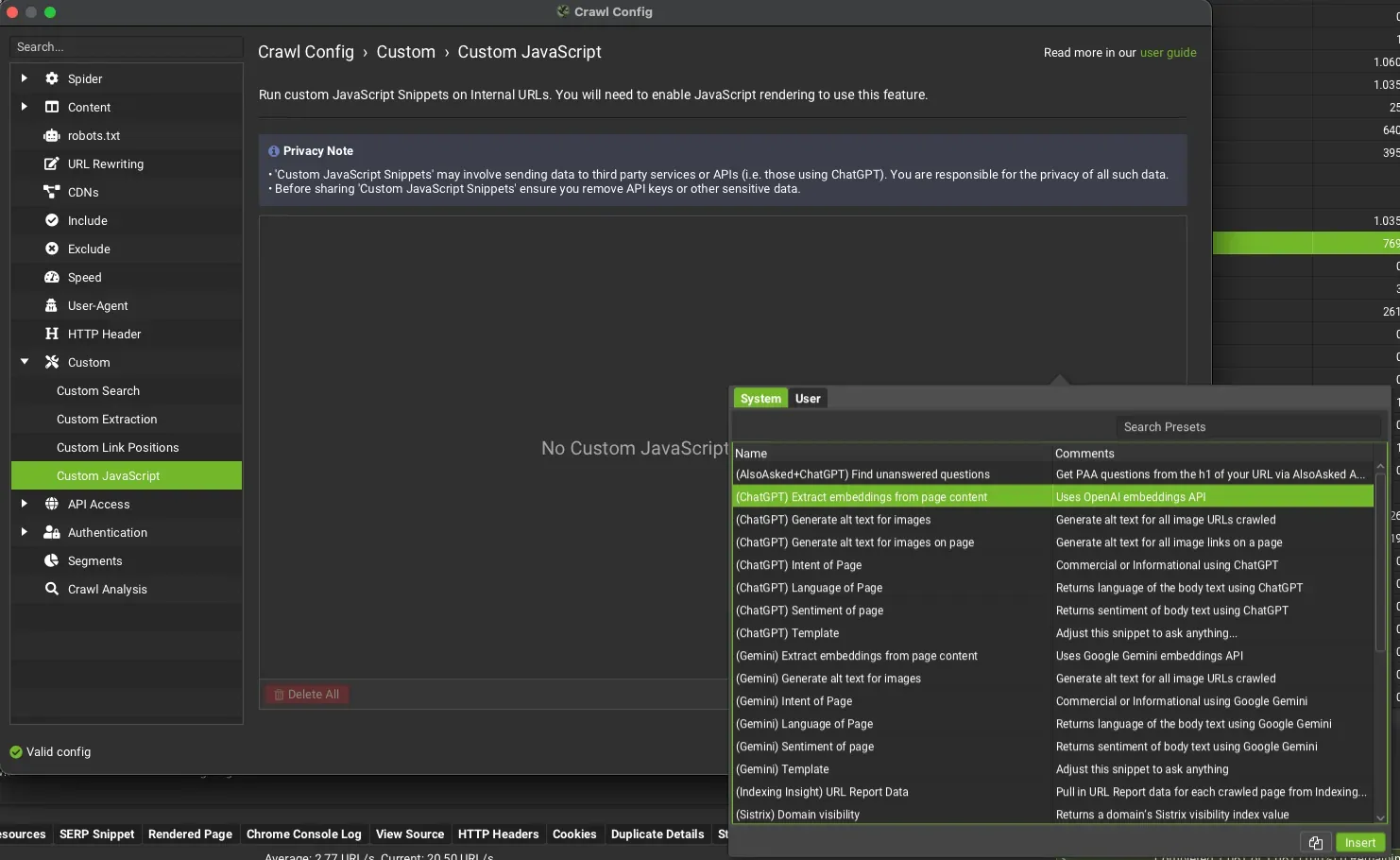
Click the “JS” icon to edit the script and enter the API key generated in OpenAI.

Below is the screen where you enter your API key. Once you’ve pasted it in the field, just run the crawl with Screaming Frog to get the embeddings. Since API usage costs money, I recommend using the “JavaScript Tester” with a URL to preview the result you’ll get from a full crawl.
The “Custom JavaScript” results appear in the dedicated tab; use the filters if several Custom JS extractions or actions are active.
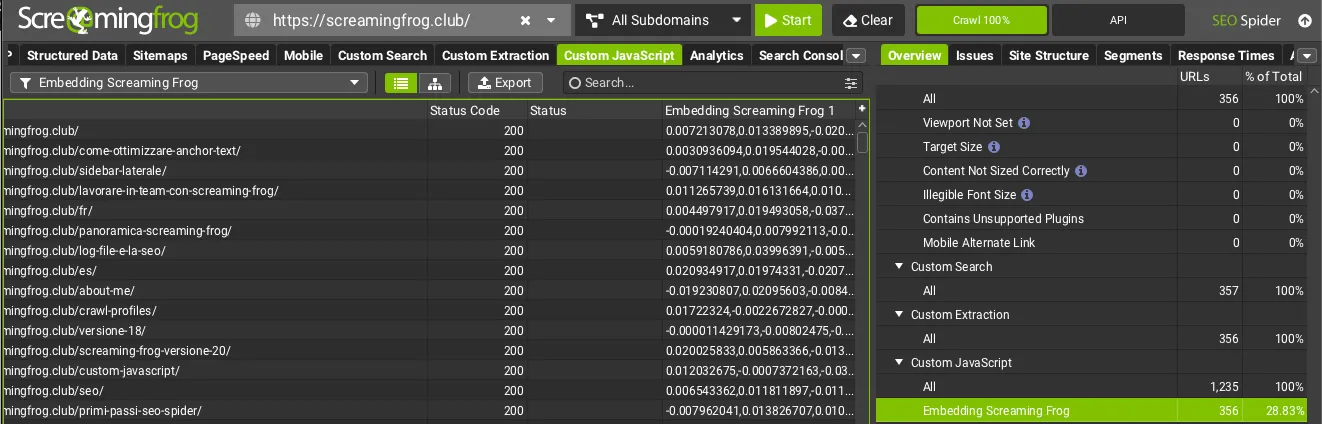
If you need to share the crawl or your Screaming Frog configuration, delete the API key first so you don’t hand it over. According to community rumours, Screaming Frog’s developers have already been asked to mask API keys once entered, to protect this valuable and costly data.
But now that we have the embeddings from Screaming Frog, how do we work with this new data? As we’ve seen, embeddings have many uses; let’s go through the process of running a very accurate analysis of related pages based on the vectors we’ve obtained.
Visualise your clusters with Python
You’ve extracted the data. Now what? Use this Python script (compatible with Google Colab) to turn the raw numbers into a 2D visual map.
- Input: the CSV file exported from Screaming Frog (columns: Address, Embeddings).
- Output: a scatter plot showing how your articles group by topic.
- What it’s for: spot at a glance the “semantically orphaned” pages (isolated points) that need internal links.
Step by step
A first use case is understanding the connections between the pages of a website, or between the product pages of an e-commerce store, to give visitors or potential buyers the best possible experience.
Here’s how:
- Get the embeddings with Screaming Frog.
- Export the SEO Spider data and format the file, replacing “Address” with “URL”.
- Delete the “Status Code” and “Status” columns, so you only have 2 headers:
- URL.
- Embeddings.
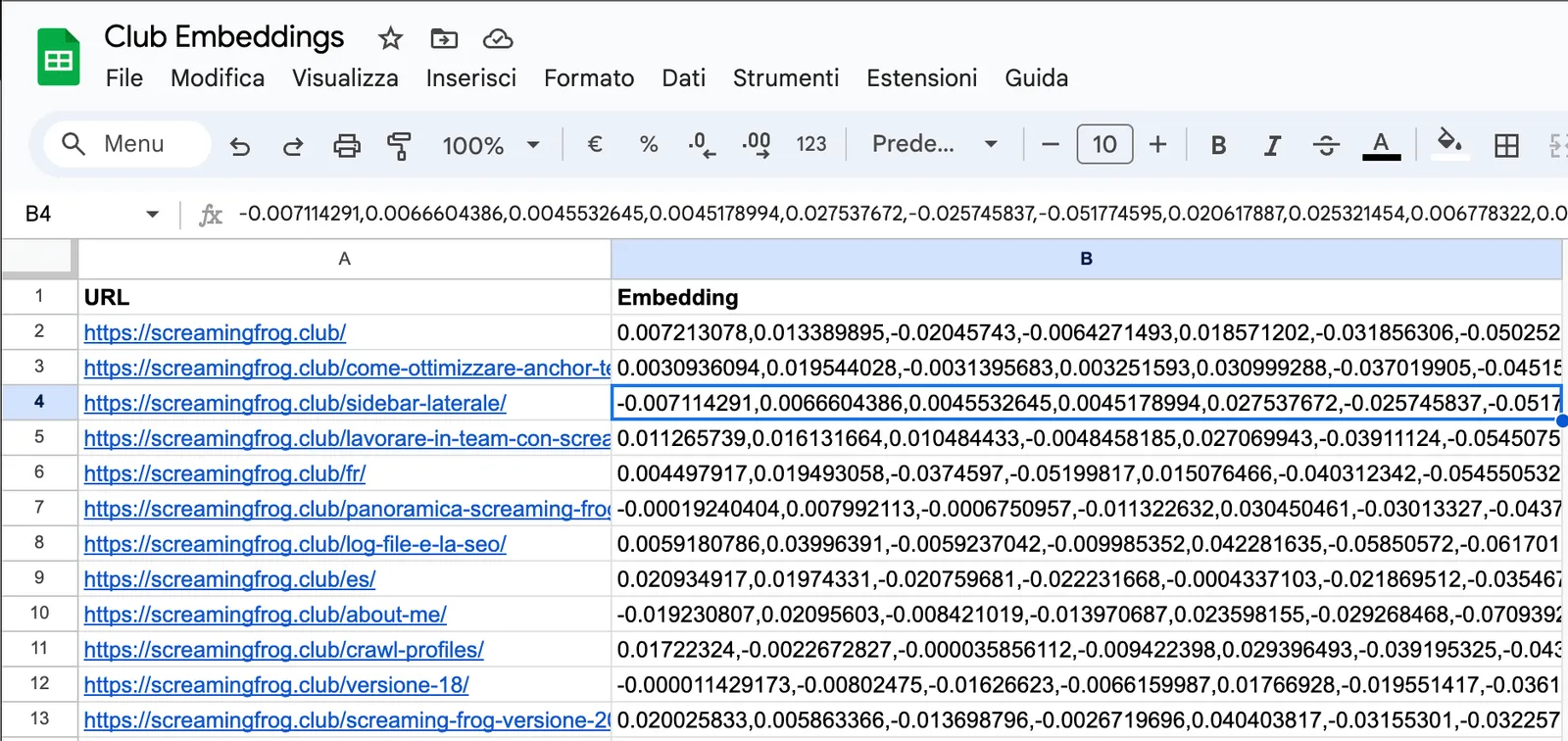
Now you can use a Python script on Colab to process your data. Here’s Gus Pelogia’s script for the processing.
The tool will ask you to upload your CSV file (the one from Screaming Frog).
Once the data is processed, it automatically downloads another CSV with the results split into two columns (if you use Google Sheets you’ll need to split the data into columns):
- Source page.
- Related pages.
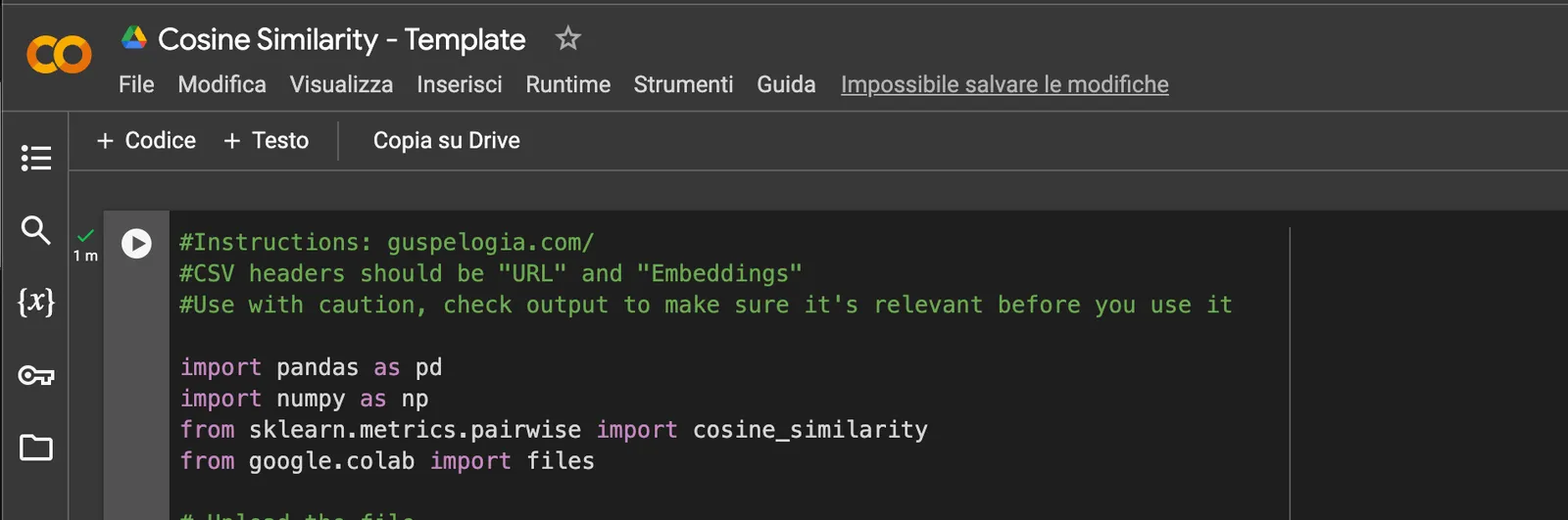
Just click the “Play” icon and Colab will let you upload the file from Screaming Frog.
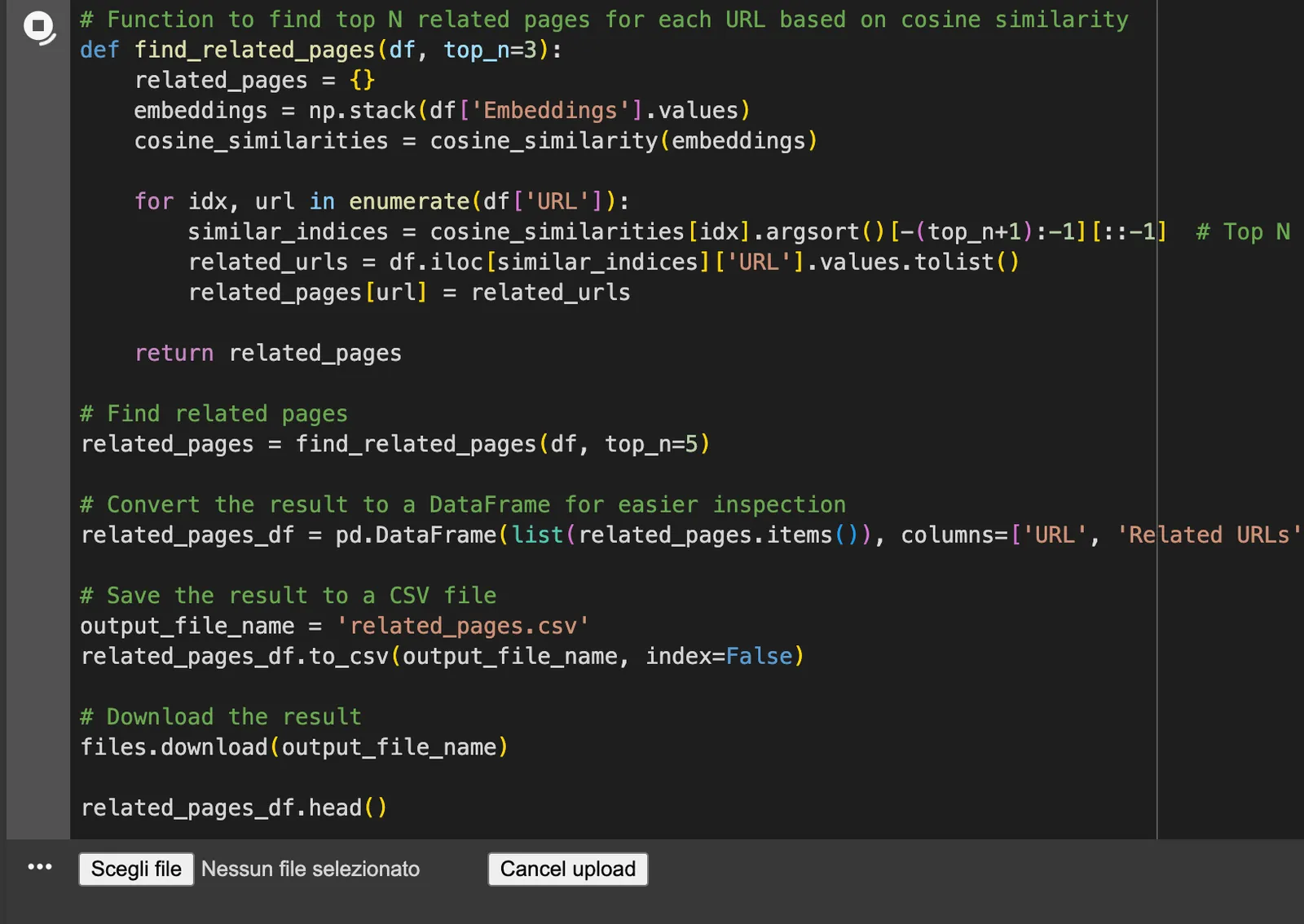
At the end of processing, a new file called “related_pages.csv” is downloaded automatically.
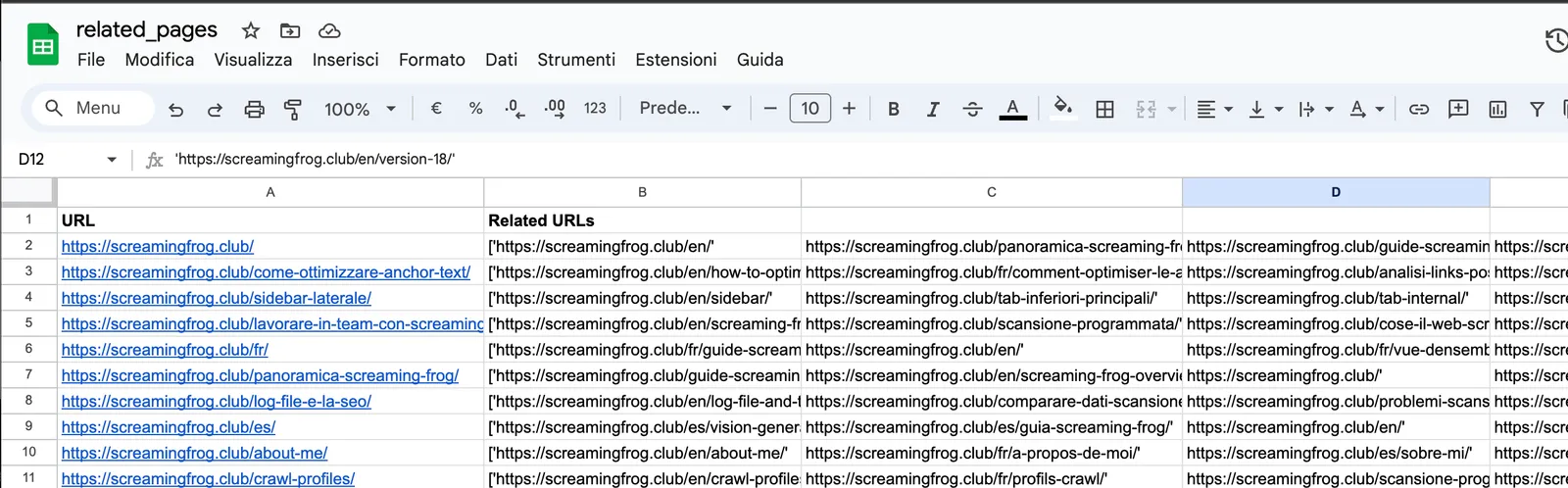
Now all that’s left is to check the results and make the right changes to the site for optimal semantic “correlation” of content. Applied to e-commerce products, this can be an excellent strategy to improve ROI and average order value.
Clustering
For clustering with embeddings you can use different clustering algorithms such as K-means or DBSCAN, which use different similarity metrics to create homogeneous groups. For my script I used the “pandas” library for data handling, “sklearn” for clustering and “matplotlib + seaborn” to output an image and a CSV file. The dataset file was formatted like the previous one, with two columns: “URL” and “Embeddings”.
# Import the libraries you need
import pandas as pd
import numpy as np
from sklearn.cluster import KMeans
from sklearn.decomposition import PCA
import matplotlib.pyplot as plt
import seaborn as sns
from google.colab import files

# Upload the file
uploaded = files.upload()

# Read the file into a DataFrame
df = pd.read_csv(next(iter(uploaded)))

# Embeddings are stored as list strings: convert them to numpy arrays
df['Embeddings'] = df['Embeddings'].apply(eval).apply(np.array)

# Choose the number of clusters
n_clusters = 5  # Change this value as you like

# Extract the embeddings
embeddings = np.vstack(df['Embeddings'].values)

# Run the clustering
kmeans = KMeans(n_clusters=n_clusters, random_state=0).fit(embeddings)
df['Cluster'] = kmeans.labels_

# Reduce dimensionality for the visualisation
pca = PCA(n_components=2)
embeddings_2d = pca.fit_transform(embeddings)

# Add the PCA components to the DataFrame
df['PCA1'] = embeddings_2d[:, 0]
df['PCA2'] = embeddings_2d[:, 1]

# Save the CSV file with the clusters
output_csv = 'clustered_data.csv'
df.to_csv(output_csv, index=False)
files.download(output_csv)

# Create an image with the clusters
plt.figure(figsize=(10, 7))
sns.scatterplot(x='PCA1', y='PCA2', hue='Cluster', data=df, palette='viridis', s=100)
plt.title('Clusters of Embeddings')
plt.xlabel('PCA1')
plt.ylabel('PCA2')
plt.legend()
plt.grid(True)

# Save the image
output_image = 'clusters_plot.png'
plt.savefig(output_image)
files.download(output_image)

# Show the image
plt.show()Questions about SEO Embeddings with Screaming Frog?
These guides come from real projects. If something in your crawl doesn’t add up, or you want to apply this process to your site, get in touch.
 Author.Raffaele Visintin.Search & Strategic Marketing Advisor