

Structured Data Analysis.
Analysing structured data and monitoring opportunities and warnings with SEO Spider.
How to check and validate a site’s structured data against Schema.org and Google’s requirements. Enable JSON-LD, Microdata and RDFa extraction, read the filters of the Structured Data tab and export errors and warnings.
Structured data
As mentioned before, structured data gives search engines explicit clues about the meaning of pages and their components, and can enable special features in Google’s results.
Implementing the various types of structured data can help you get more prominent, more detailed rich snippets, which can bring more traffic and, as a result, more conversions.
In this guide you’ll use Screaming Frog to check and validate structured data against the Schema.org specifications and Google’s requirements.
-
- Enable the structured data options under “Configuration > Spider > Extraction”.
First, enable ‘JSON-LD’, ‘Microdata’, ‘RDFa’, ‘Schema.org Validation’ and ‘Google Rich Result Feature Validation’ in the Spider configuration.
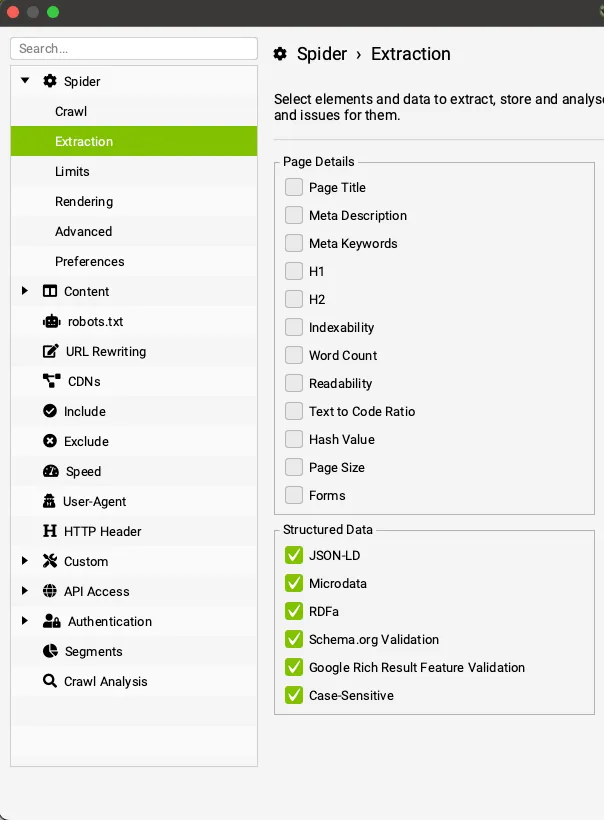
The “Case-Sensitive” option is still optional for Google’s understanding of structured data, but required for Schema.org.
-
- Run the crawl
Once the structured data options are enabled, just start the crawl: SEO Spider will begin extracting the data from the pages and validating it.
-
- Analyse the data in the “Structured Data” tab
The “Structured Data” tab has filters that help you see whether your structured data implementation has validation issues. The ‘Total Types’ and ‘Unique Types’ columns count the number of item types found for each URL.
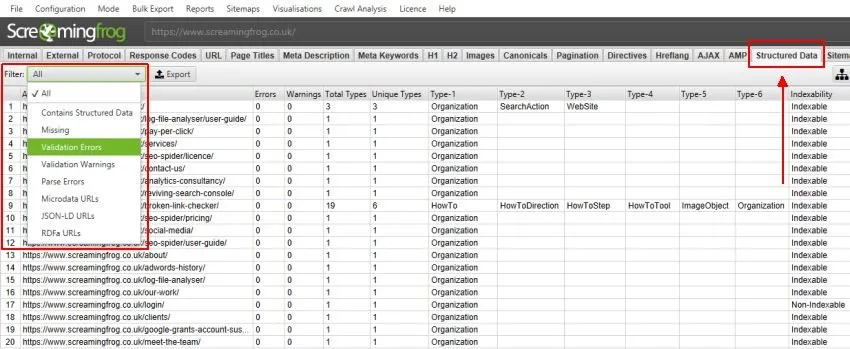
Besides the top window, you can check the sidebar, which summarises the data in each tab and filter so you know where to click without opening every filter.
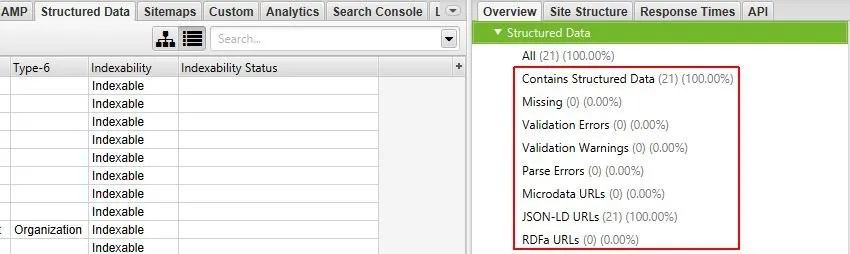
Structured data filters
Here are the filters and what they do:
-
Contains Structured Data: every URL containing structured data.
-
Missing Structured Data: URLs without structured data.
-
Validation Errors: every URL with validation errors against the Schema.org vocabulary, Google rich results or both, depending on your configuration. SEO Spider always classifies Schema.org issues as errors rather than warnings. Google rich result feature validation shows errors for missing required properties or problems with how they’re implemented.
-
Validation Warnings: every URL with validation warnings against Google Rich Results. SEO Spider fills this filter only with validation issues for recommended (optional) properties.
-
Parse Errors: every URL containing structured data that couldn’t be parsed correctly. This is often due to incorrect markup. If you use Google’s preferred format, JSON-LD, the JSON-LD Playground is an excellent tool for debugging parse errors.
-
Microdata URLs: URLs containing structured data in Microdata format.
-
Microdata URLs | JSON-LD URLs | RDFa URLs: URLs containing structured data in JSON-LD, RDFa or Microdata format respectively.
-
- View the “Structured Data Details” tab
Once the data is collected you can see all the details in SEO Spider’s bottom window: on the left, the property values with icons flagging errors or warnings; on the right, the details of each validation issue, its severity and the Schema.org links to find the specifications and fix the problem.
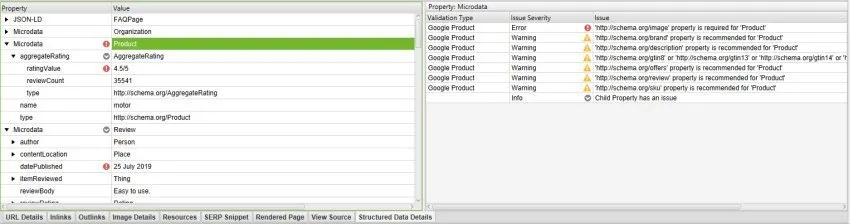
Google Product validation error example
In the example below, lv.com has validation errors and warnings against the ‘Google Product’ structured data requirements. On the right you can see 1 error among the required properties and several warnings among the recommended ones.
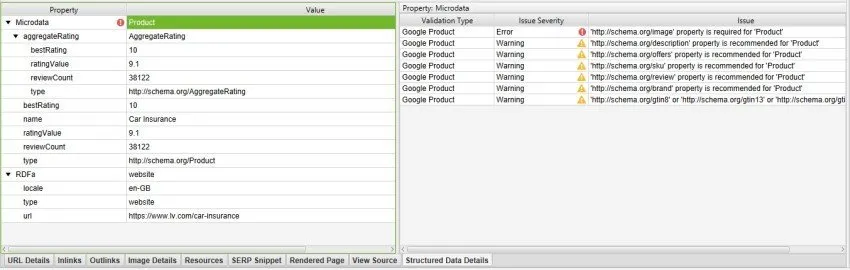
Recommended properties, flagged as warnings, can be implemented to add more information about the content (which can give a better user experience) or simply ignored.
In the next example, HSBC has an error in its breadcrumb structured data.
The issue says the ‘http://schema.org/item’ property is required for ‘ListItem’.
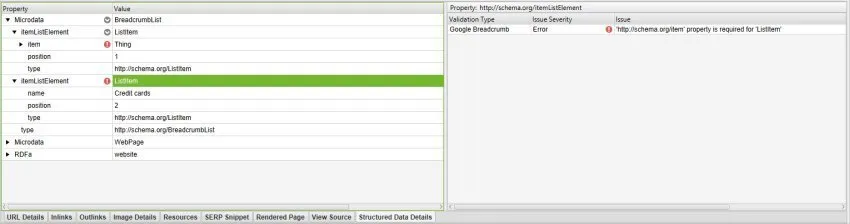
Google’s breadcrumb guidelines say the properties should include item (the web page URL), name (the breadcrumb title) and position (of the breadcrumb in the trail). HSBC is simply missing the item property and its URL.
These are just a few examples of how to read the data SEO Spider collects. I recommend reviewing the official documentation regularly, as it’s constantly updated.
-
- Exporting validation errors and warnings
Screaming Frog has two reports dedicated to structured data.
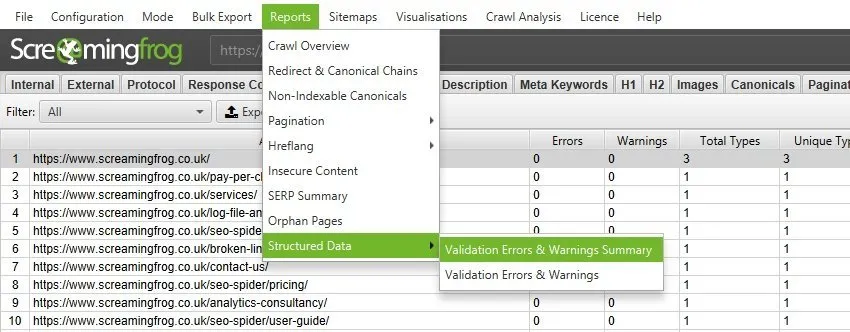
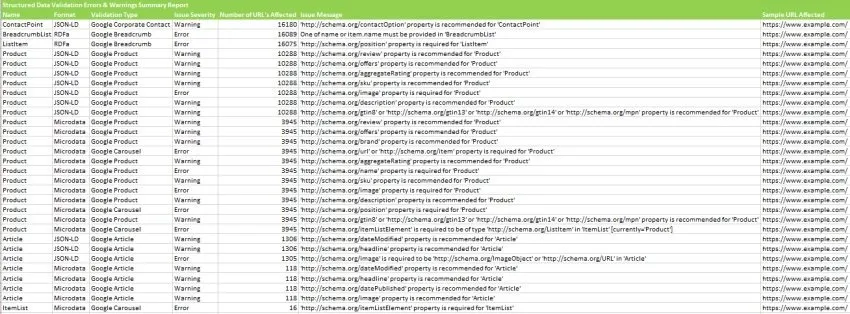
The ‘Validation Errors & Warnings Summary’ report is especially useful because it groups issues into patterns (rather than listing every instance) and shows the number of URLs affected by each pattern with an example URL (similar to how Search Console reports Web Vitals). You can see an example below.
The “Validation Errors & Warnings” report is a true bulk export of every error and warning found, with the URL it’s on. Very complete, but hard to read on large sites.
Related tabs: Structured Data | Reports
Structured data video
Questions about Structured Data Analysis?
These guides come from real projects. If something in your crawl doesn’t add up, or you want to apply this process to your site, get in touch.
 Author.Raffaele Visintin.Search & Strategic Marketing Advisor