

SITEMAPS TAB.
How to prepare your website’s XML sitemap for the crawler’s analysis.
What you’ll find in SEO Spider’s Sitemaps tab: URLs in or missing from the sitemap, orphan pages, non-indexable URLs and size limits. With a video on how to create a sitemap.
Crawling sitemaps
This tab gathers the most significant data extracted from crawling an XML sitemap.
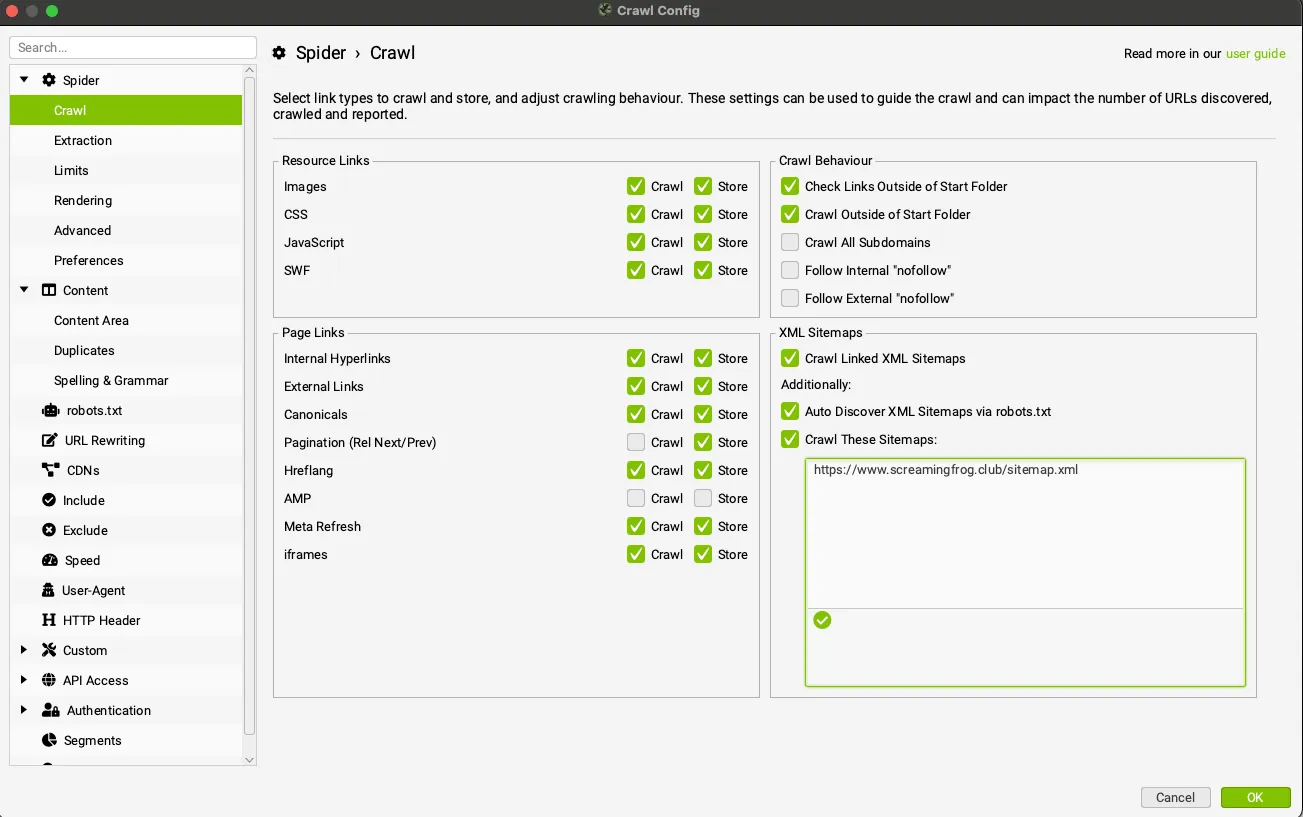
To get the data, enable Crawl Linked XML Sitemaps in 1Configuration›2Spider›3Crawl, start the crawl and then run a Crawl Analysis from 1Crawl Analysis›2Start.
The columns in this tab include general information about the URLs and their indexability.
The dedicated filters are far more interesting and specific:
- URLs in Sitemap: shows the URLs found in an XML sitemap. From an SEO point of view, a sitemap should only contain indexable, canonical URLs, avoiding pages with a status code other than 200, pages blocked by robots.txt or canonicalised pages.
- URLs Not In Sitemap: all the URLs found during the crawl that are not in the XML sitemap. I always recommend checking whether these URLs were left out on purpose or are omissions that should be added. This filter ignores non-indexable URLs, treating them as deliberate choices, so it doesn’t report them.
- Orphan URLs: URLs that are in the XML sitemap but weren’t discovered during the crawl, which points to a potential internal linking problem.
- Non-Indexable URLs in Sitemap: URLs in an XML sitemap that are not indexable for some reason. There are essentially two fixes: remove those pages from the sitemap or, if the “non-indexable” status is a mistake, fix it.
- URLs in Multiple Sitemaps: URLs that appear in more than one XML sitemap.
It may be worth creating a sitemap index. - XML Sitemap with Over 50k URLs: XML sitemaps with more than 50,000 URLs, beyond the limits set by search engines. The fix is to create a sitemap index and submit it to Google through Search Console.
- XML Sitemap with Over 50mb: every XML sitemap whose file size exceeds 50 MB.
Video tutorials
Sitemap analysis
Creating a sitemap
Questions about SITEMAPS TAB?
These guides come from real projects. If something in your crawl doesn’t add up, or you want to apply this process to your site, get in touch.
 Author.Raffaele Visintin.Search & Strategic Marketing Advisor
