

STATUS CODES.
Reference tab for analysing status codes: 4xx, 3xx and server errors
What you’ll find in SEO Spider’s Response Codes tab: columns and filters for blocked URLs, no responses, redirects and 4xx and 5xx errors, with the actions to take for each.
Status codes tab overview
The “Response Codes” tab shows the HTTP status and status codes of the internal and external URLs discovered during the crawl. Here are all the columns available:
- Address: the crawled URL.
- Content: the content type of the URL (text/html, image/png, image/jpg, etc).
- Status Code: the HTTP response code (200, 3xx, 4xx, 5xx, no response).
- Status: the HTTP header response (OK for 200, Not Found, Moved Permanently, etc.).
- Indexability: whether the URL is indexable or non-indexable.
- Indexability Status: the reason a URL is non-indexable, for example canonicalised to another URL, “noindex” or “Redirected”.
- Inlinks: the number of internal inlinks to the page. Internal inlinks are links pointing to a URL from resources on the same crawled subdomain.
- Response Time: the time in seconds to download the URL.
- Redirect URL: if the URL redirects, this column contains the destination URL.
- Redirect Type: this column can contain
- HTTP Redirect: a redirect triggered by an HTTP header.
- HSTS Policy: a redirect caused by a previous HSTS header.
- JavaScript Redirect: triggered by JavaScript execution. Only available in JavaScript rendering mode.
- Meta Refresh Redirect: triggered by a meta refresh tag in the page’s HTML.
Status code filters
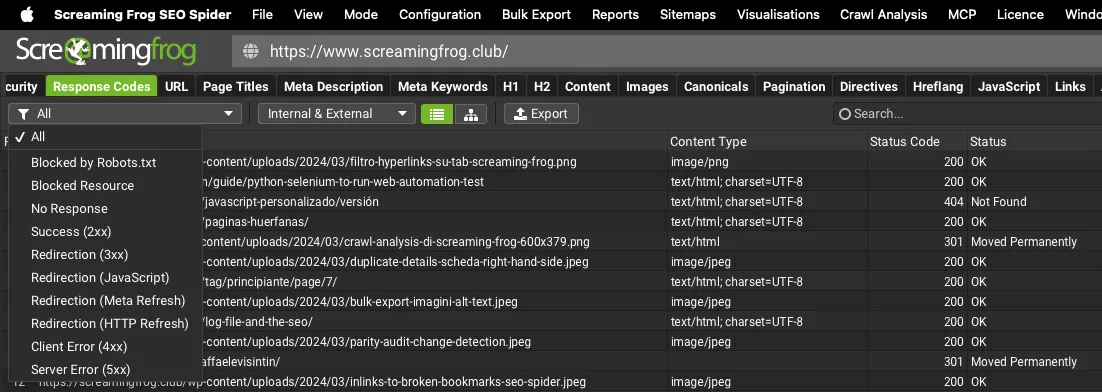
The “Response Codes” tab has the following filters:
- Blocked by Robots.txt: every URL blocked by the site’s robots.txt, which stops the crawler crawling those resources and, as a result, search engines from indexing them.

A “0” in the Status Code column means there was no HTTP response from the server, and the Status column gives the reason. In the example above, the Spider’s user agent was blocked by a robots.txt “disallow” directive, so it couldn’t get an HTTP response.
- Blocked Resource: every resource blocked by a website’s robots.txt, such as images, JavaScript and CSS. This filter is only populated if JavaScript rendering is enabled. Remember that blocked resources appear under ‘Blocked by Robots.txt’ if JavaScript mode isn’t enabled in the configuration.
- No Response: URLs that don’t respond to SEO Spider’s HTTP request. Most often this is a mistyped URL, a connection timeout, a refused connection or a connection error. With the “No Response” status, SEO Spider has trouble establishing connections or receiving responses. The issue could be a proxy.
| Address | Status Code | Status |
|---|---|---|
| https://www.screamingfrog.co.uk/no-response/ | 0 | No Response |
The “DNS lookup failed” status means the site wasn’t found at all, because the domain was mistyped or there’s no network connection.
| Address | Status Code | Status |
|---|---|---|
| https://www.screamingfrog.zone/ | 0 | DNS lookup failed |
“Connection Timeout” means Screaming Frog requested the HTTP response from the server but got no reply within 20 seconds. To fix this you can increase the Response Timeout in 1Configuration›2Spider›3Advanced or reduce the crawl speed in 1Configuration›2Speed, so you don’t overload the server and give it more time to respond.
| Address | Status Code | Status |
|---|---|---|
| https://www.screamingfrog.co.uk/timeout/ | 0 | Connection Timeout |
“Connection Refused” is returned when SEO Spider’s connection attempt was refused somewhere between your machine and the website. The most common causes are firewalls and attempts to block unknown user agents. To solve this, I recommend changing the user agent from “Screaming Frog SEO Spider” to “Chrome” in 1Configuration›2User-Agent.
| Address | Status Code | Status |
|---|---|---|
| https://www.screamingfrog.co.uk/refused/ | 0 | Connection Refused |
- Success (2XX): the requested URL was received, understood, accepted and processed successfully. Ideally every URL in a crawl should return a ‘200’ status code with an ‘OK’ status, which is perfect for crawling and indexing.
- Redirection (3XX): a redirect such as a 301 or 302 was found. Ideally every internal link should point to a 200 response, avoiding links that make the crawler take extra steps, to protect crawl budget.
- Redirection (JavaScript): a JavaScript redirect was found.
- Redirection (Meta Refresh): a meta refresh redirect was found.
- Redirection (HTTP Refresh): a redirect via the HTTP Refresh header was found.
- Client Error (4xx): resources for which there was a problem with the request. These can include 400 Bad Request, 403 Forbidden, 404 Page Not Found, 410 Removed, 429 Too Many Requests and more. Client errors such as 404s should be fixed so they don’t waste crawl budget: update the source link, remove these links (for example returning a 410 via .htaccess) or redirect them where appropriate.
- Server Error (5XX): the server failed to fulfil an apparently valid request. This can include common responses such as 500 Internal Server Error and 503 Service Unavailable. A high share of these errors may point to a server under stress or a misconfiguration that needs investigating.
Questions about STATUS CODES?
These guides come from real projects. If something in your crawl doesn’t add up, or you want to apply this process to your site, get in touch.
 Author.Raffaele Visintin.Search & Strategic Marketing Advisor