

STRUCTURED DATA TAB.
A first analysis for managing microdata and JSON structured data.
What you’ll find in SEO Spider’s Structured Data tab: supported formats (JSON-LD, Microdata, RDFa), options to enable and filters for validation errors.
Structured data overview
Search engines, and Google in particular, are constantly updated to better understand the content of a web page. Structured data exists for exactly this: it makes crawling and interpretation easier by giving search engines more precise clues.
It’s very valuable: it helps a page rank and enables features and enhancements in search results. Structured data is encoded with specific markup and follows the Schema.org vocabulary, although the main reference remains “Google Search Central”, which states which structured data is required, recommended or optional in each case.
Schema.org defines many more properties, but they aren’t required for Google Search and can be left out when optimising a website.
Google Search supports 3 structured data formats:
- JSON-LD (recommended);
- Microdata;
- RDFa.
Structured data can be tested and validated with the Rich Results Test, and its health can be monitored in the dedicated Search Console reports.
Screaming Frog is also a useful ally for monitoring this markup: the “Structured Data” tab includes all the main details and reports the validation issues found during the crawl.
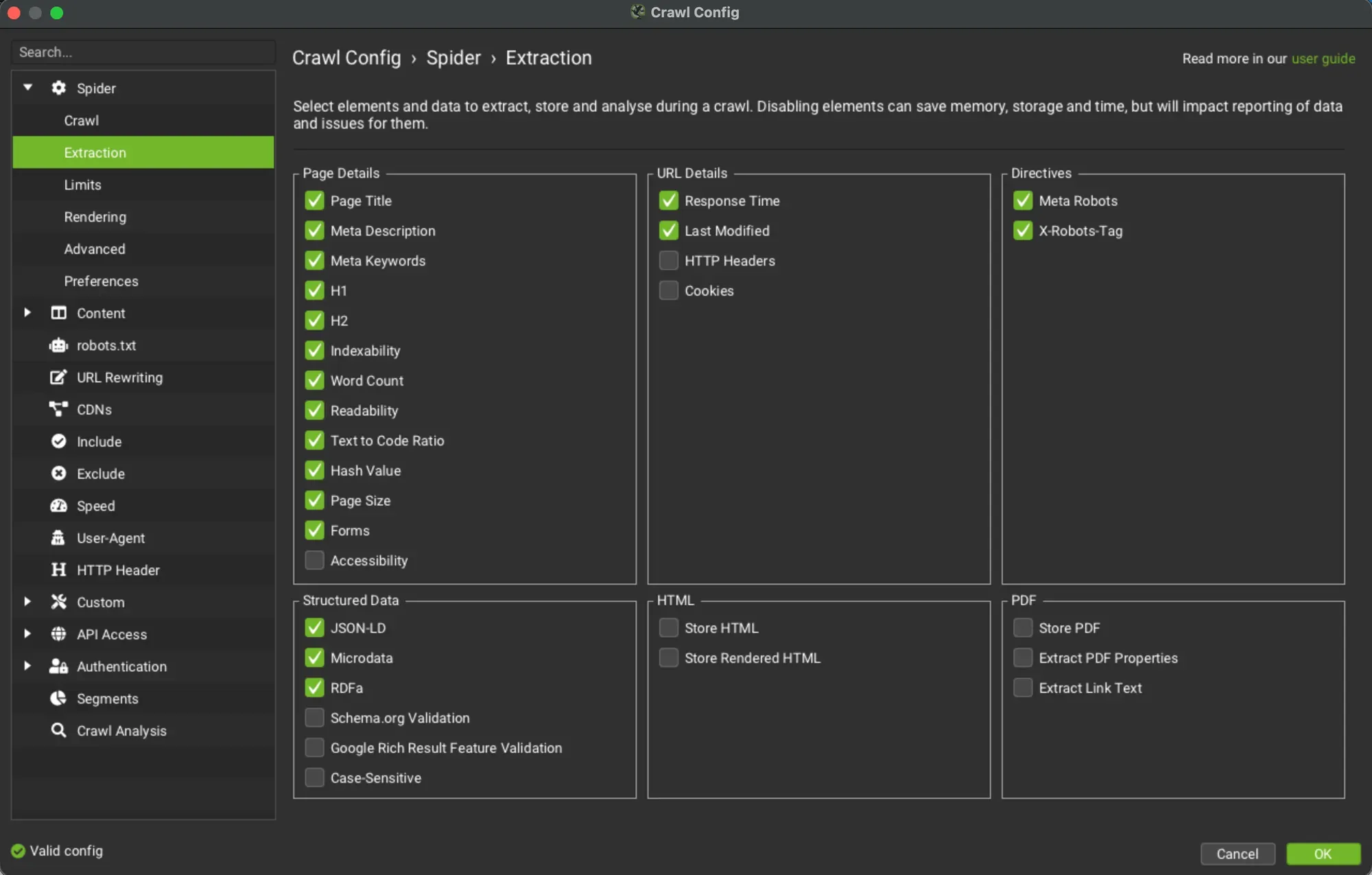
To collect the data and populate the filters, enable the JSON-LD, Microdata, RDFa, Schema.org Validation and Google Rich Result Feature Validation options in 1Configuration›2Spider›3Extraction.
The Structured Data tab
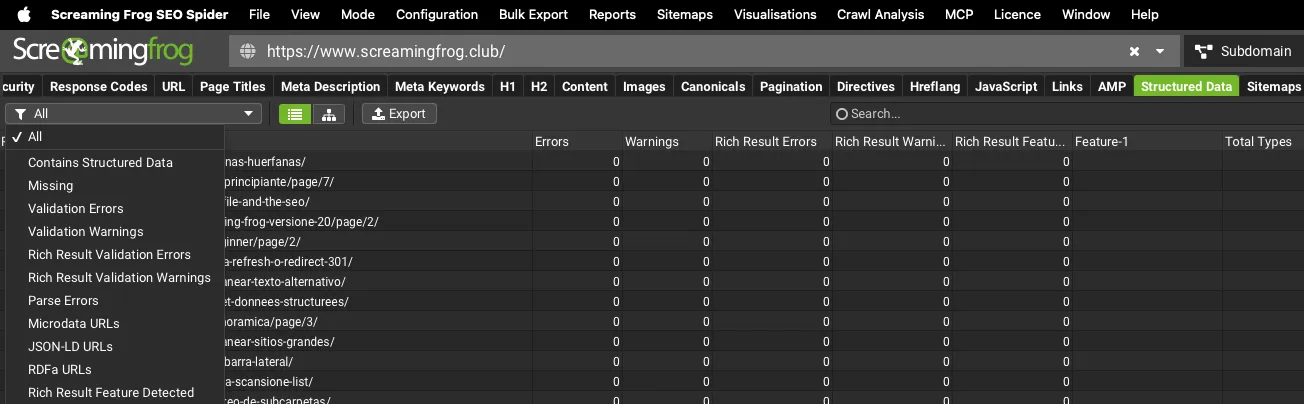
The columns available in the “Structured Data” tab:
- Address: the crawled URL.
- Errors: the total number of validation errors.
- Warnings: the total number of warnings found during the crawl.
- Rich Result Errors and Warnings: Google Rich Result validation errors and warnings.
- Rich Result Features: the Rich Result features detected (Feature 1, 2 etc.).
- Total Types: the total number of structured data types found for the URL.
- Unique Types: how many unique structured data types were found for the URL.
- Type 1: the first structured data type found.
- Type 2 etc: the second structured data type found.
The available filters are:
- Contains Structured Data: every URL that contains structured data.
- Missing: URLs without structured data.
- Validation Errors: every URL with validation errors against the Schema.org vocabulary, Google rich results or both, depending on your configuration. SEO Spider always classifies Schema.org issues as errors rather than warnings. Google rich result feature validation shows errors for missing required properties or problems with how required properties are implemented.
- Validation Warnings: every URL with validation warnings against Google Rich Results. SEO Spider fills this filter only with validation issues for recommended (optional) properties.
- Rich Result Validation Errors and Warnings: separate the errors and warnings that concern Google Rich Results only.
- Parse Errors: every URL containing structured data that couldn’t be parsed correctly. This is often due to incorrect markup. If you use Google’s preferred format, JSON-LD, the JSON-LD Playground is an excellent tool for debugging parse errors.
- Microdata URLs | JSON-LD URLs | RDFa URLs: the URLs containing structured data in Microdata, JSON-LD or RDFa format respectively.
- Rich Result Feature Detected: URLs where at least one Rich Result feature was detected.
Questions about STRUCTURED DATA TAB?
These guides come from real projects. If something in your crawl doesn’t add up, or you want to apply this process to your site, get in touch.
 Author.Raffaele Visintin.Search & Strategic Marketing Advisor
