

HREFLANG TAB.
Analysing the hreflang attribute to manage a project’s internationalisation.
What the hreflang attribute is, how to write it and what you’ll find in SEO Spider’s Hreflang tab: filters for missing return links, invalid codes, conflicting canonicals and x-default.
Hreflang overview
In an increasingly global market, more and more businesses go international with websites offering translated content for different audiences. Google uses rel="alternate" hreflang="x" attributes to decide which content is most appropriate to serve in search results based on the visitor’s location and language.
That’s why hreflang plays a key role in international organic rankings: it helps search engines understand the relationship between pages in different languages and avoids potential duplicate content issues.
The hreflang attribute can be placed in the <head>…</head>, in the HTTP header or in the XML sitemap. Its syntax must include the page it sits on (self-reference) and every alternative language in which the content is served.
<link rel="alternate" href="https://example.com/en" hreflang="en" />
<link rel="alternate" href="https://example.com/de" hreflang="de" />
<link rel="alternate" href="https://example.com/en" hreflang="x-default" />
You can also specify the region of an alternative URL for the same language:
<link rel="alternate" hreflang="en-gb" href="http://en-gb.example.com/page.html" />
<link rel="alternate" hreflang="en-us" href="http://en-us.example.com/page.html" />
<link rel="alternate" hreflang="en" href="http://en.example.com/page.html" />
<link rel="alternate" hreflang="de" href="http://de.example.com/page.html" />
<link rel="alternate" hreflang="x-default" href="http://en.example.com/page.html" />
In this case the page has a British English version, an American English version, a German version and an English version that Google serves when no geo-targeted version fits the visitor’s language (for example an Australian or an Italian visiting the site).
To collect a website’s internationalisation data you can rely on Screaming Frog and its dedicated tab, which includes the details of the hreflang annotations crawled by SEO Spider, whether in HTML link elements, HTTP headers or XML sitemaps.
To collect this valuable data, enable Hreflang in Crawl and Store in 1Configuration›2Spider›3Crawl. To extract hreflang annotations from the XML sitemap, also enable Crawl Linked XML Sitemaps.
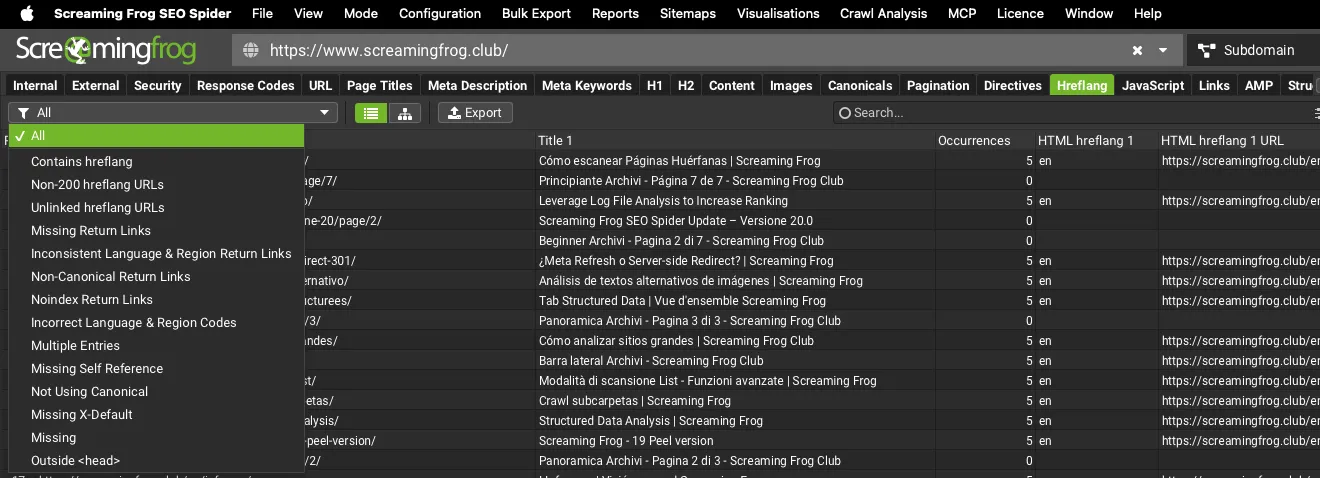
The Hreflang tab
Columns
Besides the URL address and the page title, the tab gives you important information on:
- Occurrences: the number of rel="alternate" annotations found during the crawl.
- HTML hreflang 1-2: the hreflang language and region code from the HTML link element.
HTML hreflang 1/2 URL etc: the URL used in the hreflang. - HTTP hreflang 1/2 etc: the hreflang language and region code from the HTTP header.
- HTTP hreflang 1/2 URL etc: the hreflang URL from the HTTP header.
- Sitemap hreflang 1/2 etc: the hreflang language and region code found in the XML sitemap. Note: this data is only available if you crawl the XML sitemap in list mode.
- Sitemap hreflang 1/2 URL etc: the hreflang URL from the XML sitemap. Note: this data is only filled in when you crawl the XML sitemap in list mode.
Filters
The tab has the following filters:
-
Contains Hreflang: every URL with rel="alternate" hreflang annotations from any implementation, whether link elements, HTTP header or XML sitemap.
-
Non-200 Hreflang URLs: every URL used in rel="alternate" hreflang annotations that doesn’t return a 200 status code. This includes URLs blocked by robots.txt, with no response, 3XX (redirects), 4XX (client errors) or 5XX (server errors). Given how important this element is, hreflang URLs must be crawlable and indexable, so URLs that aren’t need fixing or search engines will ignore them. Non-200 hreflang URLs can also be checked in the “URL Details” bottom pane by looking at the status code.
You can bulk export them from 1Reports›2Hreflang›3Non-200 Hreflang URLs. -
Unlinked Hreflang URLs: pages containing one or more hreflang URLs that can only be discovered through rel="alternate" hreflang annotations. Since hreflang annotations don’t pass PageRank like a traditional anchor tag, this can be an important warning for internal linking, or point to a typo or strategy error in the annotations.
To find out exactly which hreflang URLs on these pages are unlinked, use the 1Reports›2Hreflang›3Unlinked Hreflang URLs export. -
Missing Return Links: every URL found in hreflang annotations that is missing a return link (or “return tags” in Google Search Console) from its alternative pages. Hreflang is reciprocal, so all alternative versions must confirm the relationship. When page A links to page B with an hreflang annotation to mark it as an alternative, page B must link back.
Without a return link, search engines may ignore the annotation entirely or misinterpret it. Missing return URLs show in the “URL Details” bottom tab with a “missing” confirmation status, and you can bulk export them from 1Reports›2Hreflang›3Missing Return Links. -
Inconsistent Language & Region Return Links: URLs with return links whose language or region is inconsistent, meaning the return link has a different language or region value from the one the URL itself refers to. They show in the “URL Details” bottom pane with an “Inconsistent” confirmation status and can be exported from 1Reports›2Hreflang›3Inconsistent Language Return Links.
-
Non Canonical Return Links: URLs with non-canonical hreflang return links. Hreflang should only include canonical versions of URLs, so this filter collects return links pointing to URLs that aren’t the canonical versions (canonicalised).
This filter is concerned with return links from hreflang annotations. Imagine URL A is canonicalised to URL B and has an hreflang annotation to URL C: on URL C the return hreflang should point to the canonical URL (URL B) rather than URL A.
Non-canonical return URLs show in the “URL Details” bottom pane with a “Not canonical” confirmation status and can be bulk exported from 1Reports›2Hreflang›3Non Canonical Return Links. -
Noindex Return Links: links in rel="alternate" hreflang annotations that have a “noindex” meta tag. They show in the “URL Details” bottom pane with a “noindex” confirmation status and can be bulk exported from 1Reports›2Hreflang›3Noindex Return Links.
-
Incorrect Language & Region Codes: simply checks that the language (ISO 639-1 format) and optional region code (ISO 3166-1 Alpha 2 format) values are valid. Unsupported hreflang values show in the “URL Details” bottom pane with an “invalid” status.
-
Multiple Entries: URLs with multiple entries for a language or region code, for example when page X links to pages Y and Z with the same “en” hreflang value.
-
Missing Self Reference: URLs missing a self-reference in their rel="alternate" annotations.
-
Not Using Canonical: flags when URL A is canonicalised to URL B, but its hreflang annotation still self-references URL A. Hreflang should only include canonical versions of URLs.
-
Missing X-Default: URLs missing an x-default hreflang attribute.
-
Missing: URLs without hreflang attributes.
-
Outside <head>: pages with hreflang annotations outside the head, which search engines ignore.
Video tutorial
Questions about HREFLANG TAB?
These guides come from real projects. If something in your crawl doesn’t add up, or you want to apply this process to your site, get in touch.
 Author.Raffaele Visintin.Search & Strategic Marketing Advisor
