
URL DETAILS TABScreaming Frog OverviewIntermediate1

SEO Spider features and tabs
URL DETAILS TAB.
Advanced URL details for a more granular, in-depth analysis.
Brief
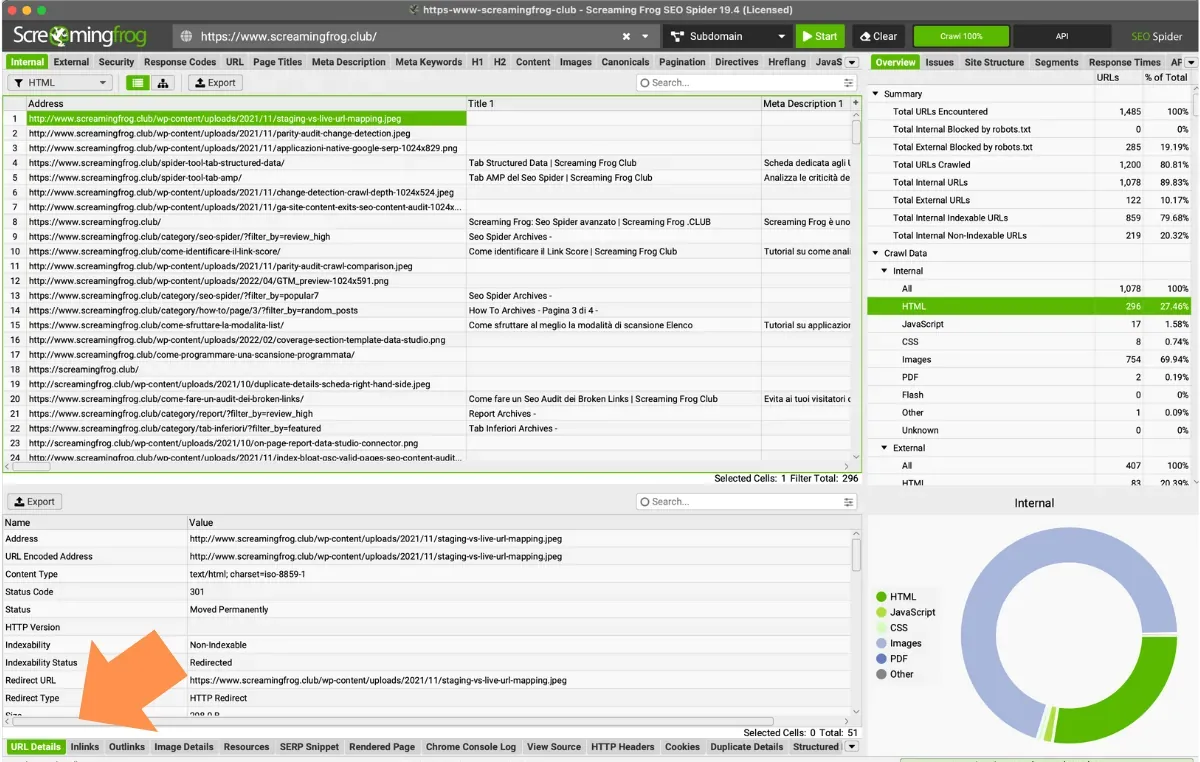
What the URL Details bottom tab shows: a summary of the selected URL with status, content, size, crawl depth and number of inbound and outbound links.
Bottom tabs: URL Details
The “URL Details” tab sits in the bottom window of SEO Spider and is populated when you highlight one or more URLs in the top window. It gives you a thorough overview of the analysed URL and shows a selection of the columns from the “Internal” tab, including:
- URL: the selected URL.
- Status Code: the server response for the selected URL.
- Status: the HTTP header response.
- Content: the content type of the URL.
- Size: the size of the crawled file or web page.
- Crawl Depth: how deep the page sits, measured in clicks from the homepage or start page.
- Inlinks: total number of internal inlinks to the URL.
- Outlinks: number of internal outlinks from the URL.
End of the guide
Questions about URL DETAILS TAB?
These guides come from real projects. If something in your crawl doesn’t add up, or you want to apply this process to your site, get in touch.
Updated by someone who uses SEO Spider every dayScreaming Frog beta tester
 Author.Raffaele Visintin.Search & Strategic Marketing Advisor
SF ClubBeta tester · SEO Spider
