

What is a CDN?.
Content Delivery Network
What a Content Delivery Network is, how it’s built and its SEO pros and cons, especially for LCP. See also how to set up SEO Spider so it treats the CDN as internal and analyses its links.
Content Delivery Network
CDN (Content Delivery Network)
CDNs are an excellent way to distribute media across multiple servers, optimise the performance of websites and e-commerce stores and improve UX through content caching.
A Content Delivery Network shortens the distance between the server and the end user, which makes it ideal for both static and dynamic content.
Many large e-commerce and web properties, such as Amazon, Netflix and Meta itself, use a CDN to make the page experience smoother.
Since Google is very sensitive to user experience, a CDN can be the right way to reach this goal.
For SEO, serving images from a CDN is very important to improve Core Web Vitals, especially LCP (Largest Contentful Paint).
CDN architecture
The architecture of a Content Delivery Network (CDN) is fairly complex, but it’s generally made up of several key components that work together to deliver content to users efficiently and reliably. Here’s an overview of the main ones:
- Points of Presence (PoP): PoPs are servers distributed across strategic locations around the world. Each PoP holds a cache of the most requested content and acts as a local delivery point for nearby users. The more PoPs there are, the better the geographic coverage and the closer the content is to end users.
- Origin servers: the original servers hosting the web content. The CDN fetches content from the origin servers and distributes it to the PoPs for caching.
- Routing and load balancing: the CDN uses routing and load-balancing algorithms to direct user requests to the most suitable PoPs and spread the load evenly across them.
- Cache software: every PoP runs cache software that temporarily stores the most requested content. This reduces latency and improves overall delivery performance.
- Global transport networks: CDNs often use high-performance transport networks to guarantee fast, reliable connections between origin servers, PoPs and end users.
- Monitoring and analytics: monitoring and analytics tools track CDN performance, collect data on traffic patterns and identify performance or security issues.
Overall, a CDN’s architecture is designed to improve the performance, reliability and security of content delivery on the internet, delivering content to users quickly and efficiently wherever they are in the world.
Advantages of a CDN
As you’ll have gathered, if your business serves visitors around the world, a CDN is highly recommended. Let’s look at the benefits in detail.
- Faster load times: the main advantage is shorter load times thanks to load balancing; this can drastically reduce bounce rates by improving how users perceive your site.
- Less downtime: with a CDN, the site is more stable because it doesn’t depend entirely on the web host; if the host has problems, the site can rely on the CDN’s servers and keep serving visitors.
- Protection against DDoS attacks: with many servers, the CDN’s nodes absorb malicious traffic, reducing the chance of the site going down.
SEO drawbacks of a CDN
A CDN can also hide some SEO pitfalls, and some experts question its use because it could hurt the ranking of media content.
The main drawbacks come down to two scenarios:
- The CDN domain: content is served from a hostname different from the website’s, which may be a weaker signal for indexing it. The same happens, to a lesser degree, if the CDN is hosted on a subdomain of the website (in that case you can work with a custom subdomain).
- Duplicate content: images may be considered duplicates. To fix this, set a canonical header telling the crawler that the CDN content is a copy of the original.
CDNs and Screaming Frog
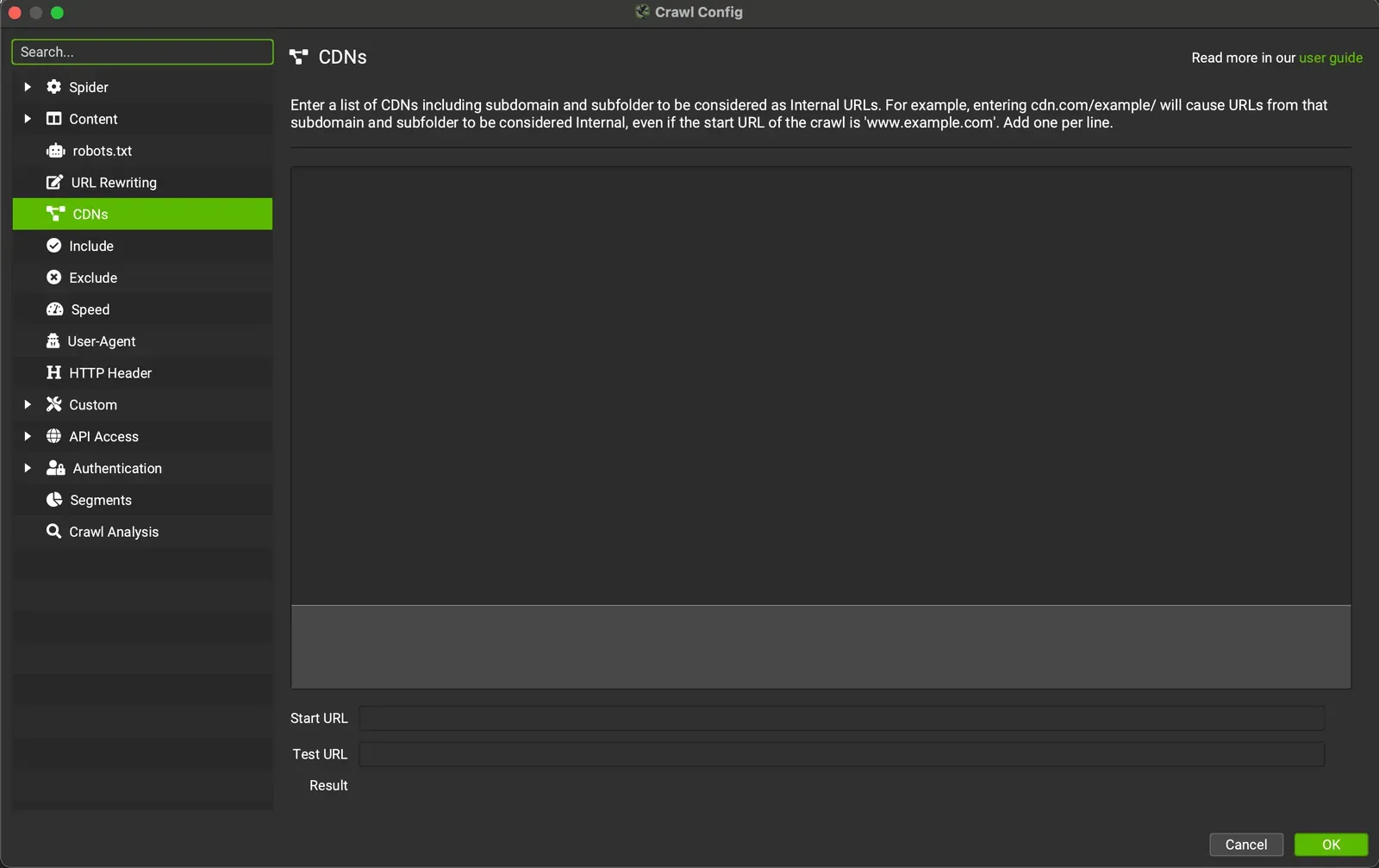
Beyond setting it up, a CDN’s performance needs checking to make sure you get the benefits listed above. SEO Spider helps here with a dedicated feature in 1Configuration›2CDNs.
Screaming Frog lets you enter a list of CDNs that will be treated as internal resources (URLs) during the analysis.
SEO Spider also lets you provide a subfolder with the domain, so that the subfolder (and everything in it) is treated as internal.
You can then monitor the CDN’s links in the “Internal” tab and work with far more detail than if they were treated as external links.
Questions about What is a CDN?
These guides come from real projects. If something in your crawl doesn’t add up, or you want to apply this process to your site, get in touch.
 Author.Raffaele Visintin.Search & Strategic Marketing Advisor
