

CANONICALS TAB.
Analysing original and secondary content through the “canonical” attribute.
What you’ll find in SEO Spider’s Canonicals tab: columns, filters and the most common canonical issues, such as multiple canonicals or canonicals pointing to non-indexable pages.
Canonicals tab overview
The rel="canonical" element helps you specify a single preferred version of a page when it’s available at multiple URLs. It’s a hint to search engines to avoid duplicate content, consolidating indexing and link signals into one URL to use for ranking.
The canonical link element should be placed in the head of the document, or sent with rel="canonical" HTTP headers.
The “Canonicals” tab shows the canonical link elements and HTTP canonicals discovered during a crawl, with these columns:
- Address: the crawled URL.
- Occurrences: the number of canonicals found (via both the link element and HTTP).
- Indexability: whether the URL is indexable or non-indexable.
- Indexability Status: the reason a URL is non-indexable, for example because it’s canonicalised to another URL.
- Canonical Link Element 1/2 etc: every instance of canonical link elements.
- HTTP Canonical 1/2 etc: every canonical sent via HTTP.
- Meta Robots 1/2 etc: the meta robots found on the URL.
- X-Robots-Tag 1/2 etc – X-Robots-Tag data: SEO Spider finds every instance if there’s more than one.
- rel="next" and rel="prev": the tool collects these HTML link elements, designed to indicate the relationship between URLs in a paginated series.
Canonicals tab filters
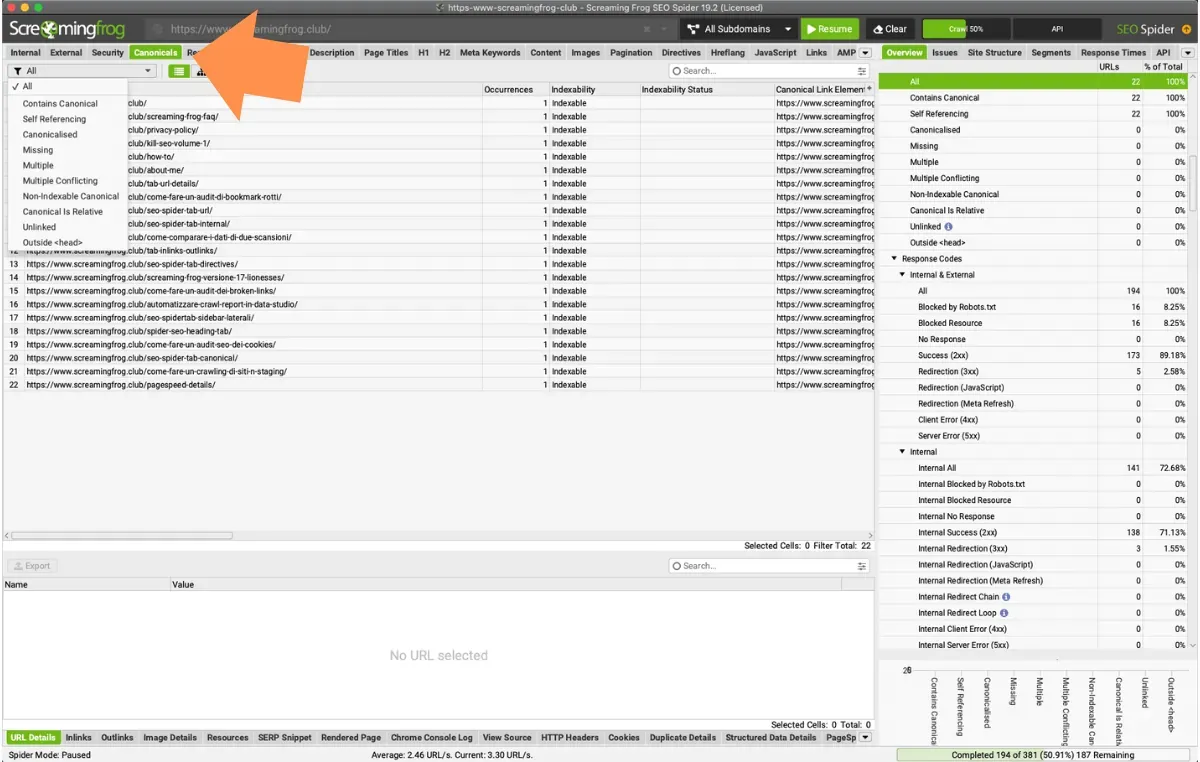
This tab includes the following filters:
- Contains Canonical: pages that have a canonical URL (via link element, HTTP header or both). It can be a self-referencing canonical, where the page URL is the same as the canonical URL, or the page can be “canonicalised”, where the canonical URL is different from the page URL.
- Self Referencing: the URL has a canonical that is the same as the crawled page URL (so it references itself). Ideally only canonical versions of URLs should be linked internally, and every URL should have a self-referencing canonical to help prevent any potential duplicate content issues.
- Canonicalised: the page has a canonical URL different from itself. The URL is “canonicalised” to another HTML page, which tells search engines not to index the page and to assign ranking to the target canonical URL.
In a perfect world a website wouldn’t need to canonicalise any URL, because only canonical versions would be linked, but canonicals are often needed because of circumstances outside your control and to prevent duplicate content. - Missing: there are no canonicals, either as a link element or via HTTP header. In this case Google picks what it thinks is the best version or URL, which makes rankings unpredictable.
- Multiple: there are multiple canonicals set for the same URL (multiple link elements, HTTP headers, or both). This can lead to unpredictability, as there should be a single canonical URL set by a single implementation (link element or HTTP header) for each page.
- Multiple Conflicting: the page has several canonicals pointing to different URLs, for example one in the HTML and one in the HTTP header.
- Non-Indexable Canonical: the canonical URL is a non-indexable page, meaning it doesn’t respond with a 200 status code. This filter includes canonicals blocked by robots.txt, with no response, redirects (3XX), client errors (4XX), server errors (5XX) or ‘noindex’.
- Canonical Is Relative: the canonical URL is relative rather than absolute.
- Unlinked: the canonical URL receives no internal links (requires Crawl Analysis).
- Outside <head>: the canonical link is outside the head and search engines ignore it.
Questions about CANONICALS TAB?
These guides come from real projects. If something in your crawl doesn’t add up, or you want to apply this process to your site, get in touch.
 Author.Raffaele Visintin.Search & Strategic Marketing Advisor