

DIRECTIVES TAB.
Analysing the meta robots tag and the X-Robots-Tag in the HTTP header.
What you’ll find in SEO Spider’s Directives tab: meta robots and X-Robots-Tag, how they interact with robots.txt and what each filter means, from noindex to unavailable_after.
Directives tab overview
The directives tab shows the data for the meta robots tag and the X-Robots-Tag in the HTTP header. These robots directives can control how your content and URLs are shown in search engines such as Google.
To understand how important these directives are, consider two scenarios a search engine bot may run into:
- The robots.txt file is missing or allows a URL to be crawled: search engines consider that resource crawlable and indexable unless more specific directives are set with meta robots.
- The robots.txt disallows the URL and blocks crawling. In this case the meta robots won’t be seen and their instructions won’t be followed.
The meta robots tag should be placed in the head of an HTML page, or in the HTTP header with the X-Robots-Tag, and several directives can be combined:
<meta name="robots" content="noindex, nofollow">X-Robots-Tag: noindex, nofollowThe tab has three columns: the first is the URL address and the others are dedicated to meta robots and X-Robots-Tag respectively, for which SEO Spider collects every instance found.
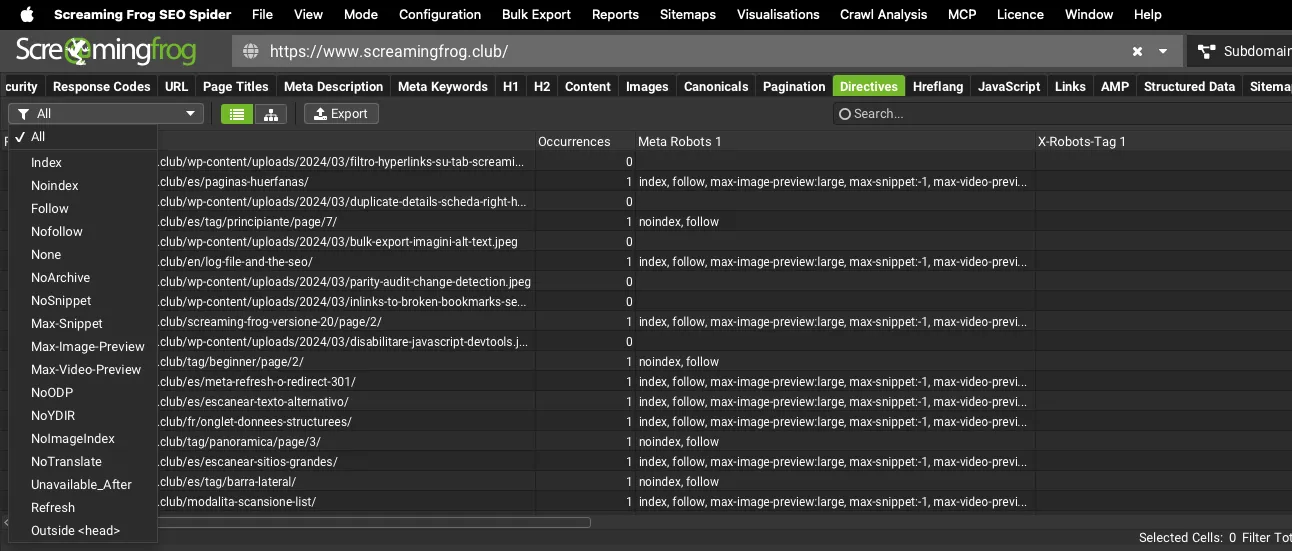
Filters
The available filters are:
-
Index: pages with the “index” attribute; it isn’t needed, because search engines index URLs even without this directive.
-
Noindex: this attribute tells search engines not to index the page. It doesn’t stop the crawler crawling it! It can be set globally or for a specific search engine.
-
Follow: the “follow” directive tells the crawler to follow all the links on the page. If it’s absent, search engines follow links by default.
-
Nofollow: a ‘hint’ telling search engines not to follow any link on the page for crawling. It’s commonly used on staging sites together with “noindex” to keep search engines out before launch.
To crawl pages with this directive, enable ‘Follow Internal Nofollow’ in 1Configuration›2Spider›3Crawl.
Remember: with this directive, the page’s links don’t pass PageRank. -
None: the “none” meta tag doesn’t mean there are no directives; on the contrary, it’s very restrictive and combines “noindex” and “nofollow”.
-
NoArchive: this robots tag tells Google not to show a cached copy of the page in search results. Since 2024 Google has removed the cached copy from results and the “cache:” operator, so this directive now has little effect.
-
NoSnippet: this meta robots stops the search engine (currently only Google) from showing a snippet such as the meta description in search results.
-
Max-Snippet: limits the length of this page’s text snippet in Google to [number] characters. Special values include 0 for no snippet, or -1 to allow any snippet length.
-
Max-Image-Preview: sets the maximum size of an image preview for the page in Google. The values can be:
- “none”: no image preview is shown;
- “standard”: a default image preview may be shown;
- “large”: a larger image preview, up to the width of the viewport, may be shown.
-
Max-Video-Preview: tells Google to use at most [number] seconds as a video snippet for videos on the page in search results. You can also use 0 to allow only a static image, or -1 to allow any preview length.
-
NoODP: an obsolete meta tag that told Google not to use the Open Directory Project (DMOZ) for its snippets. It can safely be removed.
-
NoYDIR: an old meta tag that told search engines not to use the Yahoo Directory for snippets. It can be removed.
-
NoImageIndex: this directive tells Google not to index the images on an HTML page. If images on a URL with “noimageindex” are also linked from other pages, they may still get indexed. To prevent this, set an X-Robots-Tag in the image file’s HTTP header.
-
NoTranslate: tells Google not to offer a translation of the page in search results. Without it, the search engine may show a link next to the SERP result to view a translated version of the page.
-
Unavailable_After: lets you specify the exact date and time after which Google should stop showing the page in search results. Very useful for pages about events, trade fairs, time-limited promotions and so on.
-
Refresh: redirects the user to a new URL after a set amount of time.
-
Outside <head>: pages with a meta robots outside the head, which search engines may ignore.
Questions about DIRECTIVES TAB?
These guides come from real projects. If something in your crawl doesn’t add up, or you want to apply this process to your site, get in touch.
 Author.Raffaele Visintin.Search & Strategic Marketing Advisor