

EXTERNAL AND SECURITY TABS.
Screaming Frog’s External and Security tabs for analysing elements outside the crawled subdomain and security.
What you’ll find in SEO Spider’s External and Security tabs: columns and filters for external links, HTTPS, mixed content, security headers and Bad Content Type.
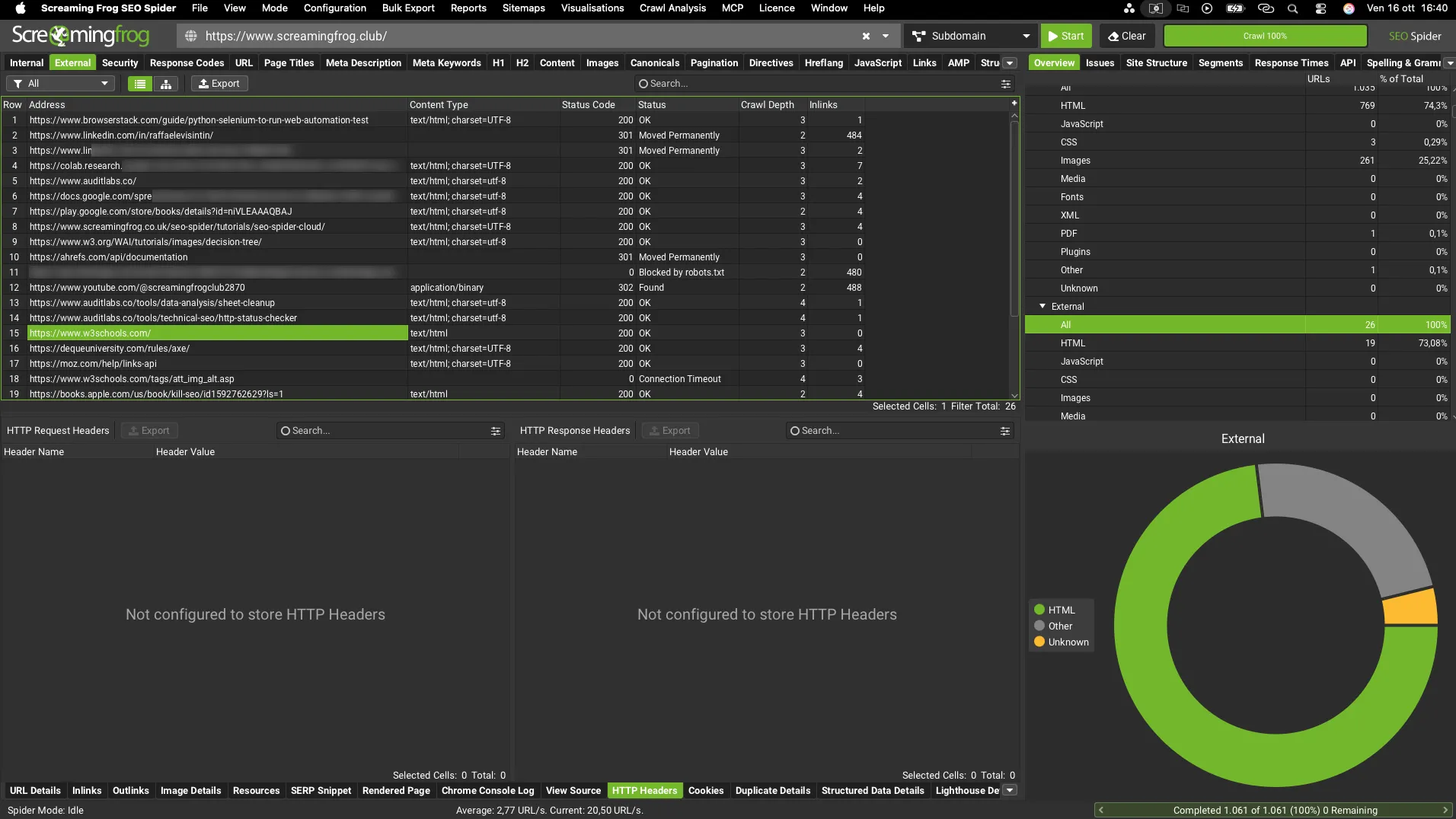
External tab overview
The “External” tab includes all the data on external URLs. URLs on subdomains other than the crawl’s start page are classified as “external”.
The tab includes the following columns:
- Address: the external URL.
- Content Type: the content type found at the URL.
- Status Code: the HTTP response code (200, 3xx, 4xx, 5xx).
- Status: the HTTP header response (“OK” for 200 responses, “Internal Server Error” for server problems, “Forbidden” for a 403 status, etc.).
- Crawl Depth: the number of clicks needed to reach a URL from the homepage or the crawl’s start page.
- Inlinks: the number of links found during the crawl pointing to the external URL.
Select a URL in the top window to see the link details (e.g. the link source in the Inlinks tab > From) in SEO Spider’s bottom window.
The available filters are the same as in the Internal tab.
Security tab
The “Security” tab shows the security data of the internal URLs in a crawl and includes:
- Address: the crawled URL.
- Content: the content type of the URL.
- Status Code: the HTTP response code.
- Status: the HTTP header response.
- Indexability: whether the URL is indexable or non-indexable.
- Indexability Status: the reason a URL is non-indexable, for example canonicalised to another URL or with a “noindex” tag.
- Canonical Link Element 1/2 etc: every instance of canonical data found for the URL.
- Meta Robots 1/2 etc: every instance of meta robots found on the URL.
- X-Robots-Tag 1/2 etc – X-Robots-Tag data.
The security tab has several filters that give you a very detailed view of any issues:
-
HTTP URLs: isolates every URL using the HTTP protocol, including those where insecure resources are loaded. HTTPS is essential for security and for safe browsing. Chrome and other browsers show messages such as “Not secure” next to the address to discourage users from visiting HTTP pages.
To check which URLs have mixed content, look at the ‘Inlinks’ tab in SEO Spider’s bottom window. You can also export these results from 1Bulk Export›2Security›3HTTP URLs Inlinks. -
HTTPS URLs: every URL using the secure HTTPS protocol.
-
Mixed Content: every HTML page served over HTTPS that loads resources such as images, JavaScript or CSS over HTTP, which aren’t considered secure. Mixed content weakens HTTPS and makes pages more vulnerable.
You can see the HTTP resources for each URL in the ‘Outlinks’ tab and export them with their source pages from 1Bulk Export›2Security›3Mixed Content. -
Form URL Insecure: HTML pages with a form whose action attribute points to an insecure (HTTP) URL. All form URLs on a website should be encrypted, so they must be HTTPS. You can see the HTTP form URL by clicking the source URL in the top window and then the ‘URL Details’ tab in the bottom window. They can be exported with the pages they’re on from 1Bulk Export›2Security›3Form URL Insecure.
-
Form on HTTP URL: HTTP pages with a form, which browsers may block. Any data entered in the form, including usernames and passwords, could be intercepted and harm the user. You can see the form by clicking the URL in the top window and then the ‘URL Details’ tab in the bottom window.
-
Unsafe Cross-Origin Links: every page linking to external sites with target="_blank" (to open in a new tab) without also using rel="noopener" (or rel="noreferrer"). Using target="_blank" alone exposes pages to security and performance problems. Ideally rel="noopener" should be used on every link with target="_blank" to prevent “reverse tabnabbing”.
FURTHER READING:
Reverse tabnabbing: the page opened with target="_blank" can take control of the originating page by using “window.opener.location.assign()” to replace the background tab with malicious content. With rel="noopener", an attacker can’t access the window object through window.opener.
The “noopener” attribute has no SEO effect, but it protects security and performance by stopping the destination page’s processes running on the same thread as the originating page. “noreferrer” is more debatable: it strips the click’s referrer data at browser level, so the owner of the linked site can’t see where the visit came from. In Google Analytics, “noreferrer” turns the traffic source from “referral” into “direct”, skewing traffic stats. Since linking out is usually intentional, we don’t consider this attribute essential.
External links with target="_blank" can be seen in the ‘Outlinks’ tab, in the ‘Target’ column. They can be exported with their source pages from 1Bulk Export›2Security›3Unsafe Cross-Origin Links.
- Protocol-Relative Resource Links: every page loading resources such as images, JavaScript and CSS through protocol-relative links (for example “//screamingfrog.co.uk”).
This is very common: developers use it to save time and let the browser pick the protocol. However, it can expose some sites to being compromised and cause performance issues.
Protocol-relative resource links can be seen for each URL in the ‘Outlinks’ tab, where the ‘Path Type’ column shows ‘Protocol Relative’. They can be exported with their source pages from 1Bulk Export›2Security›3Protocol-Relative Resource Links.
- Missing HSTS Header: every URL missing the HSTS response header. The HTTP Strict-Transport-Security (HSTS) response tells browsers the site should only be accessed over HTTPS, not HTTP. If a site accepts an HTTP connection before redirecting to HTTPS, visitors initially still communicate over HTTP. The HSTS header tells the browser never to load over HTTP and to convert every request to HTTPS automatically. SEO Spider itself follows HSTS instructions, but reports any link to an HTTP URL with a 307 status code and an ‘HSTS Policy’ status.
- Missing Content-Security-Policy Header: any URL missing the Content-Security-Policy response header. This header lets a website control which resources are loaded on a page, which helps protect against cross-site scripting (XSS) attacks that exploit the browser’s trust in content received from the server. SEO Spider only checks the header exists; it doesn’t check whether the directives inside are well set for the site. That has to be done manually.
- Bad Content Type: any URL whose actual content type doesn’t match the content type set in the header. It also flags any invalid MIME type used.
- Missing X-Content-Type-Options Header: the header that stops the browser guessing the content type (MIME sniffing) is missing.
- Missing X-Frame-Options Header: the header that protects the page from clickjacking, i.e. being loaded in another site’s iframe, is missing.
- Missing Secure Referrer-Policy Header: there’s no Referrer-Policy limiting the information sent to other sites.
Video tutorial
Questions about EXTERNAL AND SECURITY TABS?
These guides come from real projects. If something in your crawl doesn’t add up, or you want to apply this process to your site, get in touch.
 Author.Raffaele Visintin.Search & Strategic Marketing Advisor