

Lazy Loading and XPath.
Analysing lazy loading with Screaming Frog’s advanced XPath feature.
How to check with SEO Spider that lazy-loaded images are visible to Google, using Custom Extraction with the XPath expressions shared by Jonathan Moore.
Lazy loading and SEO
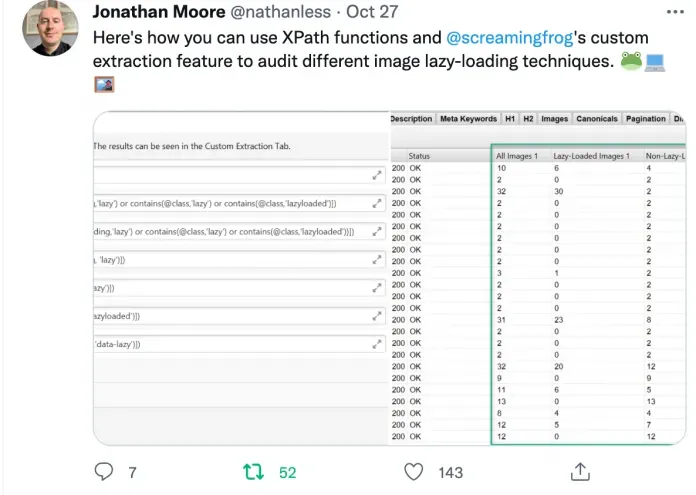
This guide starts from a tweet by Jonathan Moore, who shared with the SEO community how to crawl lazy-loaded images using Screaming Frog’s XPath support.
Lazy loading images
Let’s start by understanding what lazy loading is, to fully appreciate Jonathan’s work.
You know when you browse a web page and new images keep appearing as you scroll down?
That’s “lazy loading”: on-demand loading that only happens when the user’s navigation requests it. It’s used for all the elements that would hurt page performance if they were loaded up front with everything else on the main thread (and would also affect Core Web Vitals).
Since loading speed is one of the pillars of search engine ranking, this strategy, which gives users a better browsing experience, deserves serious consideration.
Lazy loading and Google
So, given all this, the strategy is recommended for every website to improve the user experience. But what does Google think of it?
Google supports it, but warns you to be very careful with the implementation so you don’t stop its bot crawling lazy-loaded resources, otherwise it may not index them.
In short, the search engine approves of the technique but asks you to make sure it can see every resource it needs to evaluate for indexing. To understand exactly what Google asks, read its dedicated guide: Make sure Google can see lazy-loaded content.
There are essentially 3 things every developer must consider:
- Load content when it’s visible in the viewport: to let Googlebot crawl the whole page, make sure lazy loading loads all content whenever it’s visible in the viewport, using the IntersectionObserver API and a polyfill.
- For “infinite scroll”, support paginated loading.
- Test that lazy loading works properly: you can use a script such as Puppeteer, a Node.js library, locally to check that the screenshots it generates show all the page content.
Source: Tagliaerbe, Lazy loading (in Italian)
Auditing lazy loading with Screaming Frog
Setting up Custom Extraction
Now that we have the general principles of image lazy loading, let’s use Screaming Frog’s Custom Extraction feature (1Configuration›2Custom›3Custom Extraction) to audit all the images on a page and those loaded on demand.
Below are the XPath expressions shared by Jonathan Moore for Custom Extraction.
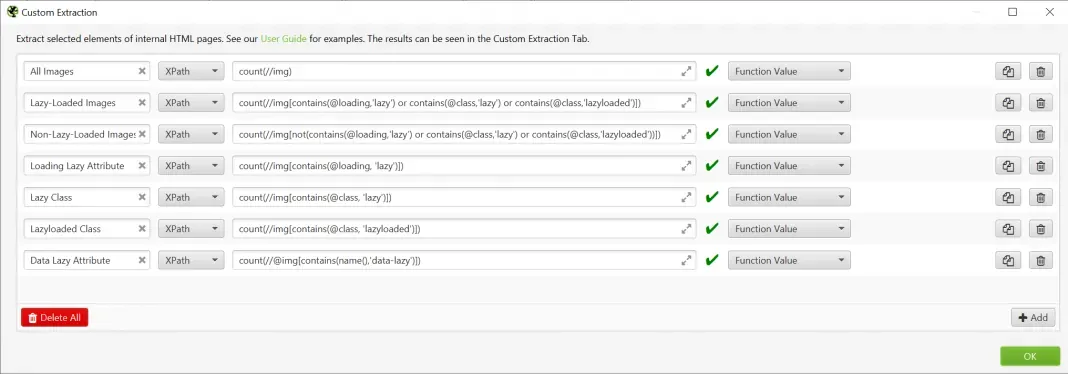
Here they are as text, for easy copying:
1) All images
-----------
count(//img)

-----------
2) All lazy-loaded images
-----------
count(//img[contains(@loading,'lazy') or contains(@class,'lazy') or contains(@class,'lazyloaded')])

-----------
3) Images not lazy-loaded
-----------
count(//img[not(contains(@loading,'lazy') or contains(@class,'lazy') or contains(@class,'lazyloaded'))])

-----------
4) Loading lazy attribute
-----------
count(//*[contains(@loading, 'lazy')])

-----------
5) Lazy class
-----------
count(//*[contains(@class, 'lazy')])

-----------
6) Lazyloaded class
-----------
count(//*[contains(@class, 'lazyloaded')])

-----------
7) Data-lazy attribute
-----------
count(//@*[contains(name(),'data-lazy')])
Source: Jonathan Moore’s configuration on GitHub.
Reading the results
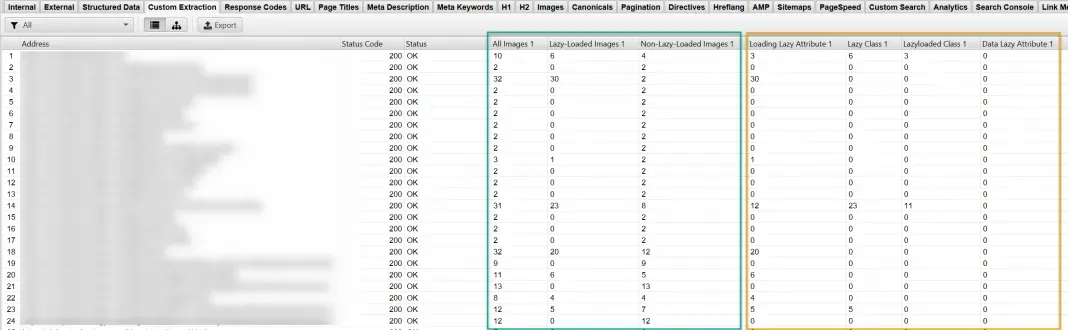
With these settings you’ll get the following results directly in Screaming Frog’s 1Custom Extraction tab, split into columns and ready for your optimisation analysis.
Questions about Lazy Loading and XPath?
These guides come from real projects. If something in your crawl doesn’t add up, or you want to apply this process to your site, get in touch.
 Author.Raffaele Visintin.Search & Strategic Marketing Advisor