

PAGESPEED DETAILS.
Analysing PageSpeed issues through the bottom tabs.
What the PageSpeed Details bottom tab shows: the optimisation opportunities for the selected URL, with the resources involved and the estimated savings.
PageSpeed
Since Web Vitals were introduced, website performance has become even more important and needs optimising to secure good organic rankings. The “PageSpeed” tab gives a very complete overview of any issues that could hold the project back. To populate it, connect to the PageSpeed Insights API via 1Configuration›2API Access›3PageSpeed Insights, enter a free PageSpeed API key, connect and run a crawl.
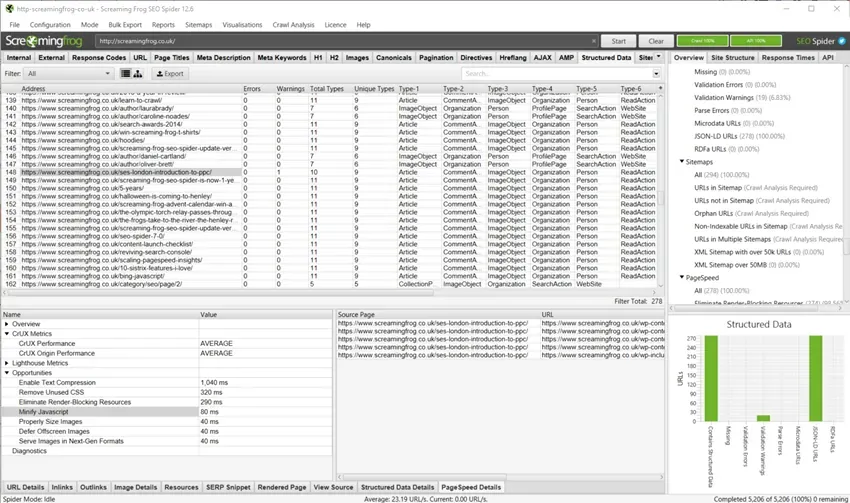
The left-hand pane gives you specific information on both the extracted metrics and the opportunities available for the highlighted URL. Click an opportunity to see more details in the right-hand pane.
- Source Page: the URL selected in the top window.
- URL: the linked resource that has opportunities available.
- Size (Bytes): the current size of the listed resource.
- Potential Savings: the potential weight saving (bytes) if the suggested opportunity were implemented.
Questions about PAGESPEED DETAILS?
These guides come from real projects. If something in your crawl doesn’t add up, or you want to apply this process to your site, get in touch.
 Author.Raffaele Visintin.Search & Strategic Marketing Advisor