

URL TAB.
The tab for analysing and managing the most important and frequent URL issues.
What you’ll find in SEO Spider’s URL tab and the filters for problematic URLs: non-ASCII characters, underscores, uppercase, duplicates, parameters and length.
The URL tab
This tab shows the details of the URLs discovered during the crawl and their issues.
-
Address: the crawled URL.
-
Content Type: the content type of the URL.
-
Status Code: the HTTP response code.
-
Status: the HTTP header response.
-
Indexability: whether the URL is indexable or non-indexable.
-
Indexability Status: the reason a URL is non-indexable.
-
Hash: a hash value for each page, used to identify duplicate content.
-
Length: the length of the URL in characters.
-
Canonical 1: the canonical link element data.
-
URL Encoded Address: the URL SEO Spider actually requested. All non-ASCII characters are percent-encoded according to RFC 3986.
Filters
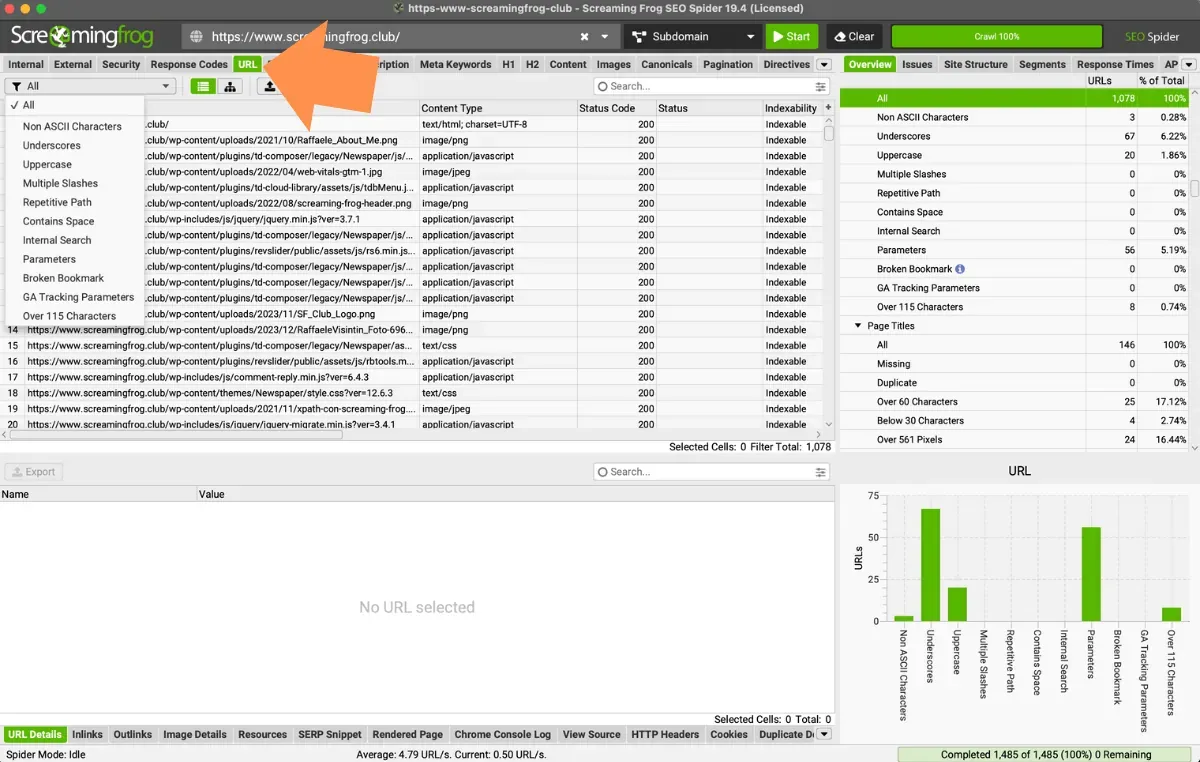
To analyse the collected data you can use these filters:
- Non ASCII Characters: URLs containing characters outside the ASCII character set. URLs should be converted to a valid ASCII format by encoding them with safe characters (% followed by two hexadecimal digits). Today browsers and search engines are largely able to transform and adjust URLs automatically.
- Underscores: URLs containing underscores (“_”). Search engines don’t always interpret these characters as word separators, which can hurt indexing. We recommend using hyphens “-” between words to mark the spaces between the queries you want to rank for.
- Uppercase: URLs containing uppercase characters. URLs are case-sensitive, so as a best practice they should generally be lowercase to avoid any potential confusion and duplication.
- Multiple Slashes: the URL has multiple slashes in its path (example: screamingfrog.co.uk/seo**//**).
- Repetitive Path: the URL has a repeated path in the string (example: screamingfrog.co.uk**/seo/seo/, or screamingfrog.co.uk/services/seo/technical/seo/**). In some cases this can be legitimate and logical for the site structure, but it may be redundant and seen as “overstuffing” by search engines. This filter can also help you spot incorrect relative links that could generate infinite URLs.
- Contains a Space: URLs containing a space. These are considered unsafe and can break the link when shared. Hyphens should be used as separators instead of spaces.
- Internal Search: the URL may be part of the site’s internal search. Google and other search engines recommend blocking internal search pages from crawling, and links to them should carry a “nofollow” attribute.
- Parameters: the URL includes parameters such as ‘?’ or ‘&’. This isn’t a problem for Google, but it’s best to limit the number of parameters in a URL, as they can be confusing for users and may be seen as low added value.
- Broken Bookmark: URLs with a link to an anchor (#) that doesn’t exist on the destination page. Requires JavaScript rendering and Crawl Analysis.
- GA Tracking Parameters: URLs with tracking parameters such as utm_source in internal links, which create duplicates and skew Analytics data.
- Over 115 Characters: URLs longer than 115 characters. It isn’t an error, but short, readable URLs are easier to share.
Questions about URL TAB?
These guides come from real projects. If something in your crawl doesn’t add up, or you want to apply this process to your site, get in touch.
 Author.Raffaele Visintin.Search & Strategic Marketing Advisor
