

Canonical.
Analysing the canonical attribute and best practices to avoid duplicate content.
How to check the canonical tag, essential on e-commerce sites where the same product has several paths. Read the Canonicals tab filters and spot the most common mistakes, such as canonicals pointing to non-indexable pages.
Canonical analysis tutorial
The canonical element (rel="canonical") is an attribute used to tell bots which version of a piece of content is preferred when it appears on several pages (with different slugs), to avoid duplicate content.
This tag matters on every website but becomes essential on e-commerce sites. Let’s see why.
Example:
Imagine an e-commerce store selling sportswear from the top brands, where the product page for a “running shoe” can be reached both from the brand page and from the “running” category.
Let’s look at two scenarios:
the user clicks the running shoe from the brand page.
Product page reached from the Asics brand page: domain.com/asics/gel-venture-8
the user clicks the product in the “Running” category.
Product page reached from the Running category page:
domain.com/running/gelventure-8.
Here the product page carries the category in its slug, so the site serves the same content at two different paths.
The canonical tag helps you define which of the two the crawler should consider for ranking.
Setting up the canonical crawl
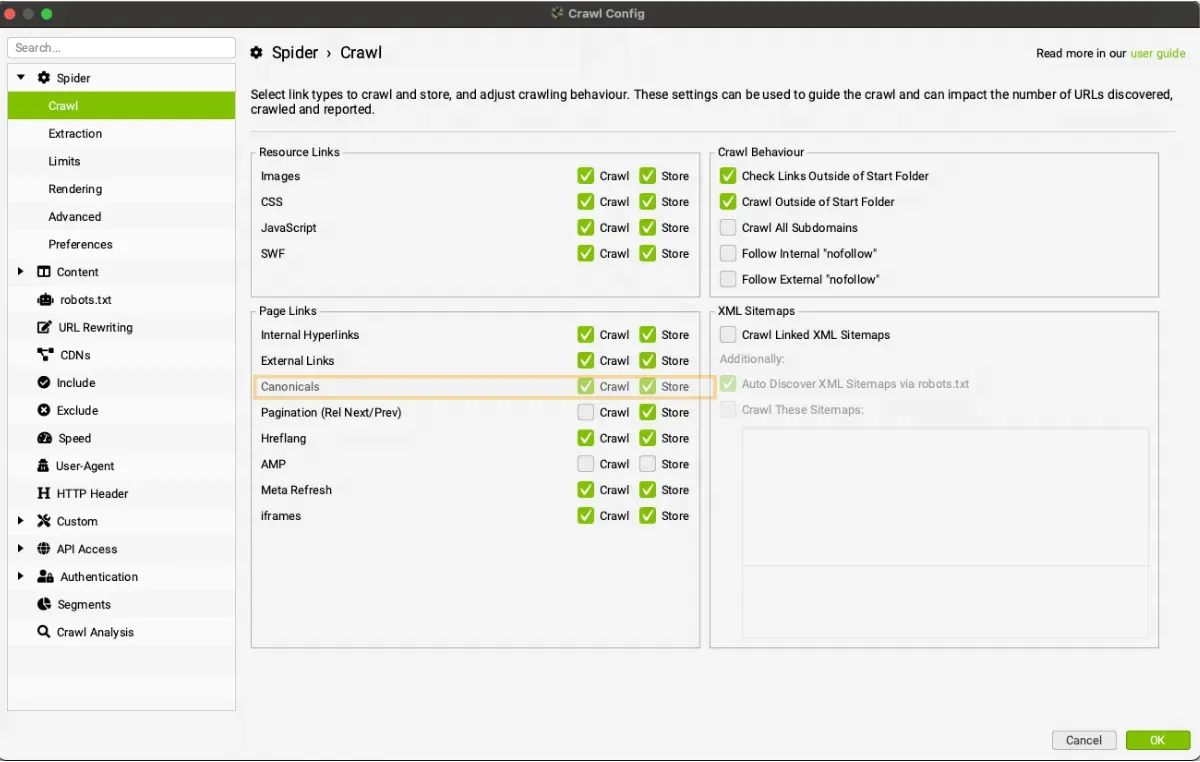
Before the crawl, check that Canonicals is enabled in Crawl and Store in 1Configuration›2Spider›3Crawl.
Canonicals tab filters
The data is in the 1Canonicals tab of the top window and can be filtered by the following:
- Contains Canonicals: the page has a canonical URL set (via link element, HTTP header or both). It may be a self-referencing canonical, where the page URL is the same as the canonical URL, or the page may be “canonicalised”, where the canonical URL is different from the page URL.
- Self Referencing: the canonical link points to the page’s own URL, marking it as the primary version of that content (see the e-commerce running shoe example above); any other URL path with the same content should therefore be “Canonicalised”.
- Canonicalised: the page has a canonical URL different from itself. The URL is “canonicalised” to another location, which tells search engines not to index the page and consolidates ranking on the canonical version.
- Missing: there’s no canonical URL, either as a link element or via HTTP header. If a page doesn’t specify a canonical URL, Google picks what it thinks is the best version or URL. This can make rankings unpredictable, so as a rule every URL should specify a canonical version (self-referencing).
- Multiple: several canonicals are set for a single URL (multiple link elements, HTTP headers, or both). This can lead to unpredictability, as each page should have a single canonical URL set by a single implementation (link element or HTTP header).
- Multiple Conflicting: the page has several canonicals pointing to different URLs, for example one in the HTML and one in the HTTP header. Google may ignore them all.
- Non-Indexable Canonical: the canonical URL points to a non-indexable page. This includes canonicals blocked by robots.txt, with no response, redirects (3XX), client errors (4XX), server errors (5XX) or ‘noindex’.
- Canonical Is Relative: the canonical URL is relative rather than absolute. It works, but a mistake in the path can point to the wrong page: absolute URLs are safer.
- Unlinked: the canonical URL receives no internal links (filter populated by Crawl Analysis).
- Outside <head>: the canonical link is outside the head, for example in the body, and search engines ignore it.
Canonical versions of URLs should always be indexable pages returning ‘200’. Canonicals pointing to non-indexable pages should therefore be corrected to the indexable versions.
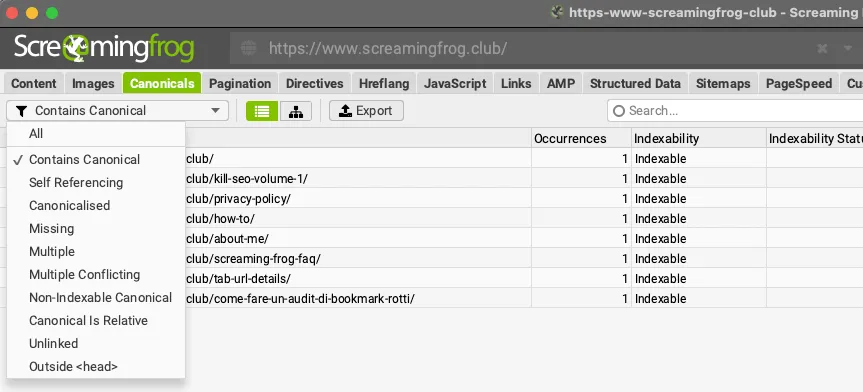
The ‘Occurrences’ column counts the number of rel="canonical" elements found for each URL.
Right-hand sidebar
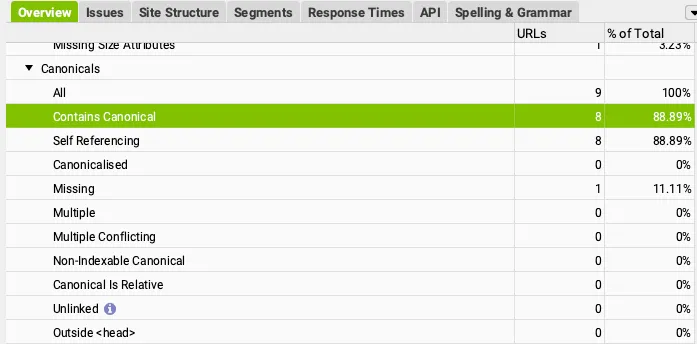
In the right-hand sidebar you can check in real time every URL with canonical issues. In the image below you can see 8 URLs with a self-referencing canonical and 1 URL where the canonical is missing.
Related tabs: Canonicals | Right-hand sidebar | Reports
Video tutorials
Canonical tag analysis
Common canonical tag mistakes
Questions about Canonical?
These guides come from real projects. If something in your crawl doesn’t add up, or you want to apply this process to your site, get in touch.
 Author.Raffaele Visintin.Search & Strategic Marketing Advisor
