

How to Optimise Anchor Text.
Learn how to analyse, define and optimise anchor text for the spider.
The types of anchor text (brand, exact match, long tail, naked links, images) and how to use them without over-optimising. See how to analyse them with SEO Spider’s Inlinks tab, Link Position and Link Path, and with the list of non-descriptive anchor text.
What anchor text is
In the 2026 SEO landscape, where artificial intelligence, advanced language models and sophisticated search engines set the rules of ranking, the importance of anchor text still shouldn’t be underestimated. Far more than simple clickable text, anchor text has become a crucial vehicle for conveying semantically rich, clear intent to search engine spiders.
Despite Google’s progress in recognising context and entities with its ever more advanced algorithms, the strategic use of anchors (brand, query, long tail, images with alt text) remains fundamental for guiding internal navigation, supporting crawlability and optimising the “search intent” associated with each link.
This updated guide keeps its practical value, offering:
- a clear, structured overview of the different categories of anchor text: brand, brand + query, exact match, related queries, long tail, naked links, generic anchors and image anchors;
- precise recommendations for a responsible SEO approach: avoid over-stuffing, favour relevant, concise and semantically consistent anchors, without losing sight of user experience;
- a hands-on focus on using Screaming Frog SEO Spider to find, analyse and optimise anchor text with tools such as the “Inlinks” tab, data exports, customising the generic or “non-descriptive anchor text” to flag, and checking link position and path to work effectively with developers;
- insights into how Google interprets empty links, links rendered with JS or crowded links, and how to handle anchor text in backlinks too – with strategies such as the “sponsored” tag or disavowing irrelevant links.
Today every on-page element, anchor text included, needs to contribute to clear semantics, a smooth user experience and effective distribution of “link equity”. This guide is therefore a valuable ally for anyone who wants to combine technical precision with an AI-proof SEO strategy.
Anchor text is the clickable text inside a hyperlink. It’s usually styled differently so visitors understand it’s a link.
<a href="domain.com">link text (anchor text)</a>This attribute essentially does two things:
- it helps the visitor’s experience on the page;
- it lets Googlebot and other search engines understand the topic of the linked page.
In SEO it’s often underestimated and neglected, but it plays a very significant role in correct spider navigation and in immediately identifying the “Search Intent” of the linked page.
Let’s look at two examples:
Discover the best smartphones of 2026 <a href="domain.com/smartphone-reviews">here</a>!In this scenario the anchor text is “here” and, as you can see, it doesn’t describe the content of the linked page at all.
Discover the <a href="domain.com/smartphone-reviews">best smartphones of 2026</a>!In this case the anchor “best smartphones of 2026” represents the content of the linked page perfectly.
So, as you can imagine, the second option is the better choice, even though Google also considers the text around the link and can work out the link’s intent.
Types of anchor text
There are several types of anchor text: here are the most commonly used.
Brand
Brand anchor text is the clickable text in a hyperlink that contains the name or brand of the company or product. This type of anchor text is used to promote brand identity and increase brand recognition online.
Brand + query
We speak of “brand + keyword” anchor text when the company name or brand is combined with a keyword related to its sector or products/services. This type of anchor text is used to improve search rankings by associating the brand with relevant keywords to increase online visibility.
Discover the <a href="screamingfrog.com/seo-overview">Screaming Frog Club SEO guides</a> and become a pro at SEO audits!Exact match
This matches exactly the keyword you want to rank for in search engines. It can be used to increase a page’s relevance for a given keyword, but it’s important to use it carefully to avoid search engine penalties (over-stuffing).
Study <a href="screamingfrog.com/seo">SEO</a> with us and become a pro at Search Engine Optimisation!Related queries
The anchor text contains words or phrases closely associated with the main keyword or the “Search Intent” of the linked page. These related queries provide extra context and improve the link’s relevance for certain topics or search keywords.
Learn how to improve your SEO skills through <a href="screamingfrog.com/seo-audit">internal link analysis</a> and become a pro at SEO audits!Here the keywords “internal link analysis” reinforce a related element of carrying out SEO audits.
Long-tail queries
Long-tail anchor text is a longer, more specific phrase or string of words, often used as a detailed search query. These queries broaden the semantics of the “main keyword”, give it context and let you rank for less competitive queries.
Over time, investing in this type of anchor text can be very rewarding for the authority of your pages in Google’s eyes.
Naked links
Naked links are hyperlinks that use the full URL as clickable text, without any keyword or extra description.
Learn how to improve your SEO skills through <a href="screamingfrog.com">www.screamingfrog.club</a> and become a pro at SEO audits!Generic anchor text
Generic anchor text is clickable text in a hyperlink that doesn’t describe the destination page specifically. It usually consists of words like “click here”, “read more”, “web page”, “here” and so on.
Learn how to improve your SEO skills through our site <a href="screamingfrog.com">CLICK HERE</a>!Anchor text on images
So far we’ve talked about text anchors, but links are very often placed on images, banners and so on. In this case the same role is played by the “alt text”. Remember that Google has for years fought against websites that don’t ensure proper accessibility, so alt text (read by screen readers for visually impaired and blind users) is essential for ranking and for avoiding penalties.
Anchor text and SEO
Rules for effective anchor text
As you’ve seen, anchor text plays a primary role in on-page SEO and should be optimised, but it should follow some rules so as not to trigger the opposite reaction from search engines and lead to penalties:
- It mustn’t be a list of keywords, so pay close attention to exact-match anchor text;
- it must be relevant and semantically related to the linked page and, if possible, unique;
- it must be concise and descriptive.
Always remember that context defines “semantics”, so your link must be relevant and draw strength from the content before and/or after it.
Analysing anchor text with Screaming Frog
Now that we understand this attribute, let’s see how our SEO Spider Screaming Frog can help us identify and analyse it.
Link analysis
To better understand internal links and, as a result, anchor text, check the Inlinks tab at the bottom of SEO Spider: once the crawl is complete, select the URL to analyse in the top window.
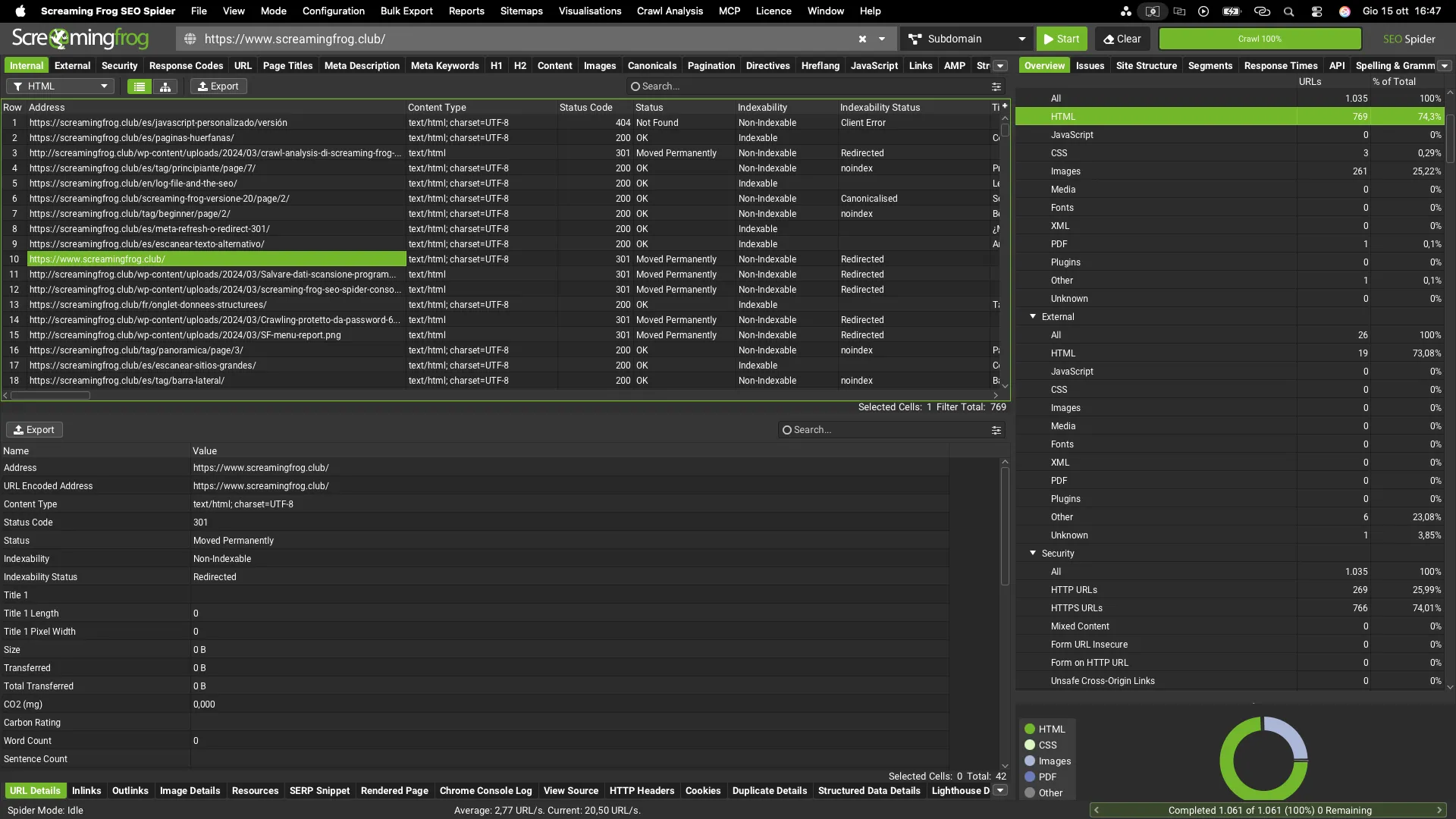
The first column (Type) shows the link type (JavaScript, image, hyperlink and so on), and the Anchor Text column shows the anchor used, if any.
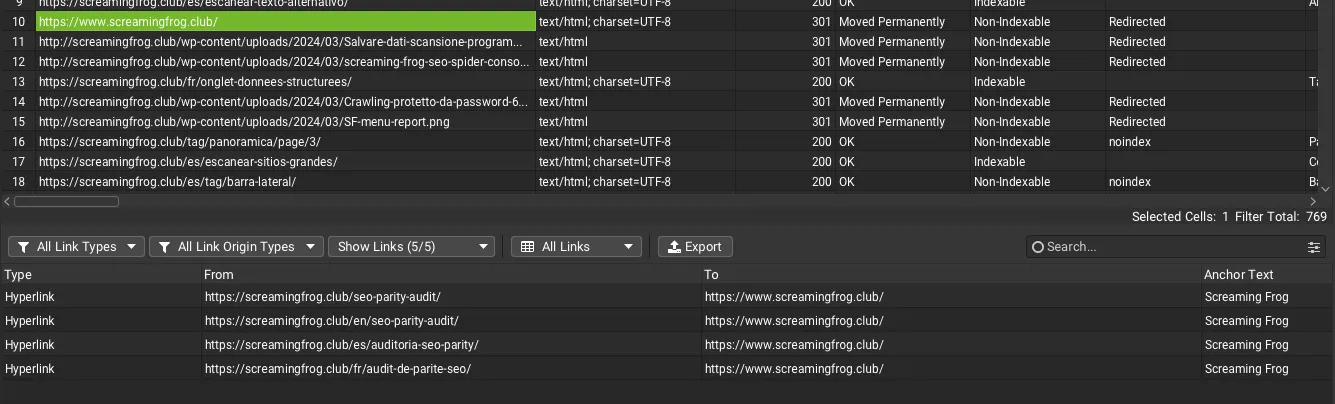
If you find non-descriptive links or, worse, links with no anchor at all, you can export them and optimise them later. The Link Position and Link Path columns also help you find where the link is and give more detailed instructions to the developer if you don’t handle it yourself.

Customising non-descriptive anchor text
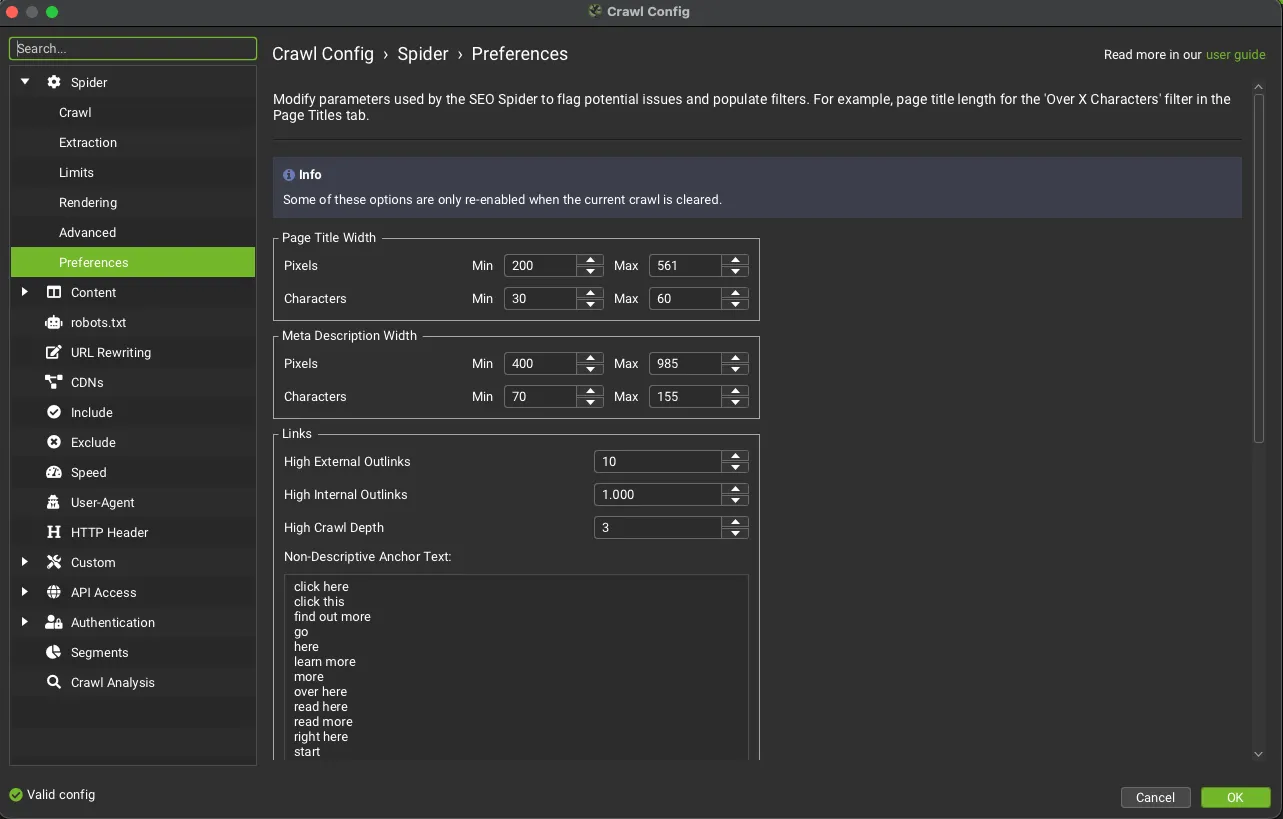
With SEO Spider you can define all the generic expressions that may have been used in your site’s anchor text, for granular control. Go to 1Configuration›2Spider›3Preferences and add the expressions in the Non-Descriptive Anchor Text field: the default list is in English, so if your site is in another language add its equivalents of “click here” and “read more” too. From the next crawl you’ll find the links with these anchors in the filters of the 1Links tab.
How Google handles anchor text
Let’s look at some special cases.
Links without anchor text
<a href="https://example.com"></a>The “textbook” answer is that Google will follow the link but won’t fully understand the “search intent” of the linked page.
The answer from the field is that Google will use the title tag if the element is empty.
Anchor text added with JavaScript
In theory there’s no problem, but my advice is to check with Screaming Frog’s JavaScript rendering (1Configuration›2Spider›3Rendering) that the anchor is present in the rendered HTML.
Several links in the same sentence
If they’re in context there’s no problem, but they should be integrated semantically and NOT right next to each other. As with everything in SEO, don’t overdo it!
Backlink anchor text
Using anchor text internally is very simple: just use a mix of “exact match”, “brand” and so on, and keep a correct link map (every page should receive at least 1 link so it isn’t treated as an “Orphan Page”). But how do we handle backlinks?
If they’re natural you won’t have control over them, but you can handle irrelevant or spammy ones with “Disavow”. If they’re paid, Google recommends adding “sponsored” to avoid penalties. In practice, just manage them like internal links, with a mix of the different anchor types.
Questions about How to Optimise Anchor Text?
These guides come from real projects. If something in your crawl doesn’t add up, or you want to apply this process to your site, get in touch.
 Author.Raffaele Visintin.Search & Strategic Marketing Advisor