

Screaming Frog SEO Spider Update – Version 22.0.
Learn how to use Screaming Frog’s semantic analysis to find similar content and topical outliers and improve linking and redirects for SEO.
Guide contents 11 sections
●Brief01.Screaming Frog – version 2202.Semantic similarity analysis03.Semantic content with cluster visualisation04.Semantic search05.AI integration improvements06.Advanced column configurator07.Data export improvements08.Multiple sitemap analysis09.Google Sheets as a source10.Version 22 conclusionsWhat’s new in SEO Spider version 22 ("knee-deep"): semantic similarity analysis with embeddings, low-relevance content, semantic search, new AI integrations (including Anthropic) and new export options.
Screaming Frog – version 22
Screaming Frog SEO Spider version 22.0, called “knee-deep”, has just been released.
A real revolution for SEO Spider, which once again surprises us with new AI integrations and confirms its leadership among the most versatile and efficient SEO tools in the world.
Semantic similarity analysis
You can now analyse the semantic similarity of pages in a crawl to find duplicate, similar or potentially off-topic and less relevant content on a site.
Semantic similarity analysis of crawled pages
- This feature goes beyond the simple text comparison used to detect duplicate content: it uses embeddings generated by large language models (LLMs), which capture the meaning of words and the semantic relationships between them.
This way you can identify similar pages even when they use different wording but cover the same topics, creating redundant content, cannibalisation or inefficiencies in crawling and indexing.
If you’re not familiar with embeddings, I recommend reading Mike King’s article “Vector Embeddings is All You Need”. It inspired many SEOs to experiment and build innovative tools based on these technologies.
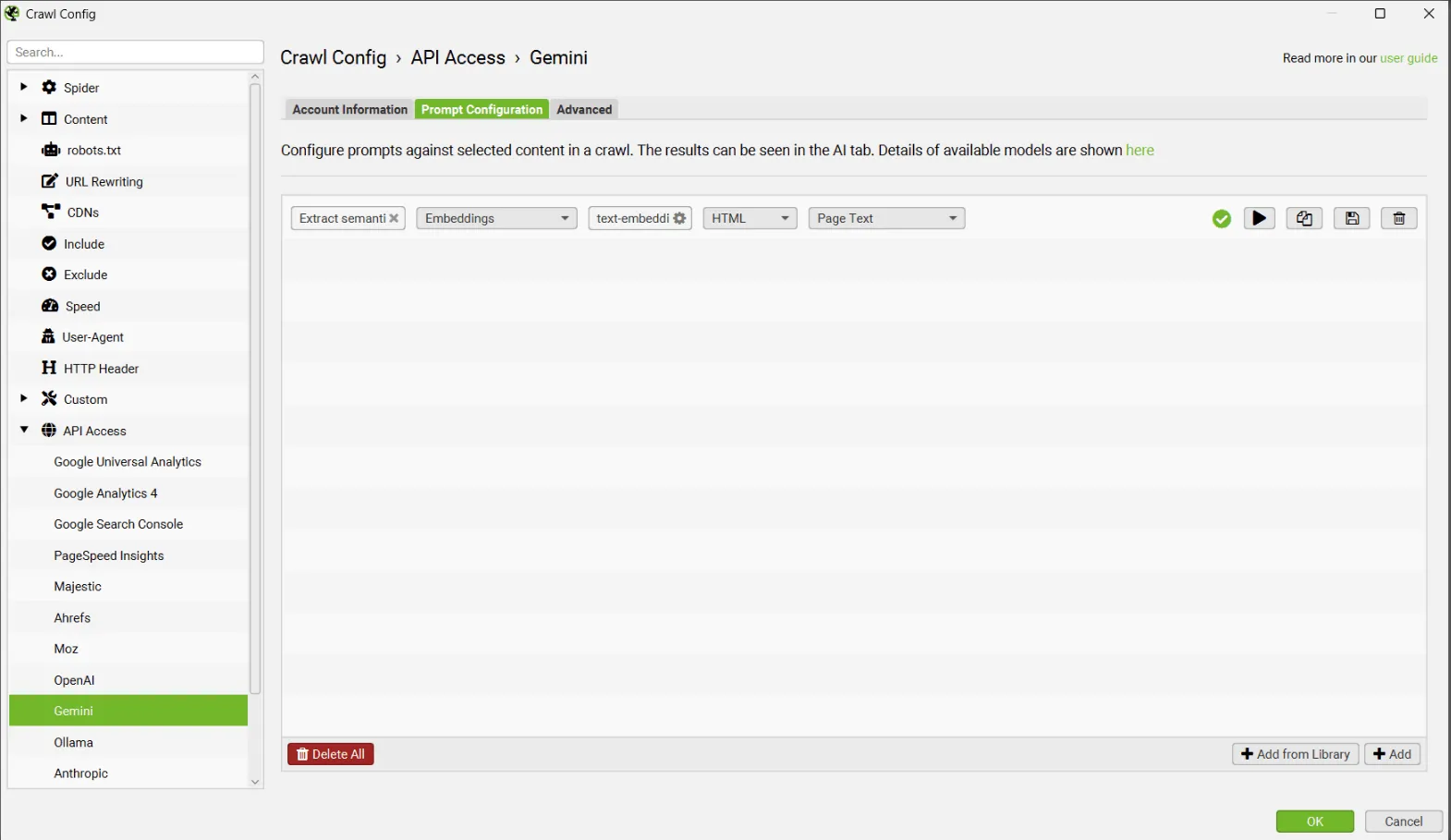
Thanks to the integration with the main AI providers (OpenAI, Gemini, Ollama), available in 1Configuration›2API Access, you can easily get vector embeddings for the crawled pages.
Semantic similarity analysis in crawling tools (such as Screaming Frog) is a strategic turning point for technical and content SEO, for several key reasons:
1. It goes beyond simple duplicate content detection
Traditionally, SEO tools relied on literal text matching to identify duplicate content. But this approach misses semantic nuances that may be fine for users yet could be treated as “duplicate” by search engines.
With LLM embeddings, you analyse the meaning of the content, detecting conceptual similarities even when the wording differs.
✅ Example: two pages about the same product with different copy can now be identified as overlapping, making “cannibalisation” analysis easier.
2. It helps prevent content cannibalisation
Many sites, especially large e-commerce stores or publishing portals, publish multiple pieces on the same topic over time. This leads to:
- Internal competition in search results (cannibalisation)
- Confusion for Google when choosing which page to index
- Wasted crawl budget
With this analysis you can:
- Identify thematically redundant pages
- Consolidate similar content into stronger assets (e.g. through redirects or merging)
- Improve the clarity of the information architecture
3. It supports SEO audits with high-level insight
Semantic analysis lets you:
- Map overlapping topics at scale
- Analyse the topical distribution of pages
- Identify clusters of similar content, even without tags or manual categorisation
This opens up new strategic opportunities, such as:
- Restructuring a blog or editorial section
- Finding content gaps (topic gaps)
- Optimising internal relationships with more precise topical linking
4. It brings AI into the SEO workflow in a practical way
Many SEOs talk about AI, but few tools have integrated it usefully. This feature:
- Uses real vector embeddings, not keyword matching
- Leverages advanced providers such as OpenAI or Gemini
- Automates semantic analysis at scale, something that would take hours or days manually
It’s an essential feature for anyone doing advanced content optimisation, especially on medium-to-large sites or sites with a long publishing history.
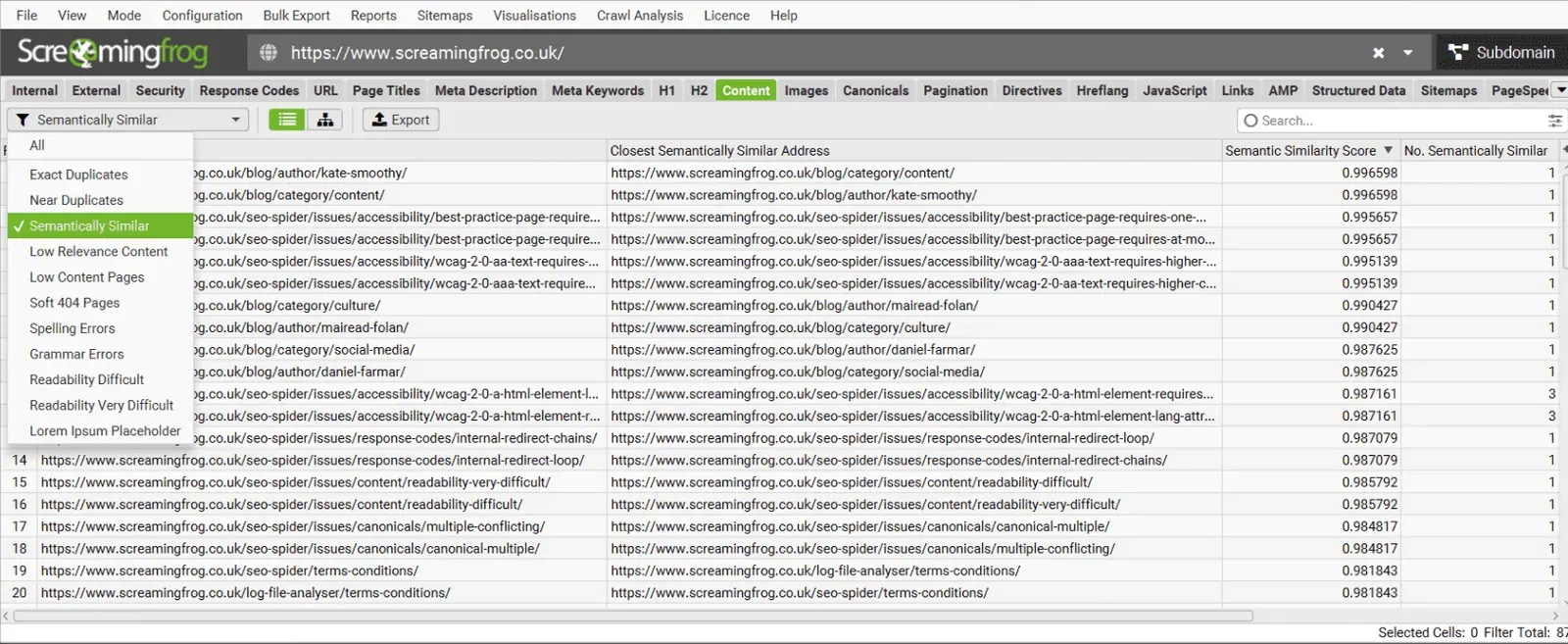
Let’s see how to set up Screaming Frog to use this new feature.
The first step is to use SEO Spider’s AI integration to vectorise the pages.
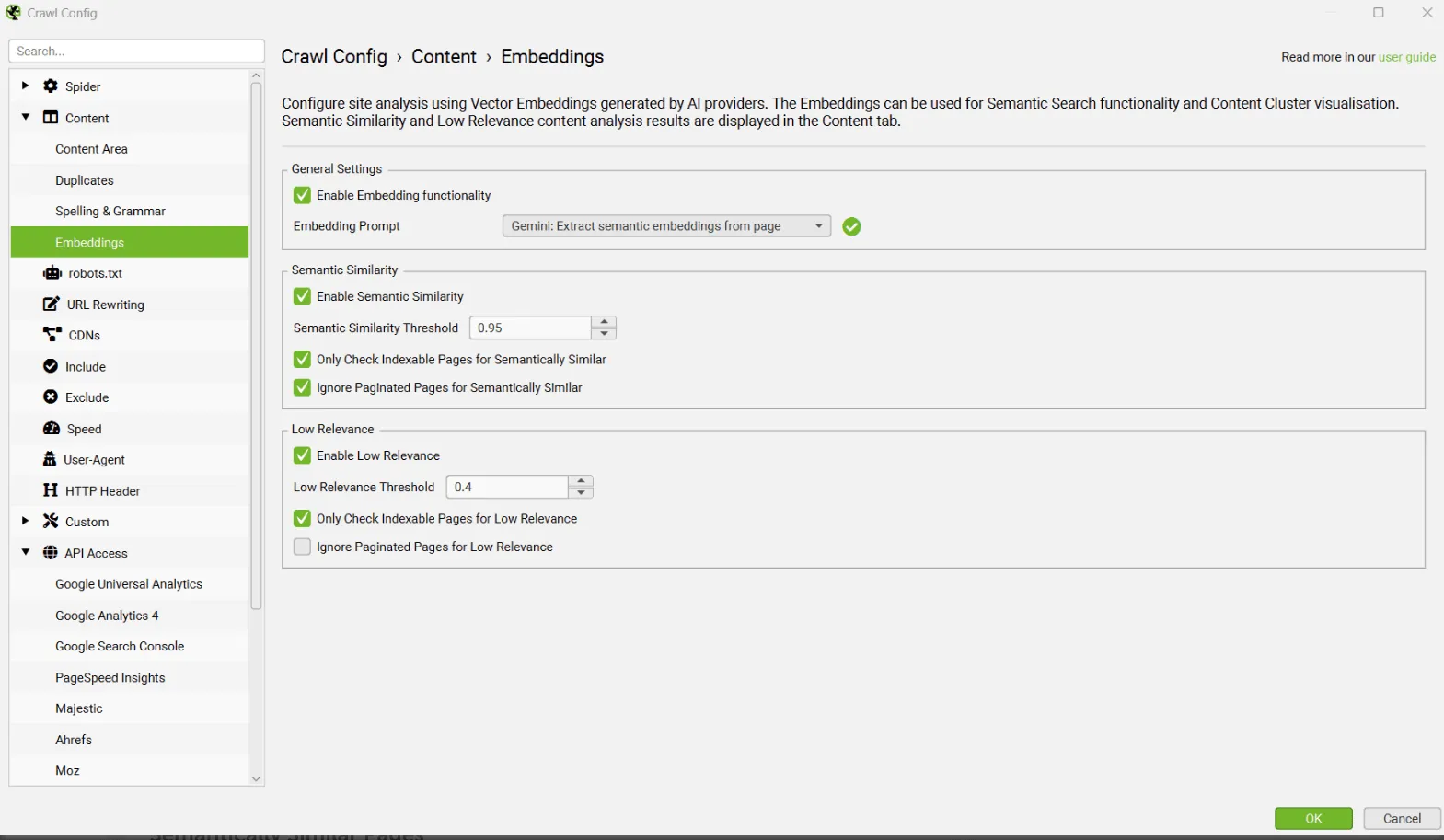
Now you can enable “Semantic Analysis” in SEO Spider from 1Configuration›2Content›3Embeddings for semantic content analysis, semantic search and visualisations.
Once the crawl is complete and Crawl Analysis has run, the “Semantically Similar” and “Low Relevance Content” filters are available in the Content tab.
Semantically similar pages
In the Content tab you can filter by “Semantically Similar”. The results show the closest semantically similar address for each URL, along with a semantic similarity score and the number of semantically similar URLs.
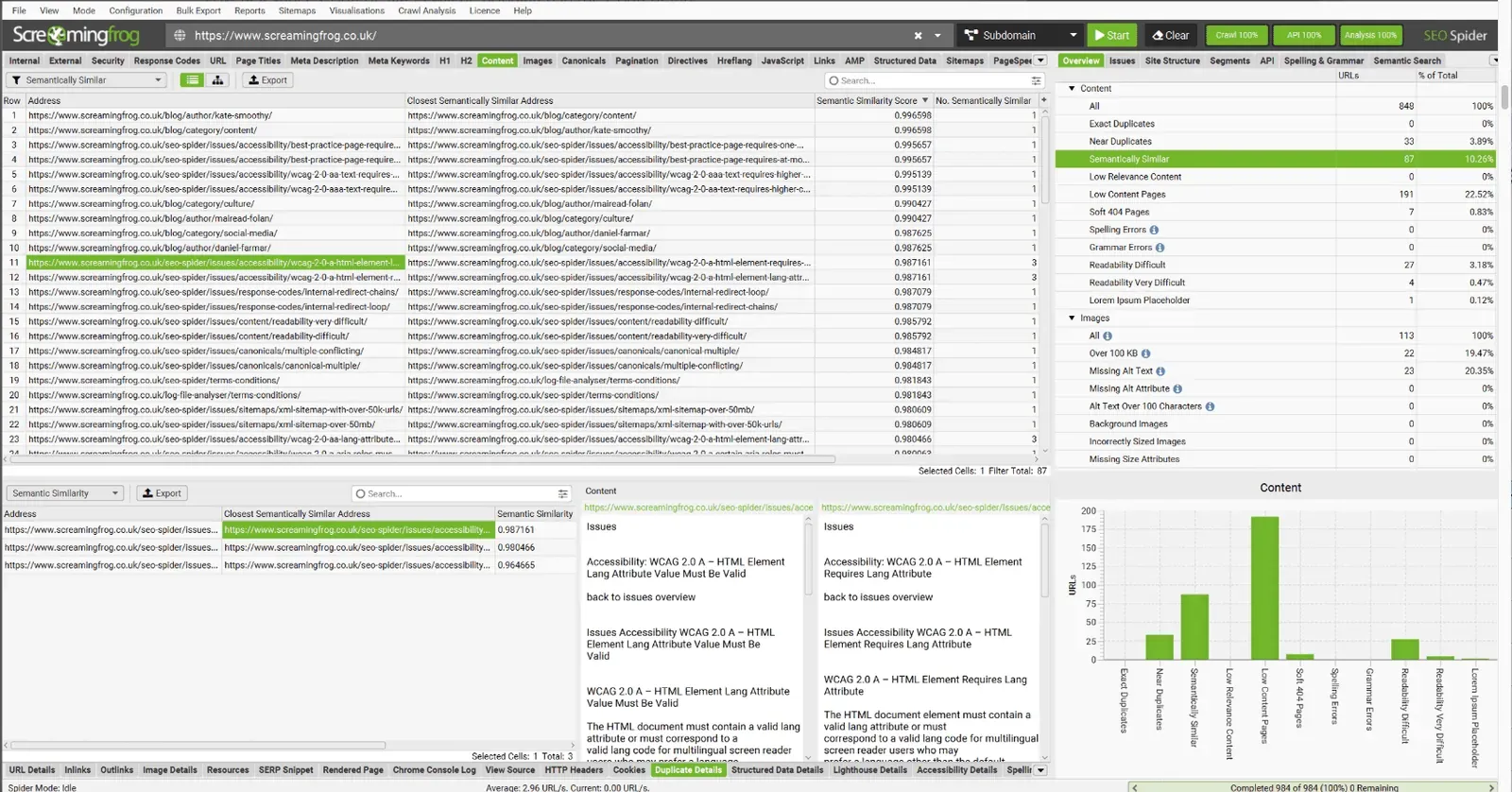
At the bottom of SEO Spider, the “Duplicate Details” tab and the “Semantic Similarity” filter show all semantically similar URLs and the content analysed.
SEO Spider assigns a semantic similarity score in a range from 0 to 1.
The higher the score, the more similar the page is to the closest semantically similar address.
Pages scoring above 0.95 are considered semantically similar by default.
For a deeper, customised analysis you can lower the semantic similarity threshold in 1Configuration›2Content›3Embeddings down to 0.5.
Low relevance content
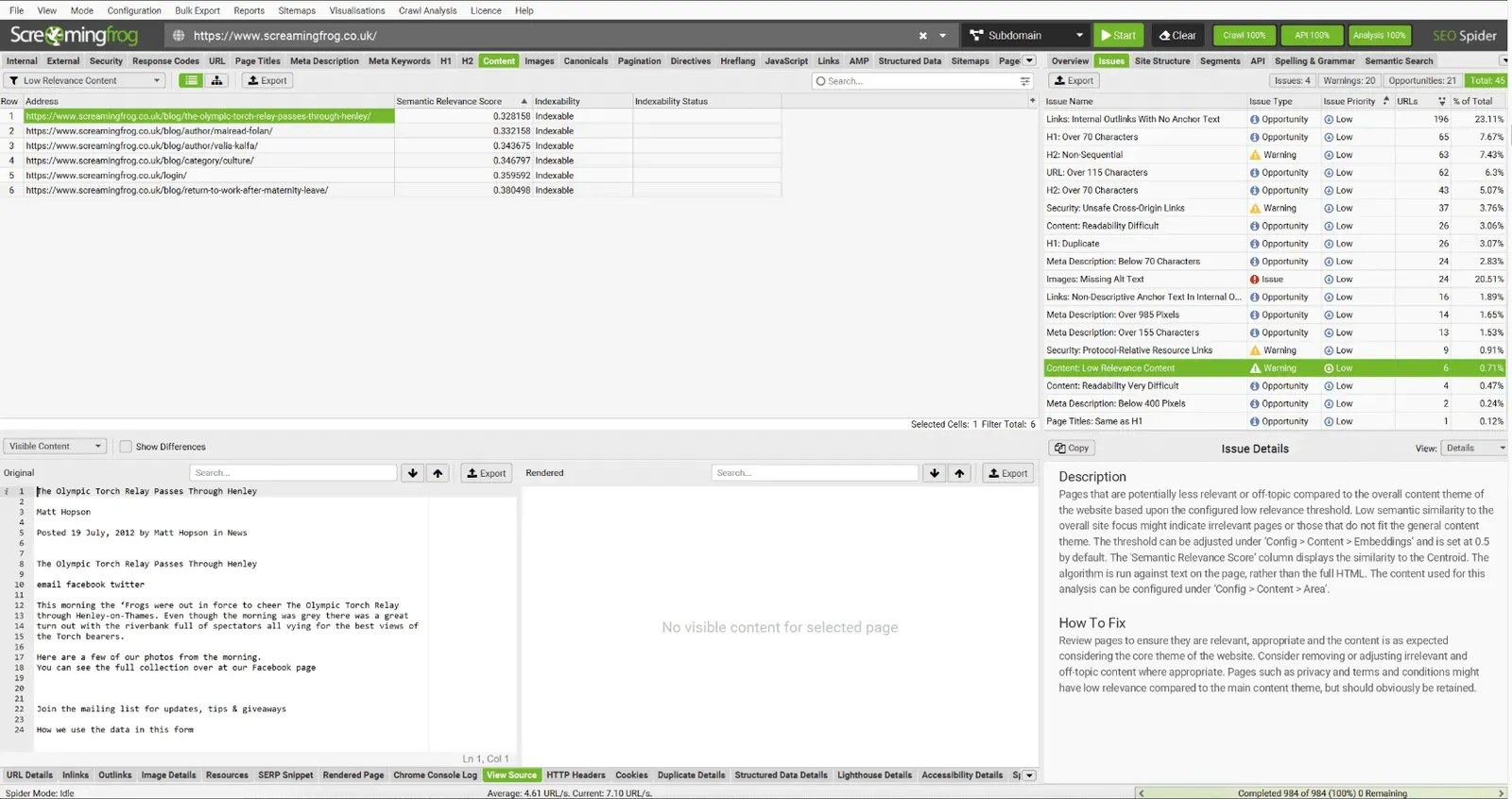
Vector embeddings (numerical representations of a text’s meaning) can be used not only to find similar content, but also to identify pages that may be off-topic relative to the site’s overall focus (the “centroid”).
Measuring how far a single page’s embedding is from the embedding of the whole site is a concept also hinted at in the recent Google leak. Some SEOs are experimenting with this idea to find “anomalous” or out-of-context content.
The outliers (not consistent with the site) are those furthest from the average and may indicate low relevance: content that’s “more off-topic” than what’s published elsewhere on the site.
Pages below the threshold can be viewed in the “Content” tab under the “Low Relevance Content” filter.
Semantic analysis takes SEO beyond keyword matching.
It lets you think in terms of topics, meaning and overall coherence, both to optimise the existing site and to handle migrations, restructures or content upgrades more intelligently.
This is only the beginning: how these tools evolve will be driven by the creative ways SEOs use them.
Semantic content with cluster visualisation
A second very interesting feature in Screaming Frog version 22 is semantic content integrated into cluster visualisations.
The content cluster diagram is available from 1Visualisations›2Content Cluster Diagram. It’s a two-dimensional visualisation of the URLs from the crawl, plotted and grouped based on their embeddings.
It can be used to identify patterns and relationships in a website’s content, with semantically similar content grouped together.
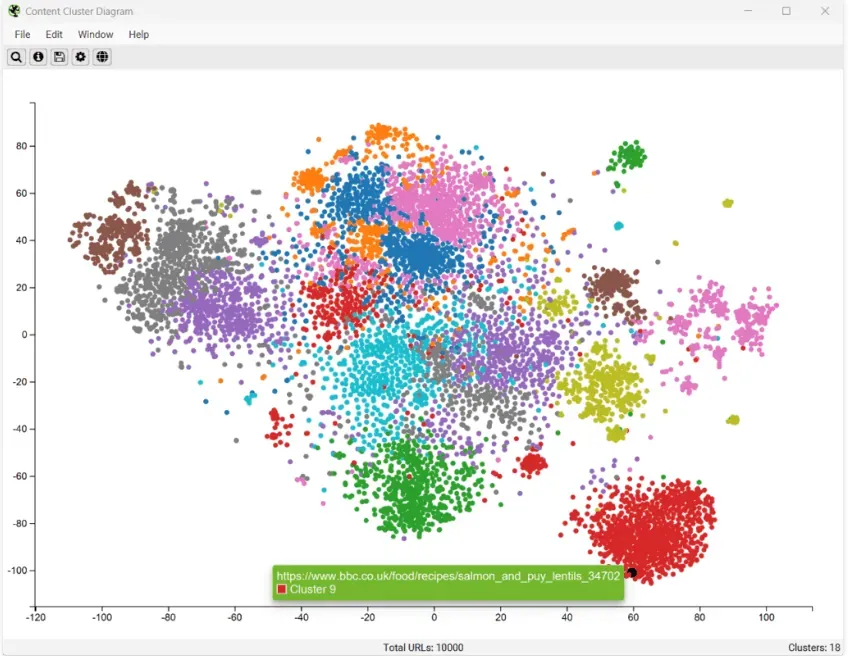
The diagrams can help visualise the scale of content clusters on a site, or identify potential topical clusters that are semantically related but may be presented far apart for users.
Semantic search
Since Screaming Frog version 22 there’s a new “Semantic Search” tab in the side panel, which lets you enter a search query and see the most relevant pages in a crawl.
This feature vectorises the search query and calculates the cosine similarity between the query and the pages in a crawl, using vector embeddings instead of keywords.
It can help quantify how relevant content is to a query for every page in a crawl, and it’s closer to how modern search engines and LLMs retrieve content today than the more simplistic presence and matching of keywords in text (Cosine Similarity Search filter).
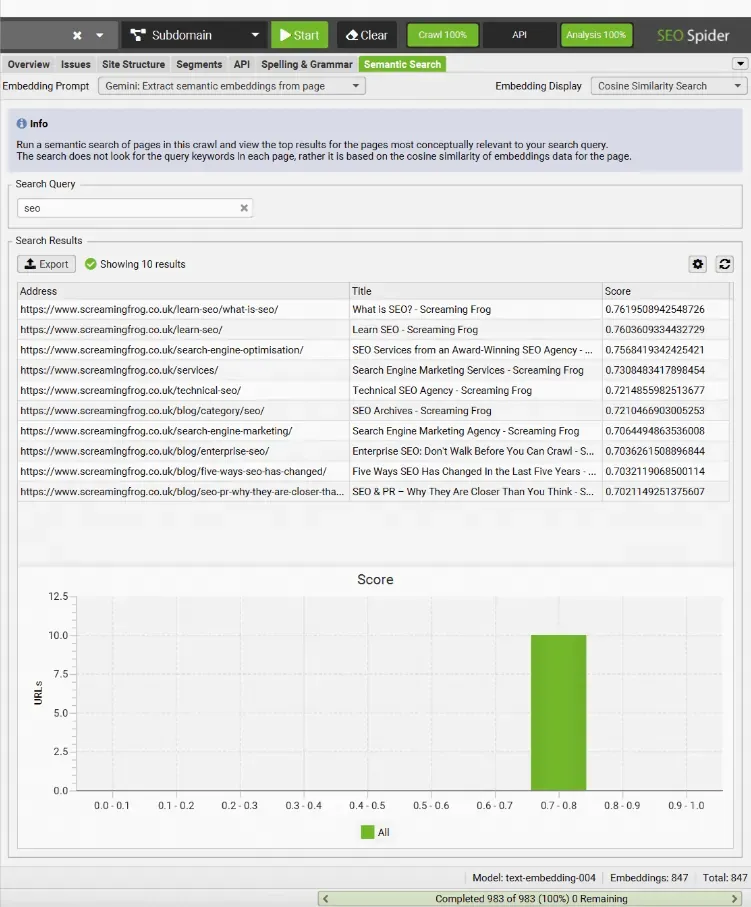
You can use this feature, for example, to find relevant pages for keyword mapping, related pages for internal linking or competitor analysis against keywords.
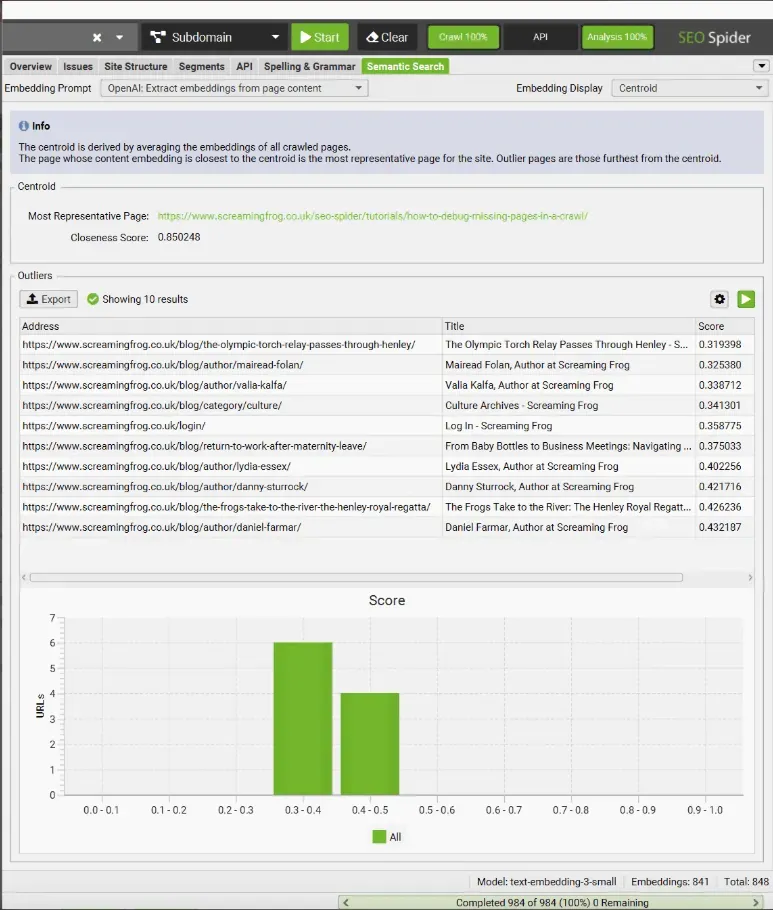
The “Embedding Display” filter can be set to ‘Centroid’ to see more details about the outliers on the website and the “most representative page”, which is closest to the average of the whole site’s embeddings.
AI integration improvements
SEO Spider also brings a series of AI integration improvements to make it even more advanced and flexible and to help reduce wasted credits and queries.
Multiple prompt targets
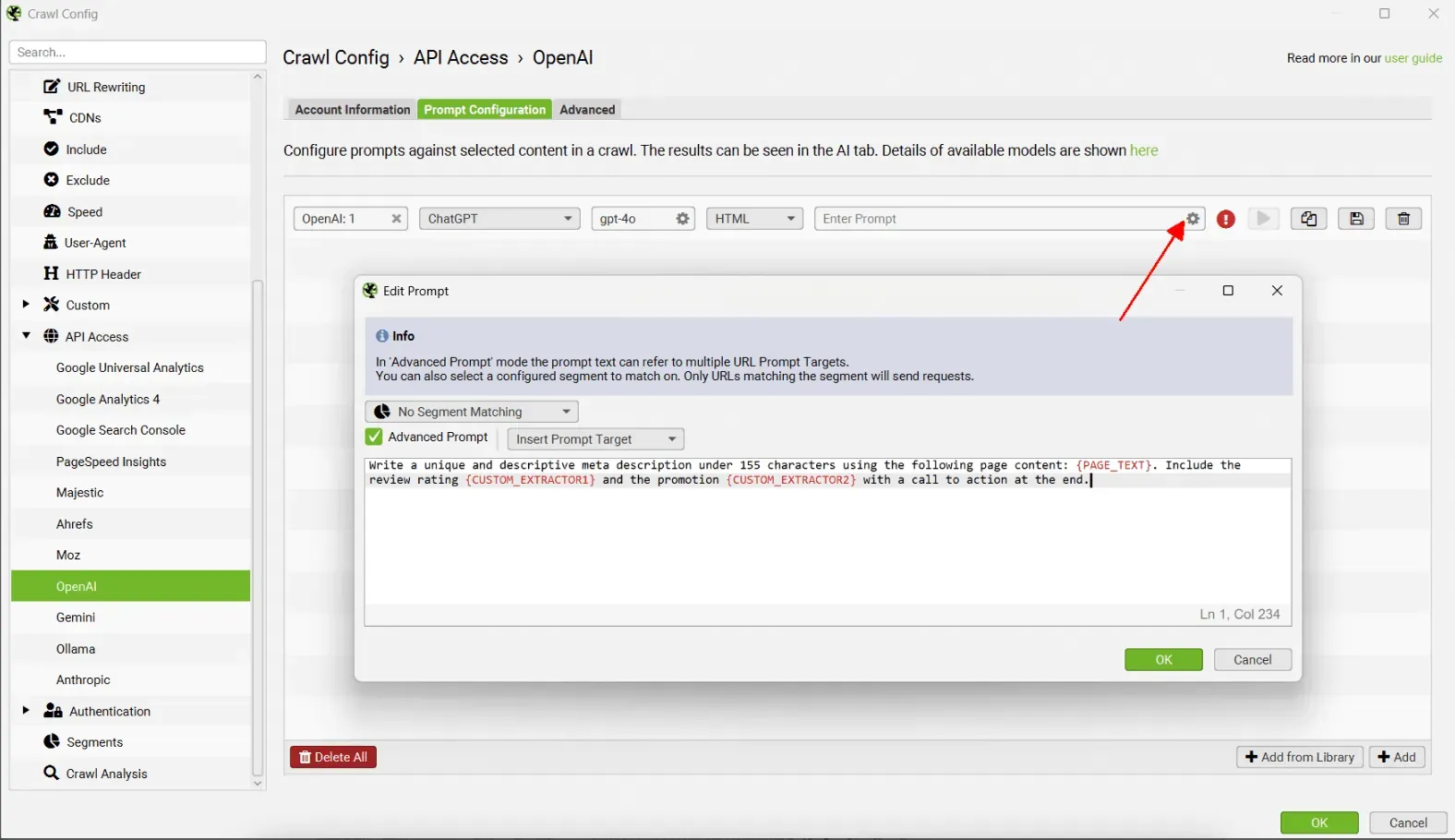
You can now click the cog next to a prompt and write a more advanced prompt that includes several prompt targets.
Prompts for specific segments and issues
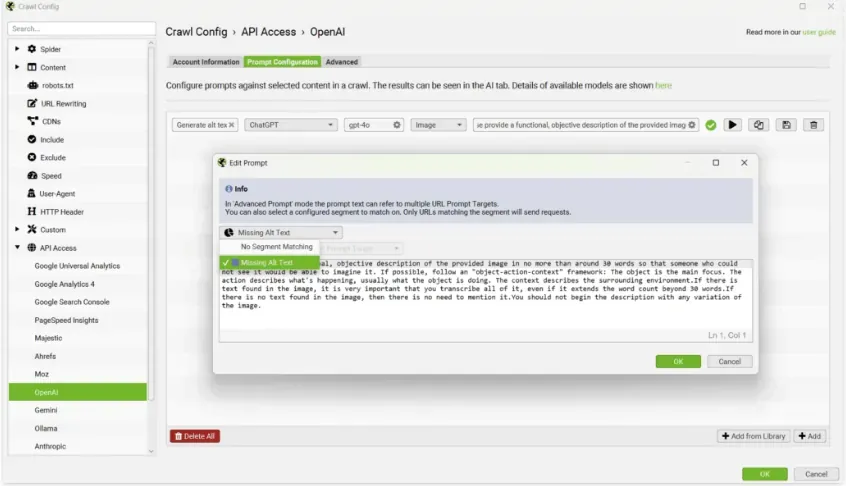
You can choose to run AI prompts only on URLs that match a specific segment. This means you can set up segments for the different scenarios where you want AI prompts to run, without wasting credits.
In the advanced prompt you can choose “Match segment”.
This helps you save credits and manage your AI call budget better.
For example, you can create image alt text only for image URLs in the segment with the “Missing Alt Text” issue, instead of for every image.
Custom endpoint
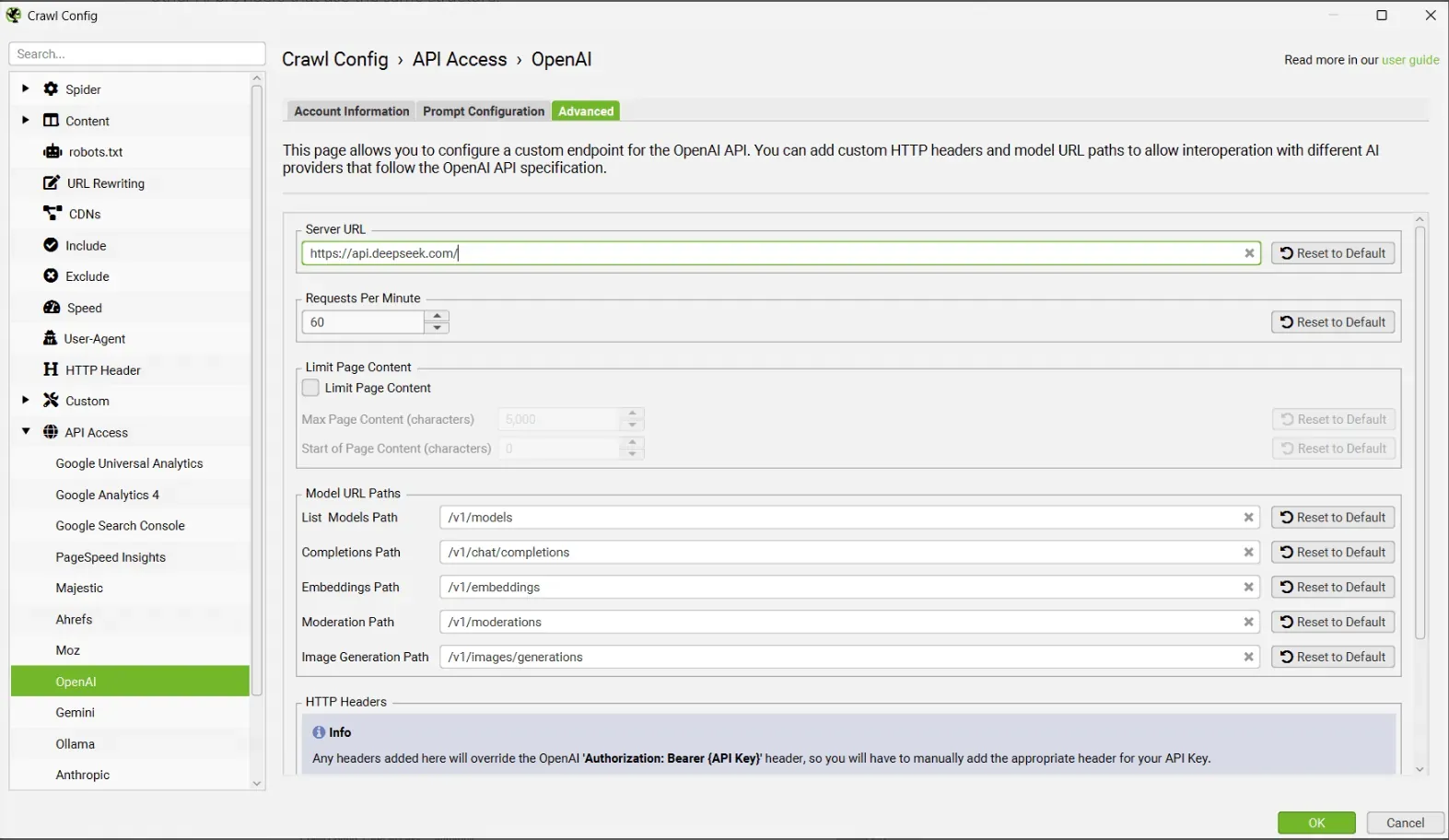
You can now customise the OpenAI endpoint, letting users connect private LLM APIs and other AI providers that use the same structure.
For example, you can use DeepSeek, Microsoft Copilot or Grok by customising the endpoint and using the relevant API key.
You can also customise model parameters and headers, and limit the length of page content to reduce token-limit errors on pages with long content.
Anthropic integration
As with the OpenAI, Gemini and Ollama integrations, you can now integrate with Anthropic (aka “Claude”) from 1Configuration›2API Access to run AI requests while crawling.
Advanced column configurator
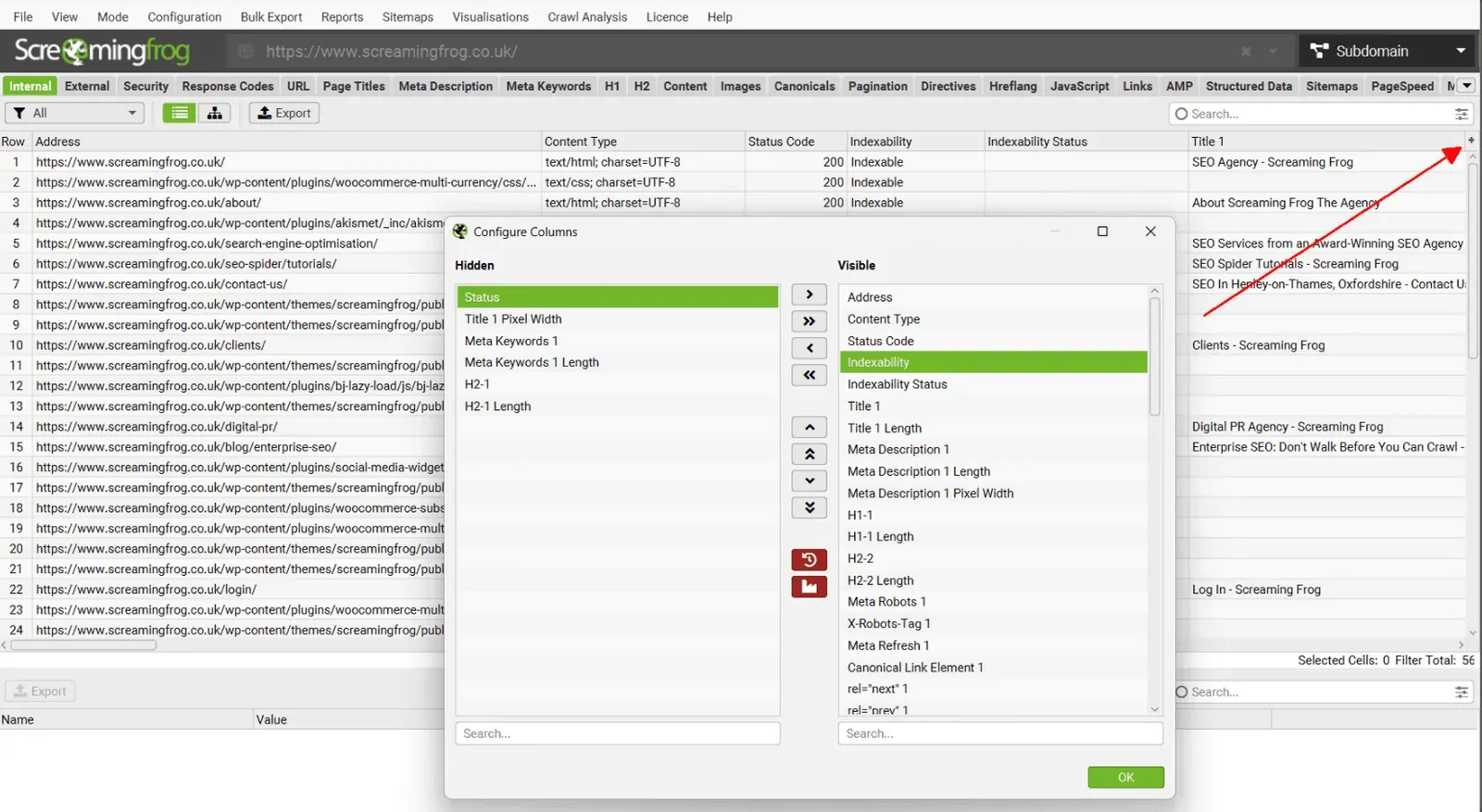
Just as you can customise tabs, you can now configure columns with an advanced configurator that lets you select, hide and reorder them in bulk. Together with the “detach” features, you can build and manage your workspace so the focus of your analysis is always in view.
Data export improvements
Custom Multi-Export
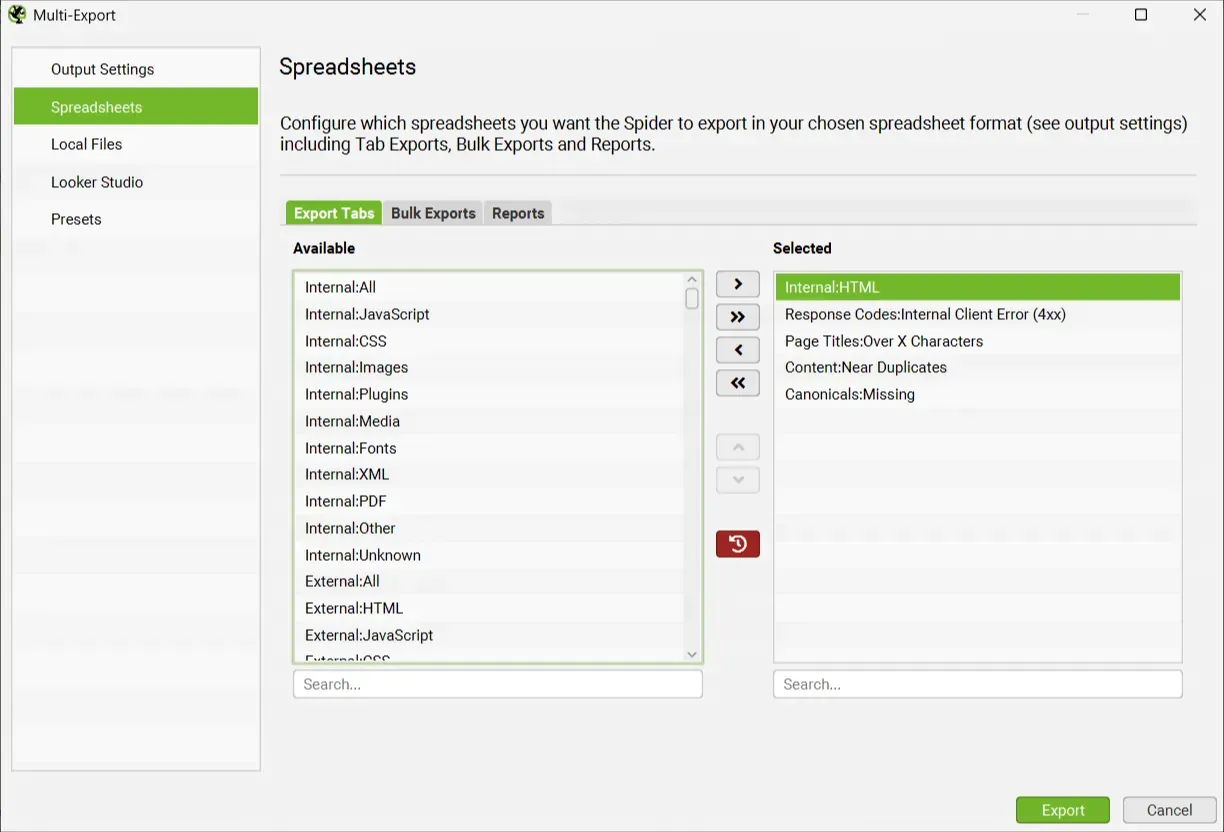
There’s a new “Multi-Export” option in the “Bulk Export” menu.
It lets you select tabs, bulk exports or reports to export with a single click.
If you use a common set of reports for your crawls, or want specific exports for certain websites, you can save them as presets and use them whenever needed, manually in the interface, in scheduling and in the CLI.
This new feature also lets you run Export for Looker Studio from a manual crawl, not just from scheduling.
Multi-Export into a single workbook
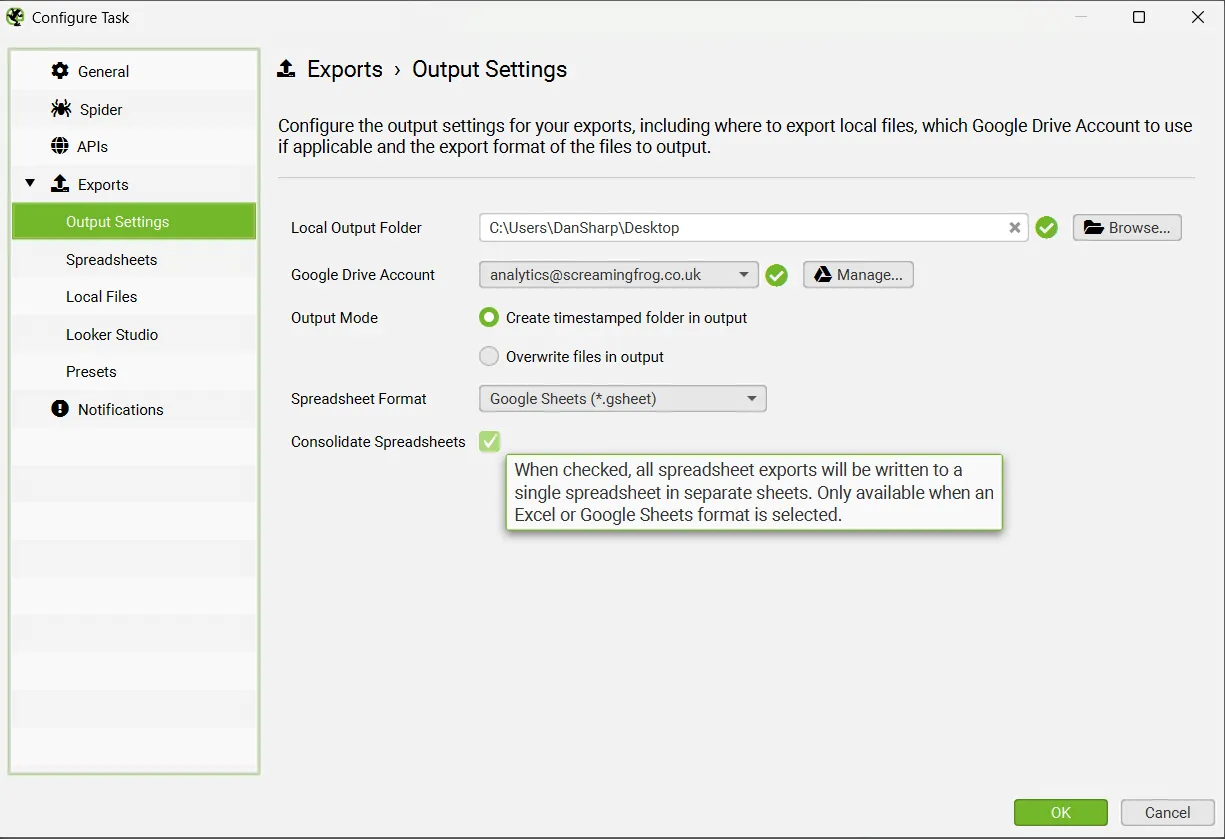
When running multiple bulk exports, manually or with Scheduling, you can now select “Consolidate Spreadsheets”.
Instead of exporting each tab, bulk export or report as a separate file, everything is exported into individual sheets within the same Google Sheet or workbook.
This option is available for both Google Sheets and Excel.
Multiple sitemap analysis
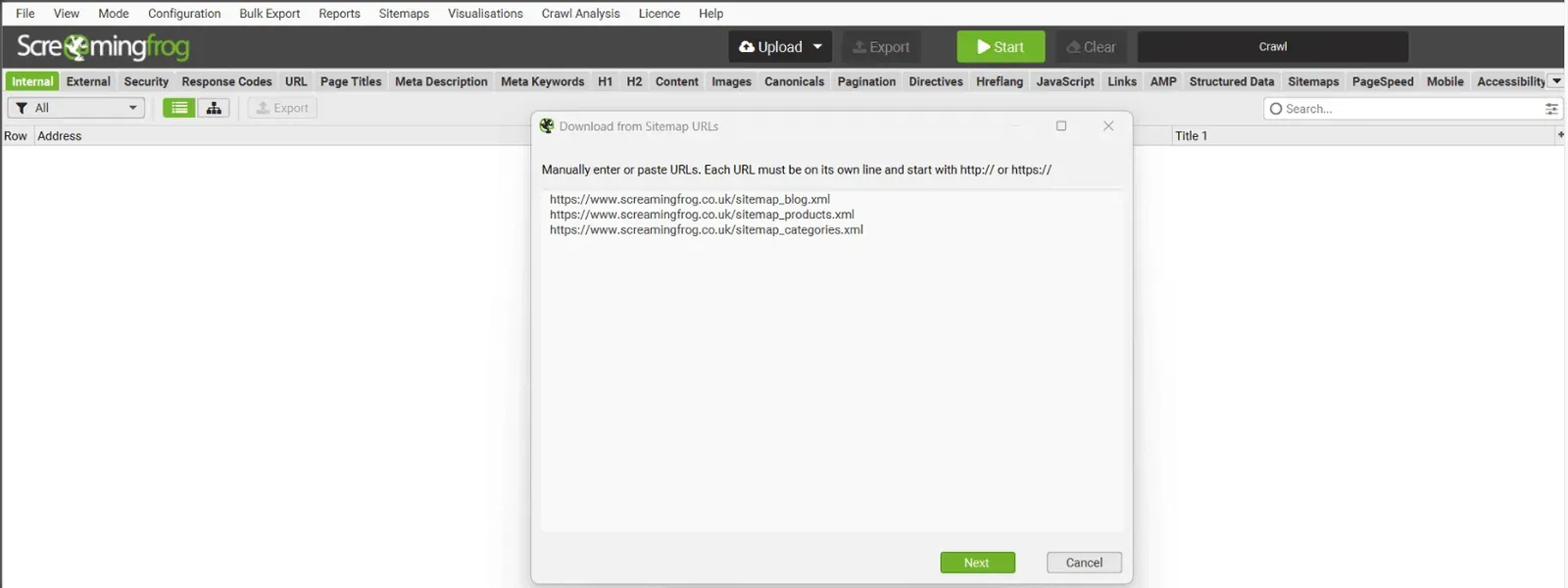
In List mode you can now upload several XML sitemaps instead of relying on a sitemap index file, making the analysis much leaner and more precise.
Google Sheets as a source
In List mode you can select a Google Sheet address as the source. Any URLs in the Google Sheet will be uploaded and crawled.
You can enter your Google Drive details so SEO Spider can access private Google Sheets.
This has exciting automation potential, as you can control which URLs are crawled using Google Sheets (and its add-ons and Apps Script).
This feature is also available in scheduling and the CLI.
Version 22 conclusions
With the release of Screaming Frog SEO Spider version 22.0, semantic analysis based on LLM embeddings marks a fundamental turning point for modern SEO. This update lets you:
- Go beyond simple text matching, using semantic vectors to identify duplicate, redundant or off-topic content.
- Visualise topical clusters and outliers.
- Strengthen strategies such as internal linking, redirect mapping, semantic title refinement and much more.
- Behind the scenes, tools such as semantic search, advanced AI configuration and flexible integrations (Anthropic, OpenAI, Gemini, Ollama) make the tool not just more powerful but smarter and more efficient.
🔧 Why update now?
- You optimise crawl budget, focusing on strategic content.
- You strengthen the site’s topical focus, removing semantic noise and increasing relevance.
- You automate audits and migrations by applying semantics to titles, redirects and pages.
- You invest in the future, using features aligned with how modern search engines work (vector-based SERPs).
All in all, this release turns Screaming Frog from a technical crawling tool into a semantic SEO hub, perfectly in line with emerging trends in search marketing!
Questions about Screaming Frog SEO Spider Update – Version 22.0?
These guides come from real projects. If something in your crawl doesn’t add up, or you want to apply this process to your site, get in touch.
 Author.Raffaele Visintin.Search & Strategic Marketing Advisor