

CUSTOM SEARCH – EXTRACTION TAB.
Analysis for custom searches and custom scraping.
What you’ll find in SEO Spider’s Custom Search and Custom Extraction tabs and how to read the results of custom searches and extractions.
Custom Search
The custom search tab lets you check whether certain elements are present in the source code of HTML pages. Searches are set up from 1Configuration›2Custom›3Custom Search, extractions from 1Configuration›2Custom›3Custom Extraction.
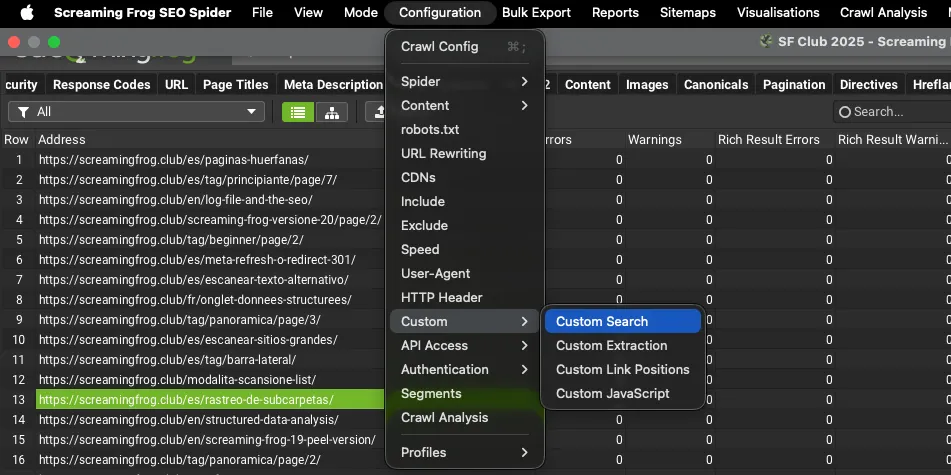
You can apply up to 100 filters using regex rules and get a Boolean result with the pages that “contain” or “do not contain” the chosen input.
Your search results will contain the following data:
- Address: the address of the crawled URL;
- Content: the content type detected for the URL;
- Status Code: the status code of the resource.
- Status: the HTTP header response.
- Contains: [x]: the number of occurrences [x] in each URL where the search input was found.
- Does Not Contain [y]: whether the searched input was found or not during the custom search.
The filters section of the tab shows the name you chose for each custom search.
Further readingCustom Search.How to set up custom searches, with regex examples for misspellings, cannibalisation and missing scripts.Read the guideCustom Extraction
With this feature you can set up to 100 custom extractions using XPath, CSSPath or regex. Extraction only runs on URLs with HTML content.
Results are shown with these dimensions:
- Address: the address of the crawled URL.
- Content: the content type detected for the URL.
- Status Code: the status code of the resource.
- Status: the HTTP header response.
The filters section of the tab shows the name you chose for each custom extraction.
Further readingCustom Extraction.Ready-to-use XPath, CSSPath and regex to extract headings, hreflang, Open Graph, tracking IDs and structured data.Read the guideQuestions about CUSTOM SEARCH – EXTRACTION TAB?
These guides come from real projects. If something in your crawl doesn’t add up, or you want to apply this process to your site, get in touch.
 Author.Raffaele Visintin.Search & Strategic Marketing Advisor
