What Is Web Scraping?.
How to scrape SERPs with Screaming Frog’s Custom Extraction.
What web scraping is, which techniques it uses and its legal limits, from the GDPR to copyright. In the second part you’ll see how to apply it to SEO with Screaming Frog, including extracting data from the SERPs.
What web scraping is
Web scraping, from the English “to scrape”, is a method for collecting data and information directly from web pages or the SERPs in order to catalogue it and store it in a database.
In some cases, still very common, web scraping is used to collect names, surnames and sensitive data to build marketing databases, but this is illegal.
In other cases it can be used for phishing campaigns, identity theft or copyright infringement.
Despite these abuses, web scraping isn’t illegal in itself, and it lets you gather very valuable data for SEO analysis and for digital marketing in general.
How web scraping works
Web scraping is a technique for automatically extracting data from websites using dedicated software or scripts. It lets you collect structured information, such as text, images or other publicly available data, and then process it for specific needs.
Technologies and methods
The main web scraping methods include:
- HTML parsing: using libraries such as Beautiful Soup in Python to analyse a page’s HTML.
- Browser automation: tools like Selenium that simulate a human user to browse and interact with pages.
- Public APIs: many sites offer APIs (Application Programming Interfaces) that give legal access to data in a structured format.
Applications of web scraping
The most common uses of web scraping are:
- Market analysis: companies can monitor competitors’ prices and customer reviews.
- Academic research: collecting large volumes of data for statistical analysis.
- Automation: cutting the time needed to gather data manually from different sources.
Real-world use cases
A concrete example is using “web crawling” in e-commerce to update prices dynamically based on competitors. Similarly, monitoring platforms such as property listing aggregators use web scraping to keep their databases up to date.
Legal aspects of web scraping
Useful as it is, web scraping raises several legal issues. Understanding and complying with the rules is essential to avoid disputes and protect everyone involved.
For example, in some jurisdictions web scraping is considered a breach of intellectual property or contract law, especially when it violates a website’s terms of service. In addition, unauthorised access to computer systems can be treated as an offence under laws such as the Computer Fraud and Abuse Act (CFAA) in the United States.
The GDPR and web scraping
The General Data Protection Regulation (GDPR), in force in the European Union since 2018, governs the collection and use of personal data. Under the GDPR, any data that can identify a person is “personal” and subject to strict rules. This includes names, email addresses, phone numbers and IP addresses.
Implications for web scraping
- Legal basis for data collection: companies must identify a valid legal basis for collecting personal data. For example, they can collect data only with the data subject’s explicit consent (Article 6 GDPR) or to pursue a legitimate interest that doesn’t override the person’s fundamental rights.
- Transparency and information: users must be told clearly how their data will be used. This requires privacy notices describing the purposes and methods of collection.
- Data minimisation: the GDPR requires collecting only the minimum data needed for a legitimate purpose (the minimisation principle).
- Data security: collected data must be protected from unauthorised access with appropriate technical and organisational measures (Article 32).
Practical examples
A well-known case highlighting GDPR issues with web crawling involves companies using scraping to collect email addresses or LinkedIn profiles without consent. This has led to significant administrative fines under Articles 83 and 84 of the GDPR, which provide for fines of up to €20 million or 4% of annual global turnover.
Companies working in web scraping must also consider the right to erasure (Article 17), also known as the “right to be forgotten”, which lets users ask for their data to be removed from databases.
Intellectual property and web scraping
Intellectual property laws, including copyright, also apply to online content.
Legal aspects
- Copyrighted content: copying protected text, images or other elements without permission is forbidden under copyright law. This also applies to publicly accessible but copyrighted content, such as newspaper articles, images or databases protected by compilation rights.
- Terms of service: most sites include clauses banning web scraping in their terms of use. Ignoring these restrictions can lead to legal action, as several international cases have shown.
Notable cases
An emblematic case was the dispute between LinkedIn and HiQ Labs, in which LinkedIn tried to stop HiQ from collecting public data from user profiles. The dispute focused on two key issues: breach of LinkedIn’s terms of service and a potential conflict with free competition. Although HiQ initially won, the case highlighted the legal complexity of web scraping.
Another significant example is the legal disputes over the use of copyrighted images through scraping. A famous case is Getty Images, which has taken legal action against platforms that use scraping software to acquire and redistribute images without a licence.
Compliance and solutions
To avoid infringing intellectual property law:
- Check usage rights: before using scraped data, make sure it isn’t protected by copyright or other intellectual property rules.
- Request licences: where applicable, obtain licences or permission to use protected content.
- Use open data sources: favour data and content released under open licences (such as Creative Commons) that allow legal, free use.
Addressing intellectual property issues is essential to avoid litigation and protect your company’s reputation.
Best practices for compliant data extraction
Complying with the rules is crucial to avoid legal problems and ensure ethical use of web scraping and data privacy.
Recommended strategies
- Get permission: contact website owners for explicit authorisation before collecting data.
- Respect privacy policies: read and comply with the site’s privacy policies.
- Use APIs: prefer official APIs over scraping HTML content directly.
- Anonymise data: remove any personal information from collected data where possible.
Writing company policies
Companies that practise web scraping should:
- clearly document their data collection procedures;
- provide detailed information on the measures taken to ensure compliance.
Web scraping for SEO
Digital marketing and scraping
Now that we understand the potential and risks of “wild web crawling”, let’s look at its applications in SEO and digital marketing in general, and how to use it with web scraping software such as Screaming Frog.
After years when this required medium-to-advanced technical knowledge, there are now no-code tools that deliver impressive results in data extraction.
At the heart of ethical web scraping is a standard called XPath, which makes it fairly easy to locate and work with the different nodes of an HTML document.
Benefits of web scraping for SEO
Web scraping offers several benefits for search engine optimisation (SEO):
- Keyword research: web scraping lets you collect a wide variety of data, including keywords used by competitors or found on the most relevant websites in a sector. You can use this to spot new keyword opportunities and improve your SEO strategy (heading and meta tag analysis, etc.).
- Competitor monitoring: web scraping lets you keep a constant eye on competitors’ activity, including changes in their SEO strategy, new content, Google algorithm updates and more. This information is valuable for adapting and optimising your own SEO strategy.
- Keeping data up to date: used wisely, it keeps your SEO data current. For example, you can continuously monitor search results and ranking changes for certain keywords, and collect data on new search trends and user behaviour.
- Backlink analysis: web scraping can be used to extract information about backlinks from relevant or competing websites. This data can be analysed to find new link building opportunities and assess the quality of existing backlinks (services such as Semrush or Ahrefs).
- Content scraping: used ethically and in line with the rules, web scraping can gather relevant content from other online sources to enrich your website with additional information or create new high-quality content by combining sources.
In short, web scraping gives SEO specialists a set of tools and data to optimise and improve websites’ performance in search engines. However, it’s important to use this information responsibly and in line with the law, to avoid legal disputes or search engine penalties.
Web scraping with Screaming Frog
Custom Extraction and Visual Custom Extraction
Now that we’ve seen why this matters, let’s look at how to use a data scraping tool like Screaming Frog to extract valuable information to improve our digital marketing strategy.
With SEO Spider you can sharpen your ability to collect data from web pages quickly and efficiently, to analyse your own website or run even very advanced competitor comparisons.
With XPath and Custom Extraction your analyses will never be the same. Plus, since SEO Spider version 19, Visual Custom Extraction has made custom scraping even simpler and more intuitive, with no prior knowledge needed to get the results you want.
To start, open 1Configuration›2Custom›3Custom Extraction.
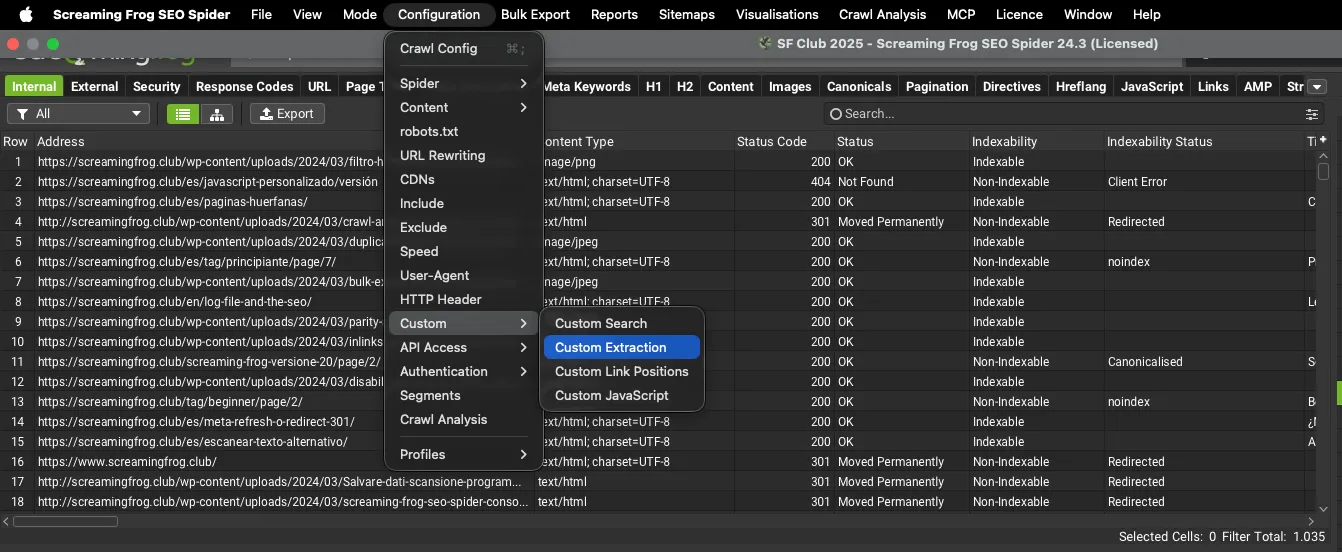
Once inside, just click Add at the bottom right and enter the scraping expression.
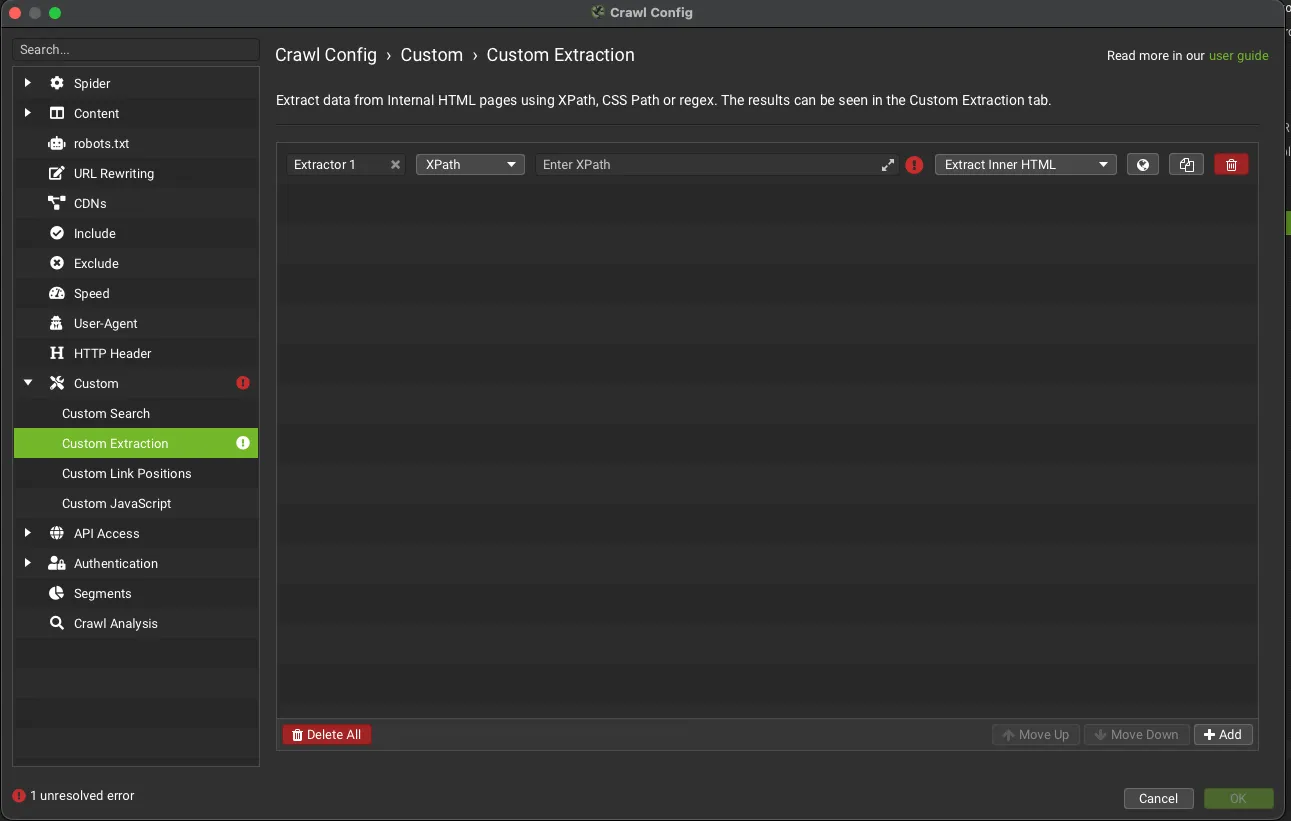
If you’re already comfortable with XPath expressions you can type them straight into the “Enter XPath” cell, or you can use SEO Spider’s “Visual” version, which lets you see the information to extract in just a few clicks using Screaming Frog’s built-in browser.
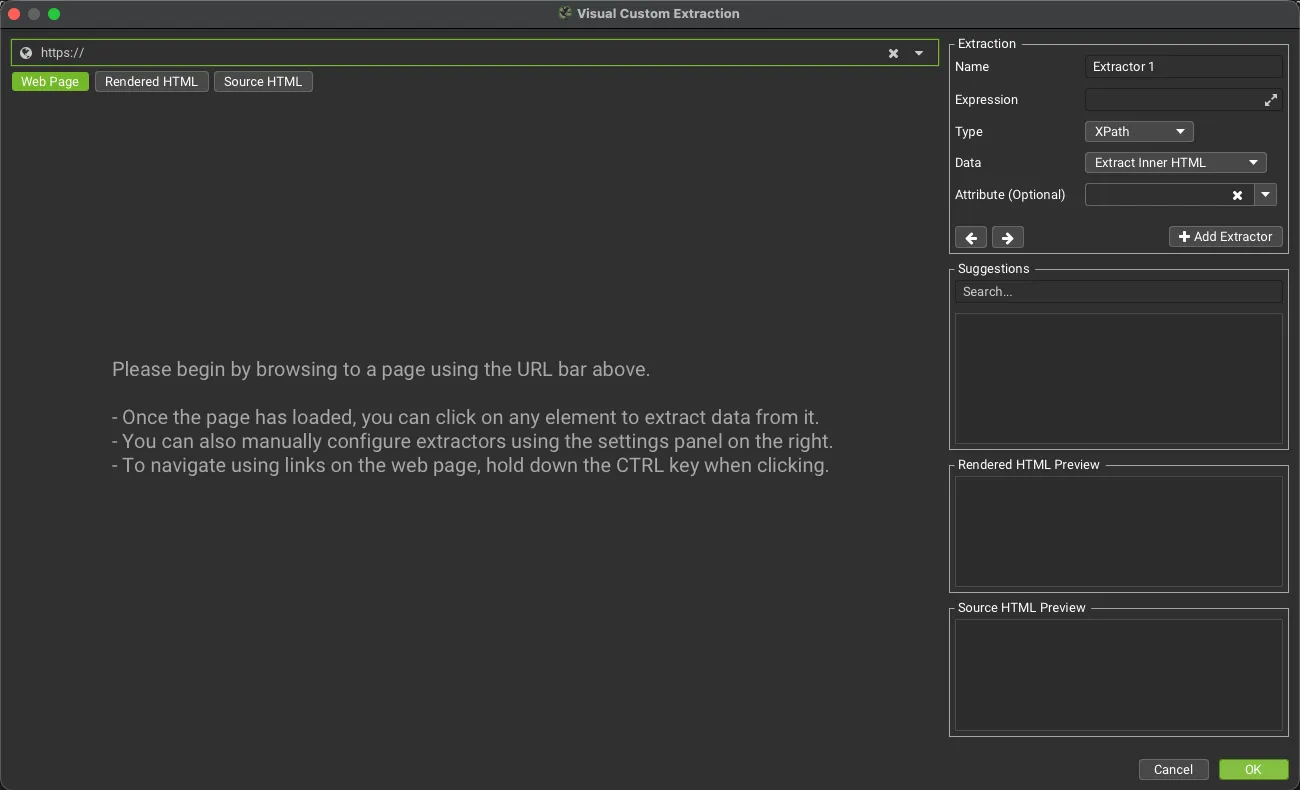
Then, when you select the element on the page you want to extract, SEO Spider highlights the area, creates a range of suggested expressions (on the right) and shows a preview of what will be extracted from the raw or rendered HTML.
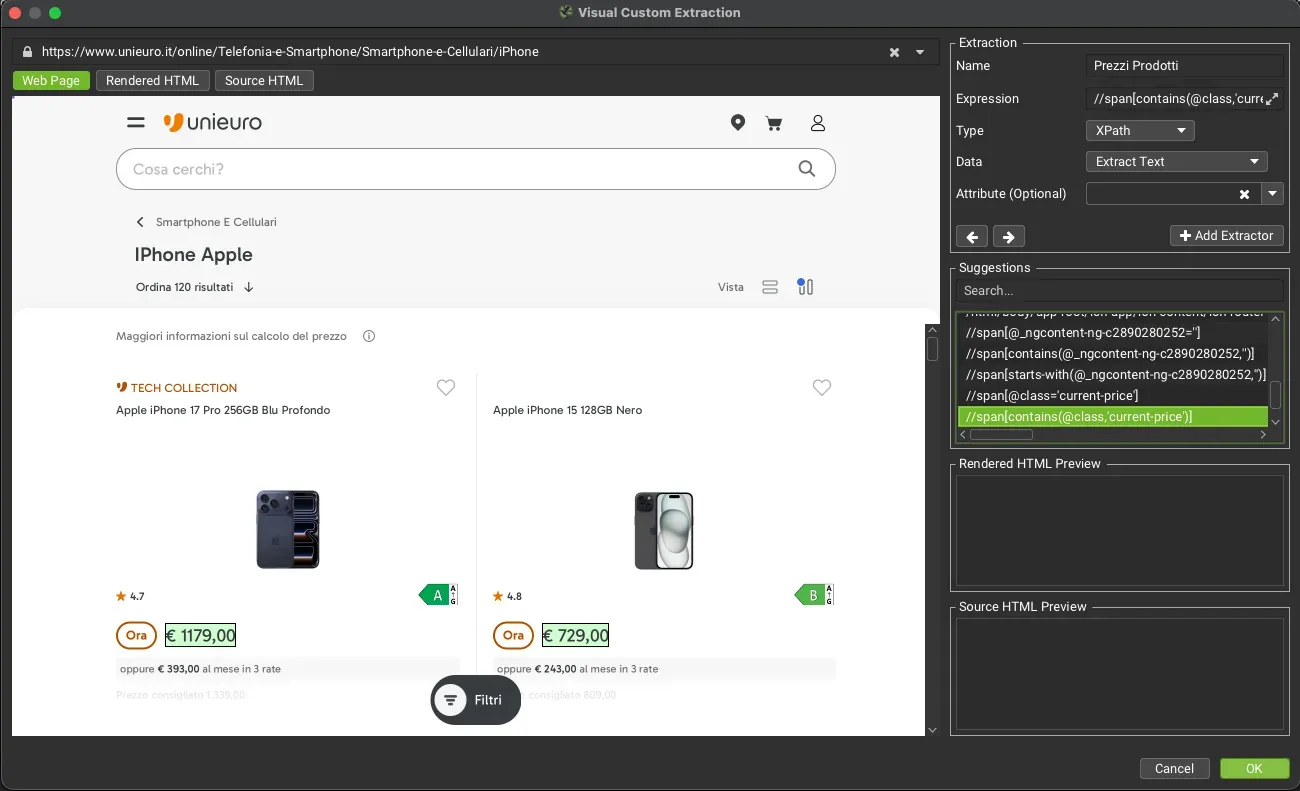
In the example above I selected the product prices (clicked on them) and, as you can see on the right, SEO Spider entered the correct extraction syntax.
There are essentially 4 extraction types (“Data”):
- Extract HTML Element: the selected element and all its inner HTML.
- Extract Inner HTML: the inner HTML of the selected element. If the element contains other HTML elements, they’re included.
- Extract Text: the text content of the selected element and of any child elements.
- Function Value: the result of the function provided, for example count(//h1) to find the number of h1 tags on a page.
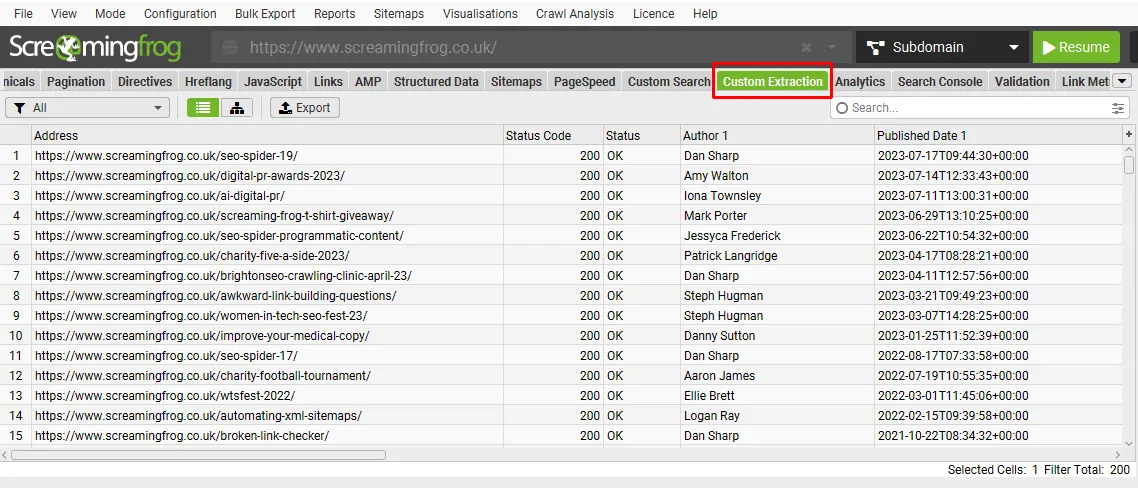
Once the crawl is done you’ll find the Custom Extraction results in the dedicated tab; if there are several extractions, you can use the filters to switch between them.
Scraping the SERPs
As well as scraping your own site or specific competitor sites, you can also extract data from directories and from the search engine itself. This should be done carefully so your IP doesn’t get blocked, but it’s very useful, for example, for collecting ranking data for certain strategic keywords.
Screaming Frog doesn’t replace services like Semrush, but for the keywords you want to rank for it’s a good tool for checking competitors’ positions, the features of the best-performing sites and so on.
- The first step is to create a Google search URL for SEO Spider to crawl. You can do this simply with this Google Sheets template.
- The second step is to configure SEO Spider appropriately:
- Use JavaScript rendering: 1Configuration›2Spider›3Rendering.
- Set “Ignore robots.txt”: 1Configuration›2robots.txt.
- Use the “Chrome” user agent: 1Configuration›2User-Agent.
- Lower the crawl speed (Max Threads = 1, Max URI/s = 0.5): 1Configuration›2Speed.
I recommend saving this configuration as a new profile from 1Configuration›2Profiles›3Save As…, so you can reuse it whenever you need it.
Further readingCrawl Profiles.How to save and load SEO Spider configuration profiles, for example the one for SERP scraping.Read the guideSetting up the crawl in List mode
With Screaming Frog’s technical setup done, it’s time to define the syntax for extracting custom data from the SERPs with a crawl in List mode: 1Mode›2List.
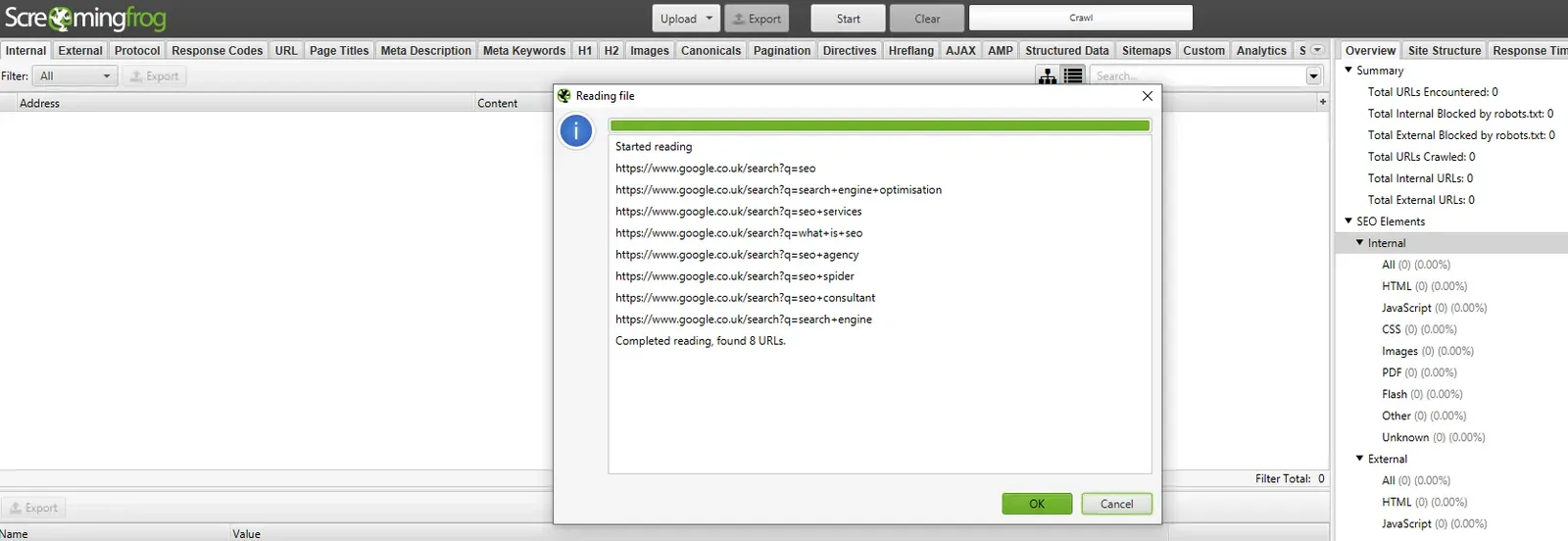
By default, crawling the generated URLs in List mode already gives interesting results in the “Outlinks” bottom tab, where you’ll find the URLs ranking for that specific query.
As you’ll see there are many links to Google, so I recommend using the bottom tab filter with the condition [To] Not Contains 'google'.
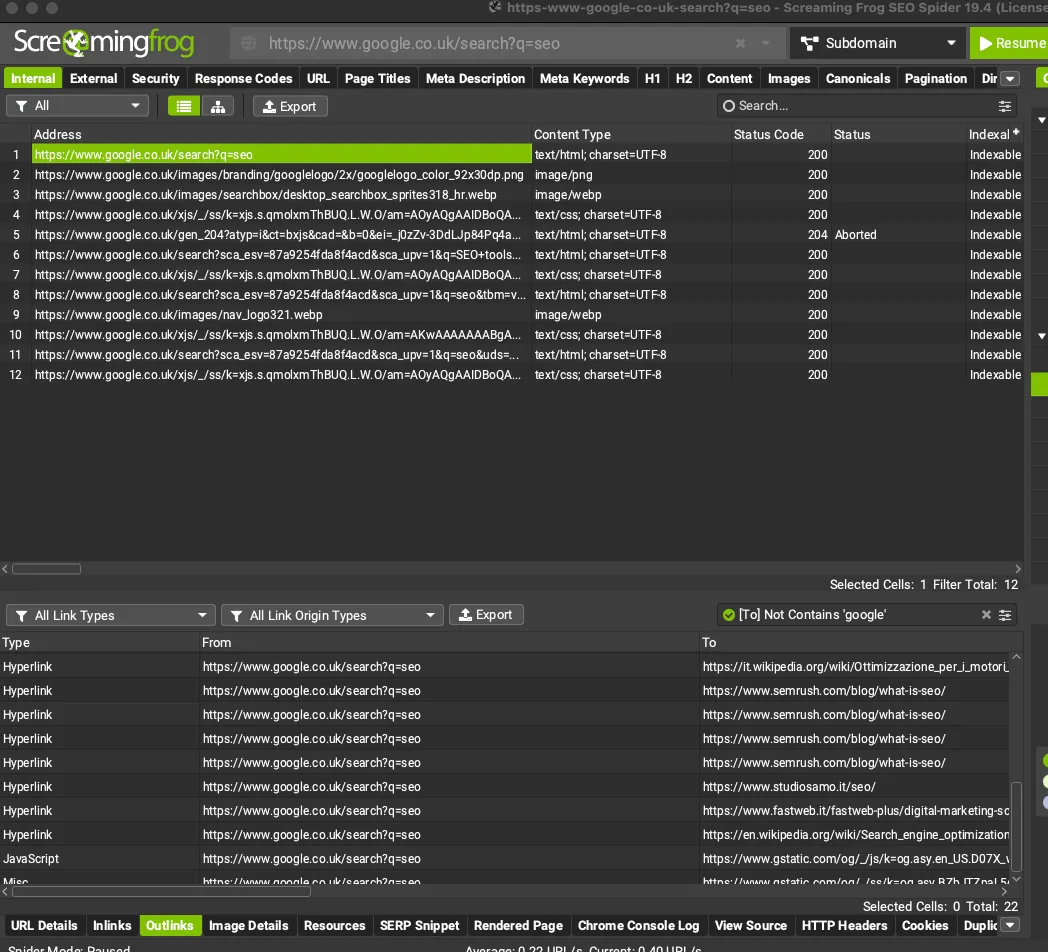
Beyond this basic feature, we can run more advanced SERP audits using Custom Extraction, for example on “People Also Ask”, featured snippets, video results or anything else that characterises the SERP. You can find the XPath syntax using SEO Spider’s built-in browser.
Practical example: extracting People Also Ask questions
The goal of this test is to extract the “People Also Ask” data from the SERP. Our reference query is “Cos’è la SEO” (Italian for “what is SEO”).
- Enter the URL generated with the template:
https://www.google.it/search?q=cose+la+seo. - Open 1Configuration›2Custom›3Custom Extraction and use the built-in browser.
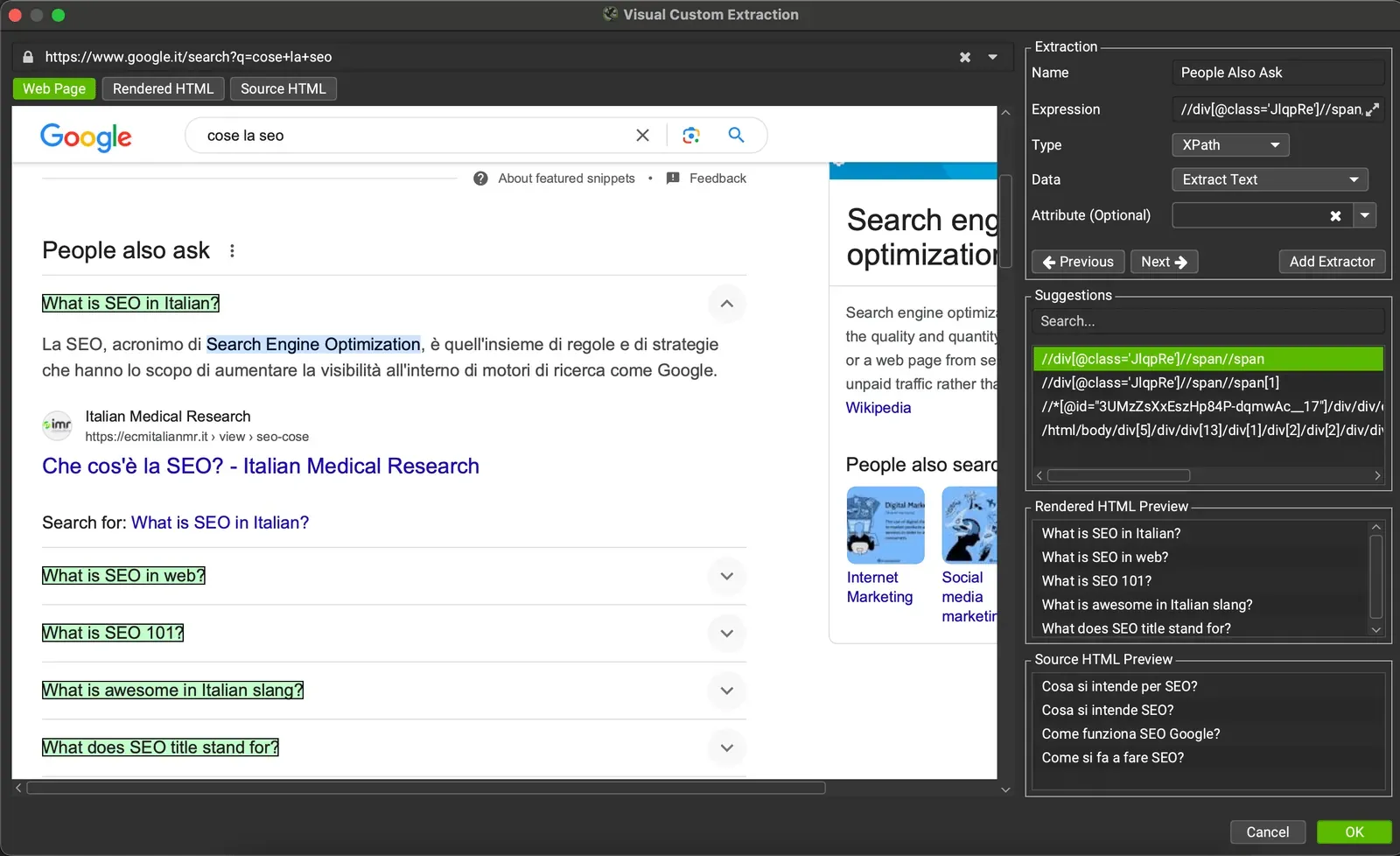
- Start the crawl in List mode and check the data in the Custom Extraction tab.

In the same way you can very easily extract all the other Google features and get both an overview and a granular view for your SEO audits.
Remember: the template you used includes some preconfigured XPath syntax, but Google often changes the SERP code and it may not return reliable results. My advice is to always use the built-in browser for these analyses.
Questions about What Is Web Scraping?
These guides come from real projects. If something in your crawl doesn’t add up, or you want to apply this process to your site, get in touch.
 Author.Raffaele Visintin.Search & Strategic Marketing Advisor
