

301 or 308 Redirect?.
Discover the differences between 301 redirects and the newer 308 to upgrade your on-page SEO. Read the full entry in the SEO Wiki.
The differences between 301 and 308 permanent redirects, when to use a redirect and which mistakes to avoid, such as chains and loops. See also how to find them with SEO Spider reports.
Permanent redirects
Redirects forward a resource to a different URL. For SEO they’re very important to preserve and guarantee the resource’s accessibility for the crawler and to improve the experience for visitors.
There are several types of redirect, but the most significant difference is whether they are temporary or permanent.
Until recently, the most used permanent redirect has always been the 301, which tells search engines a URL has moved for good. For some years now, however, a new status code with the same function has existed: the 308.
When to use redirects?
Redirects are widely used in SEO. The most frequent use cases include:
- domain change: for example a rebrand during a migration.
- merging two or more websites: redirects pass on rankings and protect the navigation experience.
- moving from http to https.
- special offers: time-limited offers where you use a temporary redirect (e.g. 302).
- deleting pages: useful to pass ranking on to a new resource and keep existing backlinks. If the resource will never be available again, a 410 status code may be the better choice.
The most frequent mistakes when redirects are used carelessly are “redirect chains” and “redirect loops”.
Redirect chain: chains occur when there are multiple redirects between the requested resource and the final destination. According to Google’s official documentation, the crawler follows up to 10 redirect hops, so shorter chains may not be a problem for SEO. Experience shows, however, that on large sites this scenario inevitably wastes crawl budget and can be very negative for search engines, which may lower the project’s crawl frequency.
Redirect loop: infinite redirects that happen when a URL redirects to itself, or when a node in the redirect chain redirects to an earlier node. The UX is compromised and the browser may show a “too many redirects” error.
301 vs 308 redirects
Both redirects are permanent, but they have some very significant differences.
Looking at their main features, both communicate a permanent move of the URL and pass link juice.
The key differences are:
301 redirect
- it is cached by the browser;
- it may change the method and body of the HTTP request, so some input data might not be passed on.
308 redirect
- by default it isn’t cached by the browser, so changes take effect immediately;
- it keeps the method and body of the HTTP request, so all input data is passed on.
Redirects and Screaming Frog
Redirects are conceptually simple, but they play a very important role in SEO.
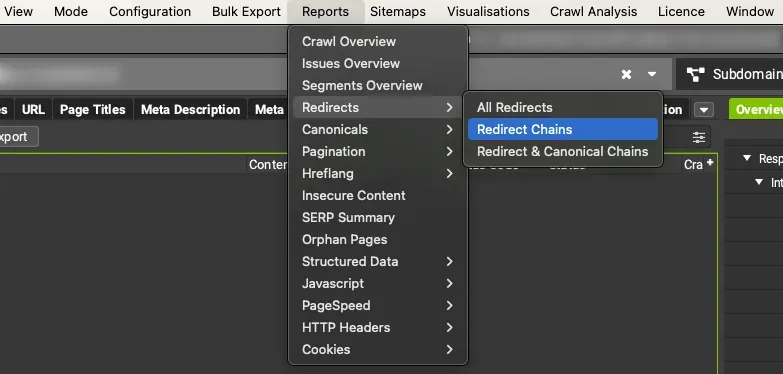
To keep your website healthy, I recommend using Screaming Frog regularly: it lets you easily see any redirect chains or loops through several reports, as well as in the right-hand sidebar, in the “Overview” tab, “Internal” and “External” sections.
The reports are in 1Reports›2Redirects›3Redirect Chains and 1Reports›2Redirects›3Redirect & Canonical Chains.
Questions about 301 or 308 Redirect?
These guides come from real projects. If something in your crawl doesn’t add up, or you want to apply this process to your site, get in touch.
 Author.Raffaele Visintin.Search & Strategic Marketing Advisor