

What is the Content Type?.
Content Type: the types and how the browser processes them.
What a resource’s Content Type (MIME type) is, which types exist and why it matters to browsers. See how to find Bad Content Types with SEO Spider’s Security tab.
Content Type
The Content Type (MIME type) is a field in the web server’s response header that tells the browser what kind of resource it is receiving.
A MIME type always has two parts: the media type and the media subtype.
EXAMPLE: type/subtype
When this field is present, the browser has much less work to do. Although it plays an important role in efficiency, the Content Type is not mandatory, only recommended.
With a Content Type, the browser doesn’t have to work out the file type on its own, but even when the header is present it may still try to interpret the file itself, a behaviour known as “MIME sniffing”.
You can stop the browser from doing this with a “nosniff” directive, which gives you full control of the situation.
How many Content Types are there?
The web uses many Content Types to identify resources.
Here are the main ones:
TEXT
text/htmlBesides this one, there are for example: “text/css” | “text/xml” | “text/javascript”
IMAGE
image/jpegFor a PNG image you’ll use “image/png”, for SVG “image/svg+xml” and, more recently, “image/webp”.
VIDEO
video/mpegFor AVI videos you’ll use “video/avi”.
AUDIO
audio/mpegBad Content Type
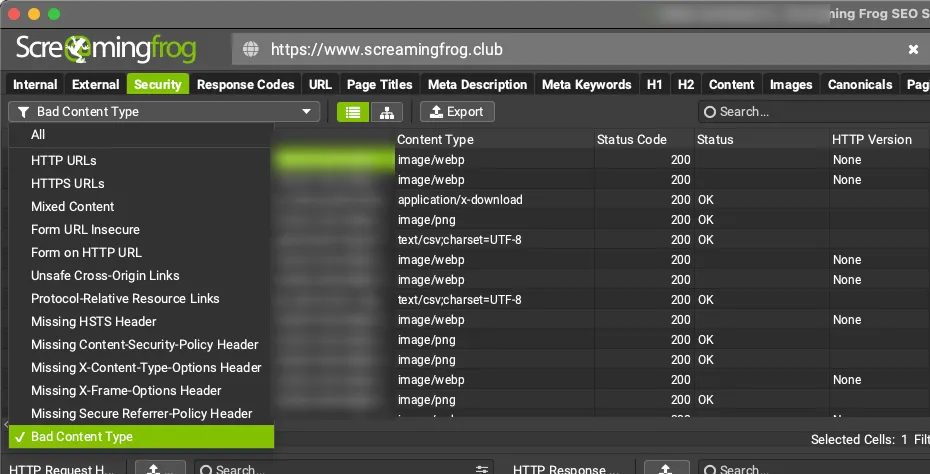
Screaming Frog makes this element easy to monitor. In the 1Security tab you’ll find it under the Bad Content Type filter.
With this filter you can review in detail every URL whose actual content type doesn’t match the one set in the header. SEO Spider also tells you whether any invalid MIME types have been used. You can export all the details with the “Export” button in SEO Spider’s top window.
This check is especially important when an X-Content-Type-Options: nosniff response header is set and the browser relies entirely on the declared Content Type.
Questions about What is the Content Type?
These guides come from real projects. If something in your crawl doesn’t add up, or you want to apply this process to your site, get in touch.
 Author.Raffaele Visintin.Search & Strategic Marketing Advisor
