

What is HSTS?.
Website security with HSTS (Strict Transport Security), which forces the browser to use secure connections.
Guide contents 5 sections
●Brief01.HSTS (Strict Transport Security)02.HSTS and preloading03.Advantages of HSTS04.Checking HSTSWhat HSTS (HTTP Strict Transport Security) is, how the header and preload work, and why it protects users. See how to check it’s in place with SEO Spider’s Security tab.
HSTS (Strict Transport Security)
HSTS (HTTP Strict Transport Security) is a security instruction that lets websites tell browsers to communicate exclusively over HTTPS, guaranteeing an encrypted, secure connection. It helps protect users from the interception of sensitive data and from cyber attacks, preventing cookie hijacking and man-in-the-middle (MitM) attacks.
Strict-Transport-Security: max-age=31536000; includeSubDomains; max-age: this value is mandatory and sets the number of seconds for which the server must be contacted only over HTTPS.
includeSubDomains: this field is optional. If set, it specifies that the HSTS policy also applies to any subdomains.
With this header, every connection to the site (subdomains included) must happen exclusively over HTTPS, in our case for “31536000 seconds”.
HTTP connections are no longer allowed: if the browser is asked to load a resource over HTTP, it must automatically try the request over HTTPS instead.
If HTTPS isn’t available, the connection must be dropped.
HSTS and preloading
The HSTS max-age value (see the code above) is refreshed every time the browser reads the header, and its maximum value is two years; in practice, protection stays in place permanently unless more than two years pass between visits.
To increase the website’s protection you can use “HSTS preloading”. Chromium maintains a database listing the sites that use HSTS, and this list ships with browsers. The browser checks this preloaded list first and won’t allow HTTP connections at all, not even on the very first request.
Strict-Transport-Security: max-age=31536000; includeSubDomains; preloadThe HSTS preload list is used by Firefox, Opera, Safari and Edge. To include your website, go to: https://hstspreload.org/.
To be included in this list you must meet these requirements:
- A valid SSL/TLS certificate.
- Redirect all traffic to HTTPS.
- Serve HSTS on the base domain (e.g. “screamingfrog.club”).
- Serve all subdomains, if any, over HTTPS.
- The expiry must be at least 1 year (31536000 seconds).
- The “includeSubDomains” directive must be specified.
- The “preload” token must be specified.
Advantages of HSTS
Because the HTTP to HTTPS rewrite happens inside the client, there are several key advantages over a simple site-wide HTTP → HTTPS redirect.
- Less communication over insecure protocols.
- Better performance, because a round trip is avoided every time an HTTP link is encountered.
- Less load on the web server. However, a site-wide HTTP → HTTPS redirect is still needed, because the Strict-Transport-Security header is ignored unless it’s sent over HTTPS. So if the first visit to your site doesn’t happen over HTTPS, you still need that initial redirect to HTTPS to deliver the Strict-Transport-Security header, unless, as mentioned above, the site is on the preload list.
Checking HSTS
Once you’ve added the HSTS directive, it’s essential to check that it’s actually there.
A first method developers use is “Google Chrome DevTools”, checking for the header in the “Network” tab, but you’d have to repeat this for every single page to make sure there are no inconsistencies and the directive is served correctly everywhere.
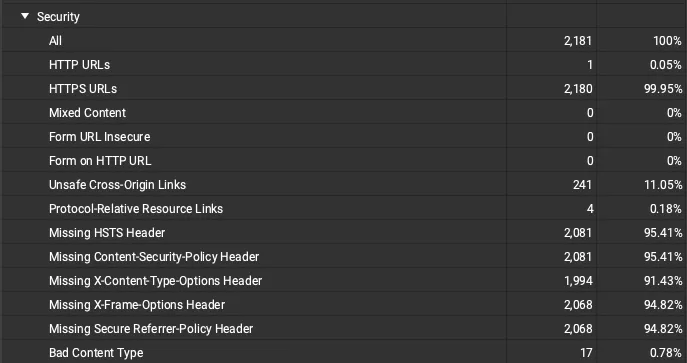
The second is Screaming Frog, which lets you check for HSTS in seconds with no effort. The crawl results are in SEO Spider’s 1Security tab, with the Missing HSTS Header filter.
Questions about What is HSTS?
These guides come from real projects. If something in your crawl doesn’t add up, or you want to apply this process to your site, get in touch.
 Author.Raffaele Visintin.Search & Strategic Marketing Advisor
