

What is faceted navigation?.
Faceted navigation, a huge SEO problem.
What e-commerce faceted navigation is and why, when badly managed, it creates duplicate content, index bloat and wasted crawl budget. See the SEO solutions and how to check them with SEO Spider.
Faceted navigation
Faceted navigation is widely used on e-commerce sites and in the categories or archives of sites with many listings. It’s an accepted UX practice because it helps visitors search by combining several filters. However, if it isn’t managed properly it can cause significant SEO problems by generating a flood of duplicate content.
Faceted navigation: how it works
Faceted navigation filters listings or products by their attributes. These vary by type of website or e-commerce store, but the most common are colour, price, brand, size and so on, often placed in a sidebar or at the top of the listing, as in the example below.
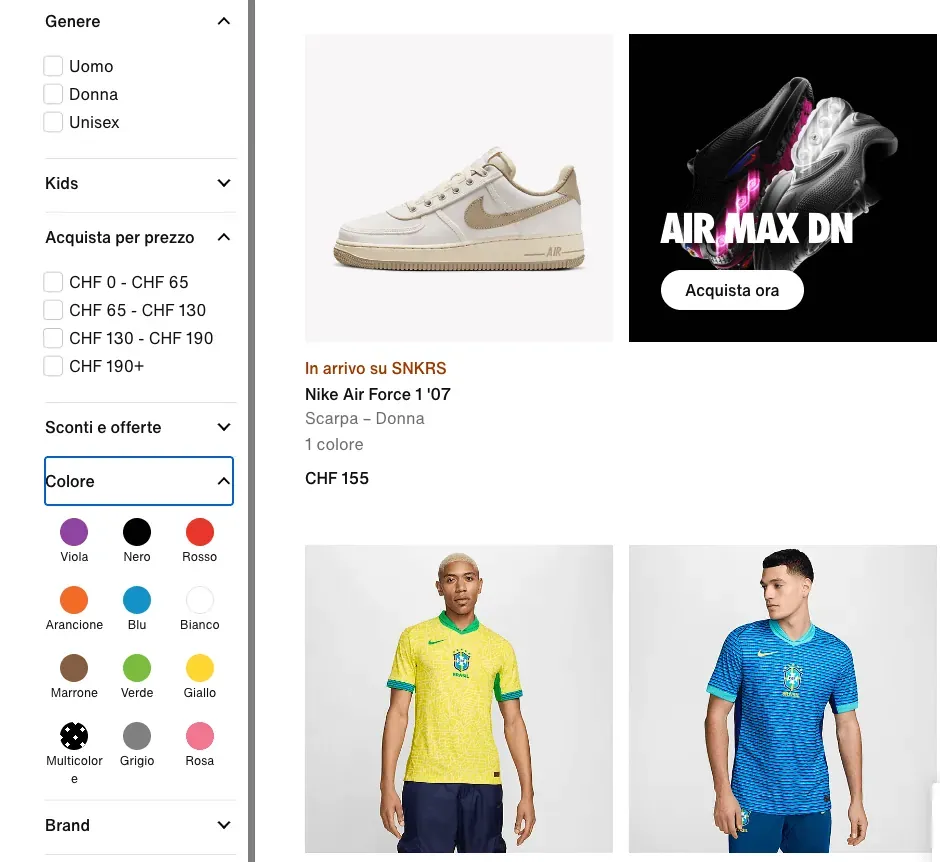
These filters let visitors narrow their search and, in a few clicks, find a selection of products or listings that better match their search intent.
Faceted navigation and SEO
Once filters are applied, the site (e-commerce store) can behave in different ways:
- the filtered listings are shown with no change to the URL.
- The site adds parameters to the URL.
www.domain.com?colour=white&size=M- The site adds a hash to the URL
www.domain.com#size=mA new static, folder-based URL is created.
www.domain.com/t-shirt/whiteDepending on how the site behaves, some very significant SEO issues can arise, because faceted navigation can potentially create an unlimited number of combinations.
The most common problems are:
- Duplicate content.
- Index bloat.
- Wasted crawl budget.
Duplicate content
The main problem SEO specialists need to manage carefully is duplicate content. The combinations generated by faceted navigation create pages that are essentially identical, differing only in a few elements. This can lead to ranking penalties from Google through potential query cannibalisation and an inevitable split of link juice across the pages created.
Below is the original URL of the “shoes” category page, followed by the same URL with faceted navigation applied (4 filters).
https://www.zalando.it/promo-scarpe-uomo/https://www.zalando.it/promo-scarpe-uomo/_beige_taglia-10/?camp=it_mss_w1_cw14_24&filling=cotone.pelle&heel_form=senza-taccoConsidering Zalando has 8 more filters, you can only imagine the thousands of possible combinations, each potentially duplicating the content of the first URL.
Index bloat
Index bloat has come up many times in John Mueller’s comments, described as a real problem for Google’s algorithm because it makes search results less effective and efficient.
For this reason, having many low-value pages indexed, differing only by their variants, can hold back the organic growth of the whole website or e-commerce store.
Crawl budget
“Crawl budget” is the amount of resources and time a search engine such as Google or Bing allocates to a website to crawl it, discover its internal links and index it.
A larger crawl budget lets a search engine explore and index more pages of a site in less time, while a limited one can lead to slower or incomplete indexing.
From this perspective, wasting it on intrinsically low-value pages reduces crawl frequency and inevitably costs rankings.
SEO solutions
Given how complex the topic is, it’s important to rein in faceted navigation, first by analysing it and then by applying the right fixes.
To find out whether your site is affected, you can take several routes:
- Check the SERP with the “site:” search operator and see whether parameterised pages are indexed (index bloat).
- Monitor Google Search Console and analyse the indexing report. Filtering for excluded pages, look at “Crawled – currently not indexed”.
- Check the number of pages submitted via sitemap: if it’s too high, make sure you haven’t included pages generated by faceted filters.
- Use Screaming Frog to find out whether you’ve handled faceted navigation.
Screaming Frog and faceted navigation
Once you’ve identified the faceted navigation problem, it’s time to fix it. There are essentially two ways:
- Use the canonical tag + nofollow (recommended)
- Set up the robots.txt file to disallow the various filters. Here’s an example.
User-agent: *

Disallow: *size=*
Although the robots.txt approach also works well, I prefer the first solution, because with a single line of code you fix the problem for good and instruct the search engine.
With the canonical, even though users have thousands of pages available, the crawler only needs to index the main one.
MAIN PAGE:

https://www.zalando.it/promo-scarpe-uomo

VARIANT PAGE:

https://www.zalando.it/promo-scarpe-uomo/_beige_taglia-10/?camp=it_mss_w1_cw14_24&filling=cotone.pelle&heel_form=senza-tacco
In the example, just add this to the HTML:
<html>
	<head>
	<title>Explore the world of dresses</title>
	<link rel="canonical"
href="https://www.zalando.it/promo-scarpe-uomo/" />
<!-- other elements -->
	</head>
<!-- rest of the HTML -->
The code must be added both to the main page (“canonical”) and to the filtered secondary page (“canonicalised”).
Now, by crawling the site and checking Screaming Frog’s Canonicals section, you can assess the situation with the available filters:
- Self Referencing
- Canonicalised
In our example we’ll have:
- 1 “self referencing” page: the main one
- 1 canonicalised page: the filtered page
There’s just one step left to avoid index bloat: add the “nofollow” directive to the filter links, and you’re done!
Further readingCanonical tag analysis.How to check the canonical tag, essential on e-commerce sites where the same product has several paths.Read the guide Further readingCanonicals tab.What you’ll find in SEO Spider’s Canonicals tab: columns, filters and the most common canonical issues, such as multiple canonicals or canonicals pointing to non-indexable pages.Read the guideQuestions about What is faceted navigation?
These guides come from real projects. If something in your crawl doesn’t add up, or you want to apply this process to your site, get in touch.
 Author.Raffaele Visintin.Search & Strategic Marketing Advisor